PA G E 2 2 I N S T R U C T I O N M A N U A L T X 4 5 0 0
6. Connect the DC connector and PL259 antenna plug
(and rear microphone extension lead if used) to the
sockets on the radio’s rear panel.
You can now refit the console to the vehicle.
NOTE: Do NOT use bolts longer than 6mm otherwise
they may foul the internal components.
DC POWER CONNECTION
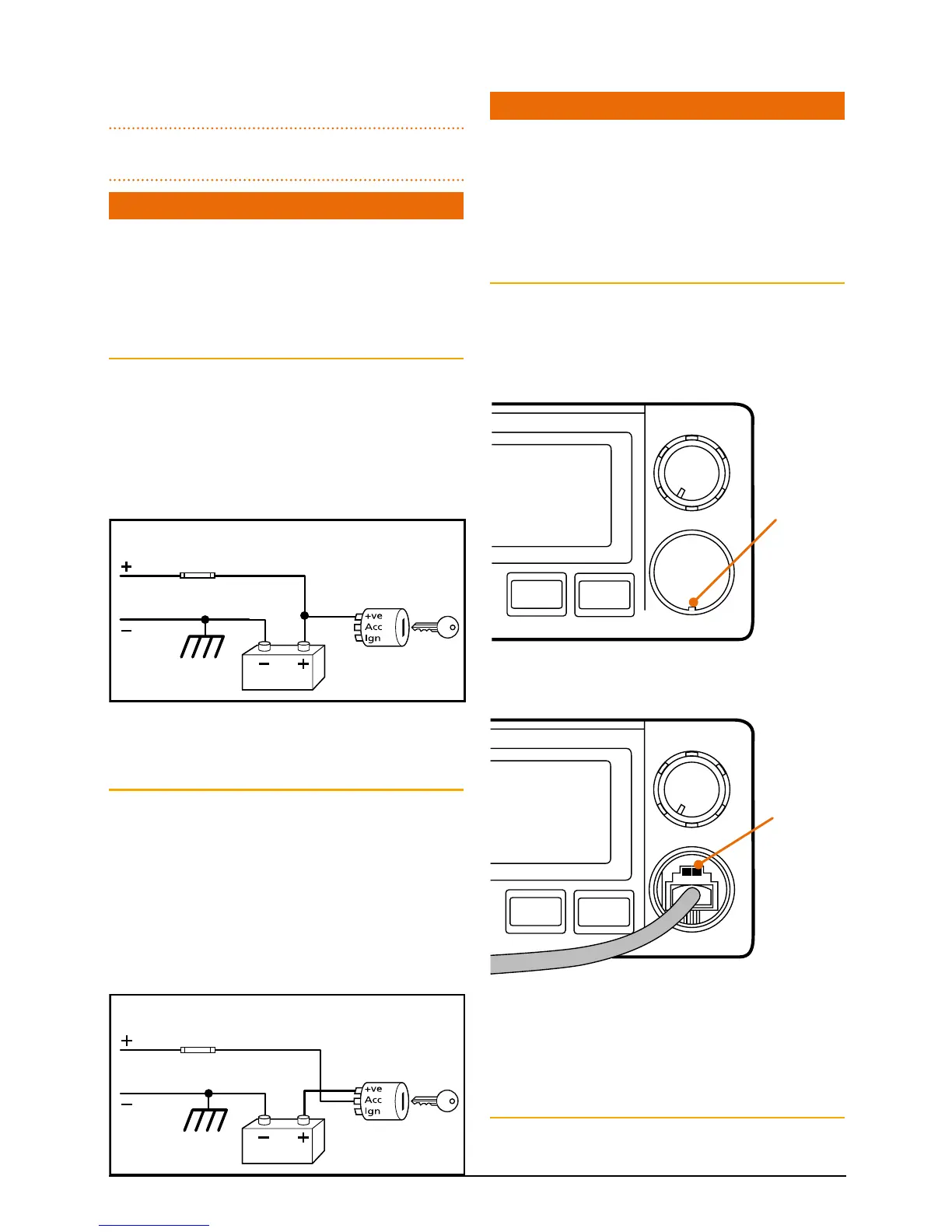
The TX4500 is designed for 13.8 V DC negative earth
installations only (i.e. where the negative side of the
battery is connected to the frame or chassis of the
vehicle). There are two recommended methods of
installation. Please refer to the following diagrams.
Radio remains On when the Ignition switch is Off
Connect the radio’s negative (Black) lead to the
vehicle’s chassis or if preferred directly to the battery’s
negative terminal.
Connect the radio’s positive (Red) lead, via the 2 Amp
fuse, to the battery’s positive terminal or to a point
in the fuse box that has +13.8 volts continuously
available.
Radio remains ON when ignition switch is OFF
RED
Fuse
BLACK
Chassis
Car battery
Ingnition Switch
Radio turns ON and OFF with ignition switch
RED
BLACK
Chassis
Car battery
Ingnition Switch
The radio can now be switched On or Off at any
time using the switch on the Volume control.
Radio Turns On and Off with the Ignition switch
Connect the radio’s negative (Black) lead to the
vehicle’s chassis or if preferred directly to the
battery’s negative terminal.
Connect the radio’s positive (Red) lead, via the 2
amp fuse, to the accessory point in the fuse box.
This point should supply +13.8 volts ONLY when
the ignition is switched ON or in the ACCESSORY
position.
Radio remains ON when ignition switch is OFF
RED
Fuse
BLACK
Chassis
Car battery
Ingnition Switch
Radio turns ON and OFF with ignition switch
RED
BLACK
Chassis
Car battery
Ingnition Switch
To Radio
The radio should now switch ON and OFF automatically
with the vehicle’s ignition switch.
MICROPHONE
The TX4500 is fitted with two microphone sockets
– one on the front panel and one on the rear. The
6 pin microphone connector can be plugged into
either socket. In fact, if the situation requires it, two
microphones can be connected simultaneously. The first
microphone keyed takes priority.
Front
The front microphone socket is fitted with a hard
protective cover. The cover is a press fit. To remove the
cover, insert a paper clip or similar into the small slot in
the edge of the cover and lift the cover away from the
panel. Retain the cover in case you require it later on.
Position the microphone plug so the plastic tab faces
upwards then press the plug into the socket until
it ‘clicks’.
Gently press the rubber strain relief grommet into
the hole surrounding the socket so that the slot
around the grommet fits neatly inside the lip inside
the hole.
Rear
If using the rear microphone connection you should
obtain the optional LEM6P rear microphone extension
Plastic tab
Lift panel
here
SILEN T
QUIE T
DUP
ALPH A
VOLUME
L
SILEN T
QUIE T
DUP
ALPH A
VOLUME



 To Next Page