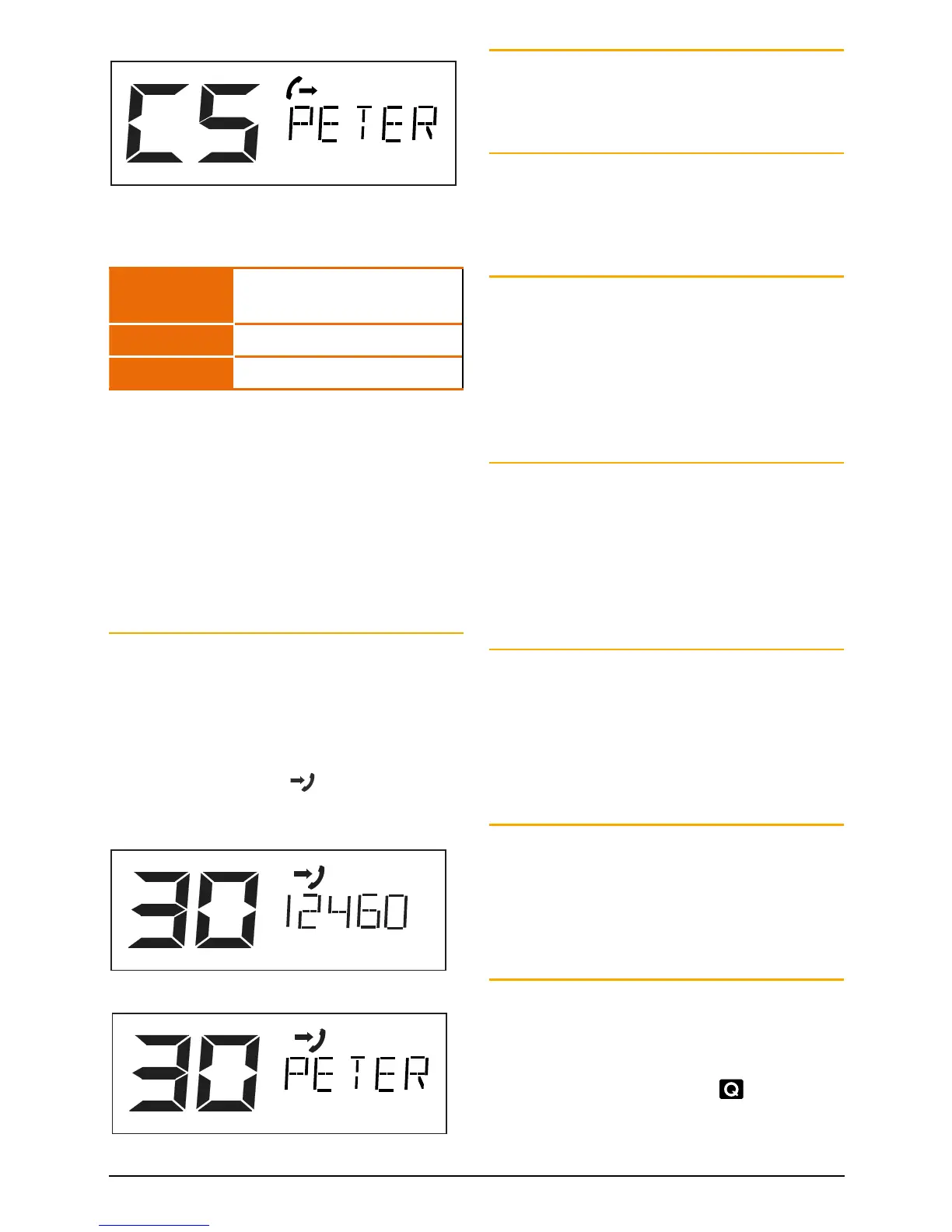
e.g. Programming Call Memory C5
Recalling Selcall Idents
1. Briefly press the CALL button. is displayed along
with the last sent or received Selcall Ident.
2. Rotate the Channel knob to select the required
Ident memory in locations ‘C0’ to ‘C9’.
3. Press and hold the CALL button to send the Ident.
Naming your Selcall Idents
Your radio allows you to label each Selcall Ident using
a 5 character name to make it easier to identify callers.
If an incoming Selcall matches one of those in your
radio’s memory, the label can be displayed instead of
the Selcall Ident.
NOTE: Before adding an ALPHA label to a Selcall Ident,
you must first store the required Ident in memory as
described left.
1. Briefly press the CALL button. will be displayed
along with the last sent or received Selcall Ident.
2. Rotate the Channel knob to select the required
Ident memory in locations ‘C0’ to ‘C9’.
3. Briefly press the F then ALPHA to select the ALPHA
mode. ALPHA will be displayed briefly.
4. If the ALPHA label is empty, ‘- - - - -’ will be
displayed, otherwise it will display the last ALPHA
label programmed into that memory.
5. Press and hold the Channel knob until the radio
beeps. The left-hand position of the Alpha label will
flash.
6. Rotate the Channel knob to select the required
character in the flashing position then briefly press
the Channel knob again to select the next position.
7. Repeat step 6 to enter up to 5 characters
as required.
8. Now press and hold the Channel knob. The entire
Alpha label will flash for a few seconds then the
radio will beep as the label is stored.
e.g. Labelling Call memory C5
Repeat steps 2 to 8 to add ALPHA labels to any
other Selcall Idents stored in memory. The following
characters are available;
Letters A B C D E F G H I J K L M N O
P Q R S T U V W X Y Z
Numbers 0 1 2 3 4 5 6 7 8 9
Punctuation <space> * +
To exit the CALL TO mode, briefly press the CALL
button (or simply wait for the Call function to time out).
The radio will return to normal operation.
To display the Alpha labels of incoming Selcalls,
the radio should be left in Alpha mode. Any incoming
Selcall that does not match those in the memory will
display -NEW-. To display the Selcall Ident of that caller,
briefly press F then ALPHA to return to the
NUMERIC mode.
Receiving Selcalls
When your radio receives it’s Selcall Ident, an alarm will
sound to alert you to the call. Initially the alarm will
beep urgently at 2 beeps per second, then, if the call
is not answered, it will slow to around 1 beep every 3
seconds. It will then continue to beep indefinitely until
you cancel it.
In addition to the alarm, the
symbol will appear on
the display along with the callers Selcall Ident or ALPHA
label to inform you of the caller’s identity.
Incoming call showing Selcall Ident
Incoming call showing Alpha label
To return the call:
Press and hold the CALL button for a few seconds until
the radio beeps. The caller’s Selcall will be sent back to
the caller.
To cancel the alarm:
Briefly press the PTT switch. The alarm will be
cancelled and the channel will be open for normal
communication. You can now talk on the channel in the
usual way.
QUIET MODE
The Quiet Mode mutes the receiver to prevent incoming
signals from being heard in the speaker until your
Selcall Ident is received. In this way you can monitor a
busy channel for personal calls without being disturbed
by unwanted signals. If your Selcall Ident is received,
the Quiet Mode is cancelled and all incoming signals
are heard in the speaker.
Setting up the Quiet Mode
To setup the Quiet Mode you must first ‘tag’ the
channels that you want to stay Quiet, then activate the
Quiet Mode. Once the Quiet Mode is activated, tagged
channels will remain Quiet to all incoming signals
unless your Selcall Ident is received. Channels not
tagged will remain open to all signals and will operate
normally.
To tag individual channels for QUIET operation:
1. Select the required channel.
2. Briefly press F then press and hold QUIET until the
radio beeps. ‘Q’ will appear on the lower right of
the display channel number indicating the selected
channel is now tagged for Quiet operation.
To remove the QUIET tag from individual
channels:
1. Select a channel that has been tagged for Quiet
operation. ‘Q’ will be displayed.
2. Briefly press F then hold QUIET until the radio
beeps. ‘Q’ will disappear indicating this channel is no
longer tagged for Quiet operation.
Activating the Quiet Mode
1. Select a channel that has been tagged for Quiet
operation (you cannot activate the Quiet Mode
unless you have selected a ‘tagged’ channel). ‘Q’ will
be displayed.
2. Briefly press F then press QUIET.
will appear on
the display.
Now all channels that were tagged for Quiet operation
will be operating in the Quiet Mode.



 To Next Page