19
3 Ba rc o de Printe r O pe ra tio n
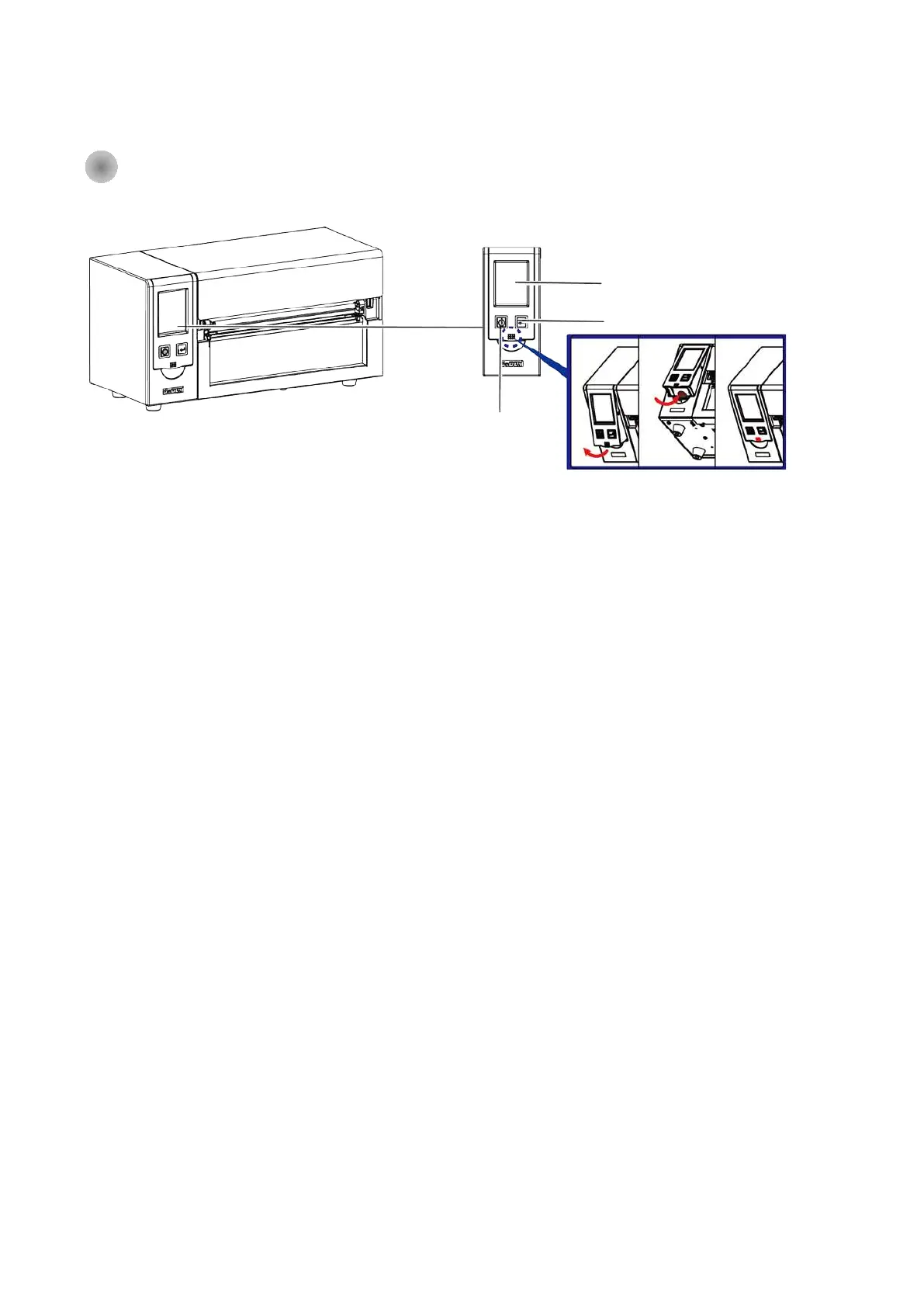
3- 1 Ba rc o de Printe r O pe ra tio n Inte rfa c e
Sta ndb y ke y
Ma ke sure the p o we r sw itc h is o n, a nd whe n p re ss the
“ Sta nd b y ke y” , the To uc h p a ne l (LC D Disp la y) will lig ht up a nd sho w “ Re a d y” . Whe n p re ss a nd ho ld
the “ sta nd b y ke y” in 3 se c o nd s, the n the p rinte r will b e g e tting into “ sta nd b y” m o d e .
Fe e d ke y
Whe n yo u p re ss the FEED b utto n, the p rinte r mo ve s the la b e l to the d e fine d sto p p o sitio n. If yo u a re
using c o ntinuo us la b e ls, p re ssing the FEED b utto n will mo ve la b e l sto c k until yo u re le a se the b utto n
a g a in. If yo u a re using ind ivid ua l la b e ls, p re ssing the FEED b utto n will mo ve o nly o ne la b e l. If the la b e l
d o e s no t sto p a t the c o rre c t p o sitio n, p le a se run the a uto c a lib ra tio n (Se e Se c tio n 3-6. fo r the la b e l
size c a lib ra tio n func tio n) o n the la b e l sto c k.
Pa use _ Fe e d ke y
If yo u w a nt to p a use the p rinting , just p re ss the fe e d ke y the n the p rinte r will b e o n p a use sta tus,
b e sid e s, the LC D will sho w “ Pa use ” till yo u p re ss the fe e d ke y a g a in the p rinte r will no t p rint a ny
furthe r.
EX, if the p rinte r is se tting fo r 10 p a g e s p rinting , whe n use r p re ss the fe e d ke y d uring the 2
nd
p a g e s
p rinting , the p rinte r w ill sto p p rinting till fe e d ke y b e e n p re sse d a g a in.
C a nc e l Printing _ Fe e d ke y
Pre ss a nd ho ld fe e d ke y in 3 se c o nd s d uring p rinting , the Printe r will b e b a c ke d to sta nd b y mo d e a nd
LC D w ill d isp la y “ Sta nd b y” a nd the p rinting jo b ha s b e e n c a nc e lle d .
EX. If the p rinte r is se tting fo r 10 p a g e s p rinting , whe n use r p re ss the fe e d ke y d uring the 2
nd
p a g e s
p rinting , the p rinte r w ill sto p p rinting fro m the 3
rd
p a g e a nd b a c k to Sta nd b y c o nd itio n sinc e the re st
p rinting jo b ha s b e e n c a nc e lle d .
Touch Panel (LCD Display)
Feed Key
Standby Key



 To Next Page