53
6-2 Print Line Ad justme nt
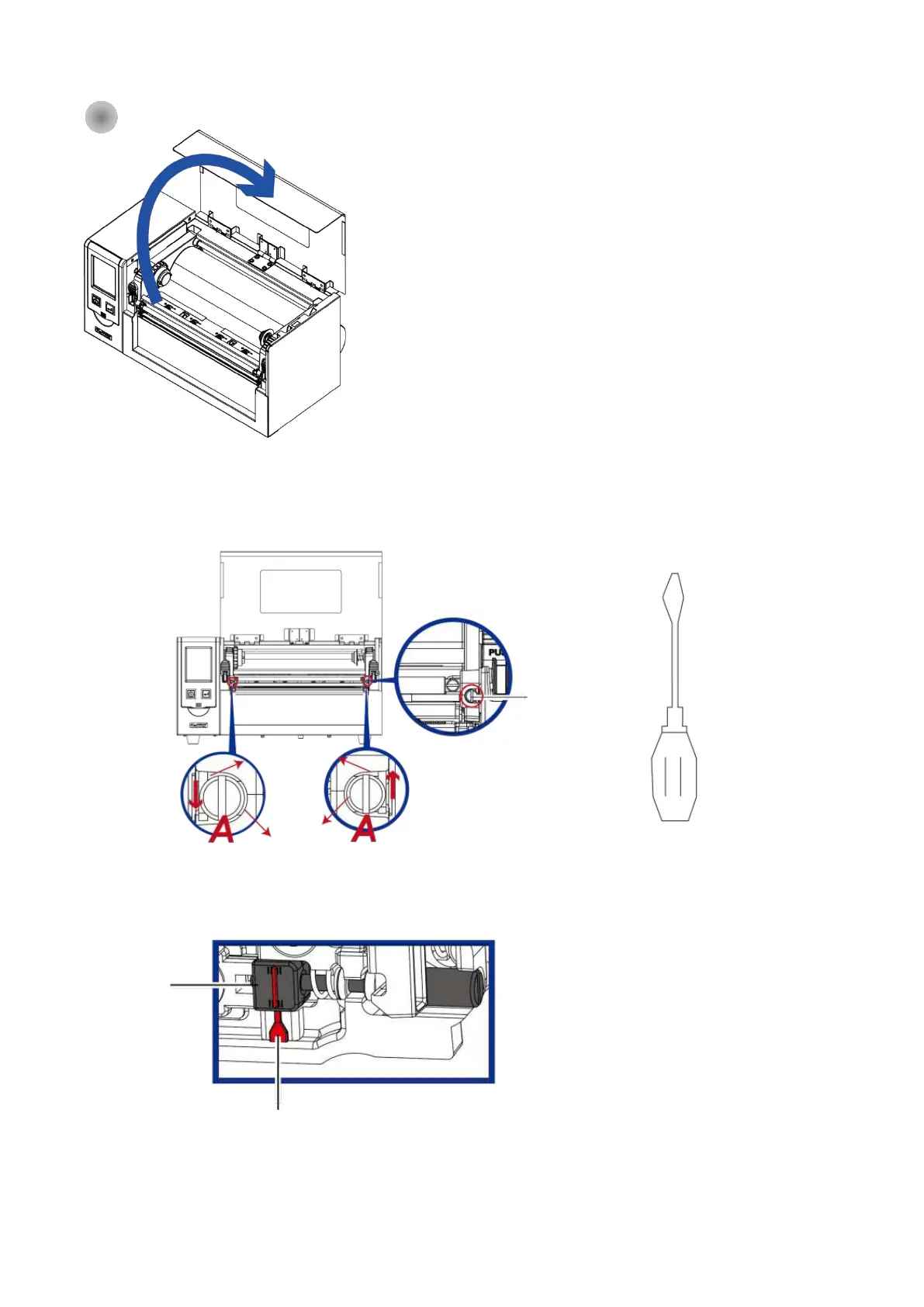
TPH p rint line a d justme nt:
To ha ve g o o d p rint q ua lity in ha rd ne ss o r thic ke r m e d ia , we w ill
sug g e st to m o ve the p rint line a little b it fo rwa rd (p a p e r fe e d ing
d ire c tio n) . And it will b e a b le to a p p ly the fla t sc re w d rive r(a s
a b o ve fig ure ) turn in c lo c kwise o r c o unte r c lo c kwise to ro ta te
the sc re w s (A) to mo ve b a c k o r fo rwa rd the TPH p o sitio n. The
a d justm e nt sc re w (A) o f the le ft a nd rig ht side o f the p rint he a d
p o sitio n a d justm e nt sho uld b e a d juste d so tha t the p rint line is
p a ra lle l to the c e nte r line o f the ro lle r. Ad just the sc re w (A) to
ro ta te o ne turn, the p rint he a d d isp la c e me nt stro ke is 0.5mm, it is
re c o mme nd e d to a d just the wa y p ro g re ssive , e a c h tim e to
a d just the 1/ 4 turn to c o nfirm the p rint q ua lity situa tio n.
(A) Turn the a d justme nt sc re w (A) o n the le ft a nd rig ht sid e s to
the p o sitio n whe re the a d justme nt line is a lig ne d with the
ind ic a ting line , a nd re turn to the o rig ina l p o sitio n a nd the n a d just
it a g a in a c c o rd ing to the a b o ve a d justme nt me tho d .
1. Lift up the to p c o ve r.
Print Line
Ad justme nt Sc re w
Print line Ad just
Ind ic a tio n Line
2. Use the fla t sc re w d rive r



 To Next Page