52
6 Ma inte na nc e a nd Ad justm e nt
6- 1 Print He a d Re pla c e m e nt
No te
* Ma ke sure the p rinte r is p o we r o ff sta tus b e fo re TPH re p la c e m e nt.
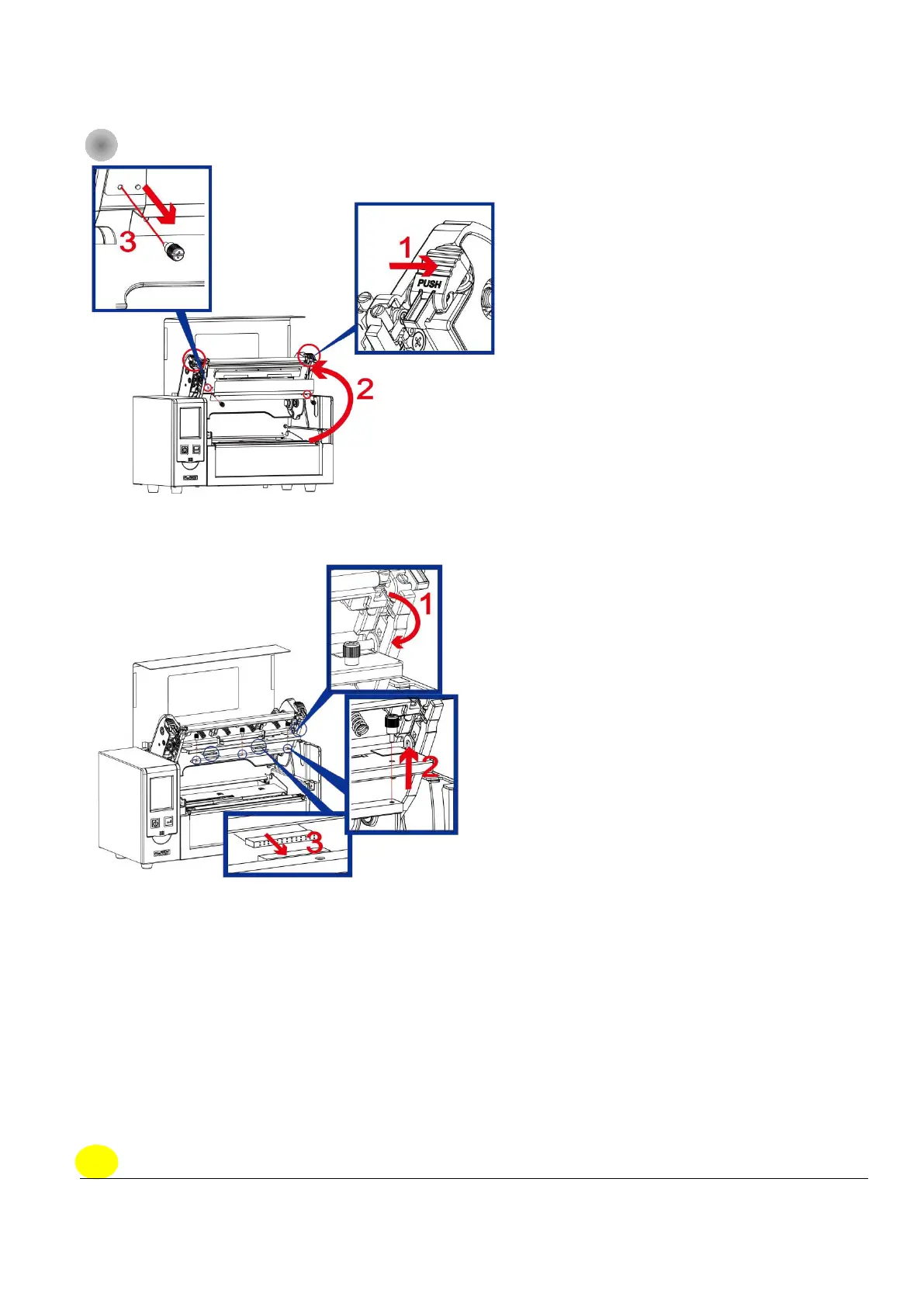
Ste p 1.
(No . 1 ) Re le a se the TPH lo c k.
(No . 2) Fo llo w the dire c tio n to o p e n the Print fra me .
(No . 3) Re mo ve the TPH c o ve r sc re w s.
Ste p 2.
(No . 1) Fo llo w the d ire c tio n to ro ll d o w n the TPH mo d ule .
(No . 2) Fo llo w the dire c tio n to ta ke o ut the thumb sc re w s
( No . 3) Ta ke o ff the TPH mo d ule fro m the c o nne c to r.



 To Next Page