44
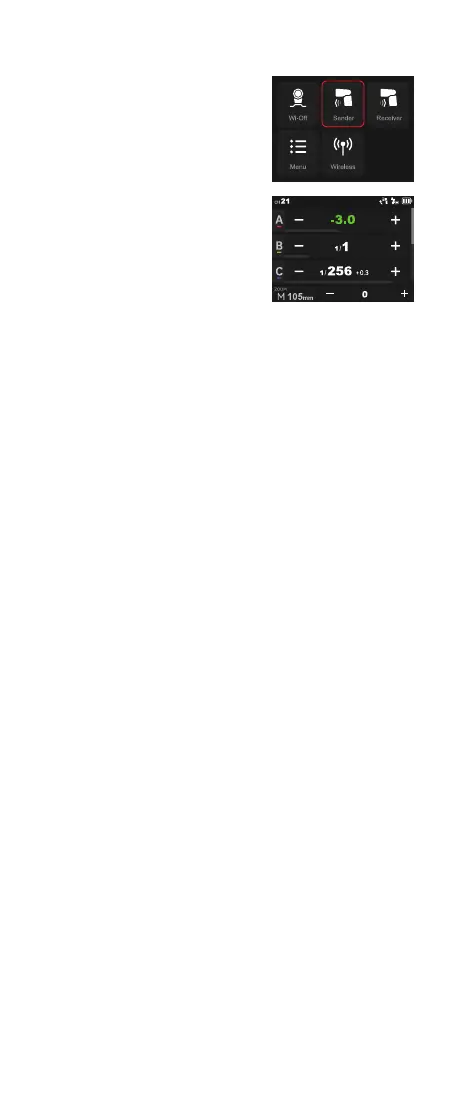
Touch Screen: Slide the screen from
the left to the right to make the mode
interface appears, click the “Sender”
icon to enter sender mode, slide upward
can check more groups.
Sender Mode
Group
M: Manual Flash—Flash Power
Five groups: A, B, C, D, E(V100 C)
M, A, B, C, D(V100 S)
Touch Screen: Press and hold the group box to switch among M (manual)
flash, TTL auto flash and OFF. If the value inside is from 1/256 to 1/1 or
from 2.0 to 10, this group is in M (manual) flash mode and the value inside
is the flash power. The flash power is adjustable by clicking the – or + icon,
or quickly adjustable by pulling the progress bar.
Buttons and Select Dial: Press the
power switch button to make the mode
interface appears, rotate the select dial
and press the set button to choose and
enter sender mode, rotate the select dial
can check more groups.
Buttons and Select Dial: Rotate the select dial and press the set button to
choose and enter a certain group, press and hold the set button to switch
among M (manual) flash, TTL auto flash and OFF. If the value inside is
between 1/256 to 1/1 or from 2.0 to 10, this group is in M (manual) flash
mode and the value inside is the flash power. The flash power is adjustable
by rotating the select dial, then press the set button to exit.
The wireless is turned on by default in
sender mode.
TTL Auto Flash—Flash Exposure Compensation Amount
Adjust the Paremeters Uniformly
ZOOM: Setting the Flash Coverage
Touch Screen: Press and hold the group box to switch among M (manual)
flash, TTL auto flash and OFF. If the value inside is from -3.0 to +3.0,
this group is in TTL auto flash mode and the value inside is the flash
compensation amount. The flash compensation amount is adjustable by
clicking the – or + icon, or quickly adjustable by pulling the progress bar.
Touch Screen: Click the – or + icon can increase or decrease the flash
power or FEC amount uniformly.
You can choose auto zoom mode or manual zoom mode (28mm-105mm).
The details of which please refer to the ZOOM section in the Wi-Off mode
above.
Buttons and Select Dial: Rotate the select dial and press the set button to
choose and enter a certain group, press and hold the set button to switch
among M (manual) flash, TTL auto flash and OFF. If the value inside is
between -3.0 to +3.0, this group is in TTL auto flash mode and the value
inside is the flash compensation amount. The flash compensation amount
is adjustable by rotating the select dial, then press the set button to exit.
Buttons and Select Dial: Rotate the select dial and press the set button
to choose and enter a certain group, press the set button to enter uniform
adjustment and rotate the select dial to increase or decrease the flash
power or FEC amount uniformly, then press the set button to exit.



 To Next Page