40
Installing/Disassembling the Camera Flash
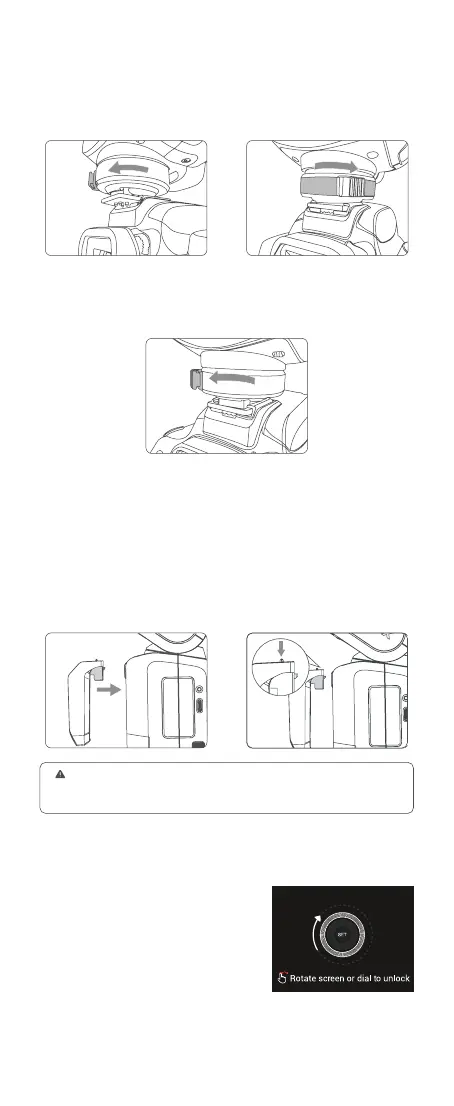
Installing the camera flash: Rotate the hot shoe xing buckle and rotate it
to the left, insert the camera flash into the camera's hot shoe. Then rotate it
to the right until it locks up.
Disassembling the camera flash: Press and rotate the hot shoe xing
buckle to the left until it is loosened, then take off the camera flash.
Installing/Disassembling SU-1
Installing: Align the detachable
sub flash SU-1 with the external
flash interface of V100 and insert
it parallelly, then press it down, a
"click" sound means it’s properly
installed.
Disassembling: Push the detaching
pusher on SU-1 and pull it up at the
same time to detach it.
Note: Please turn off V100 before installing and disassembling SU-1. Do not
insert in or pull out SU-1 when V100 is in power on status or working, otherwise
malfunctions may occur.
Power Management
Power On: Long press the power switch
button until the < SET > icon appears on
the panel, then slide the screen or rotate
the select dial in the direction showed on
the panel to turn it on.
Note: The screen backlight automatically turns
off after 15 seconds of no operation in power-on
status, and it can be lit up by touching.



 To Next Page