54
TTL: Fully Automatic Wireless Flash Shooting
The below instructions are described in touch screen operation, you can
also use buttons and select dial.
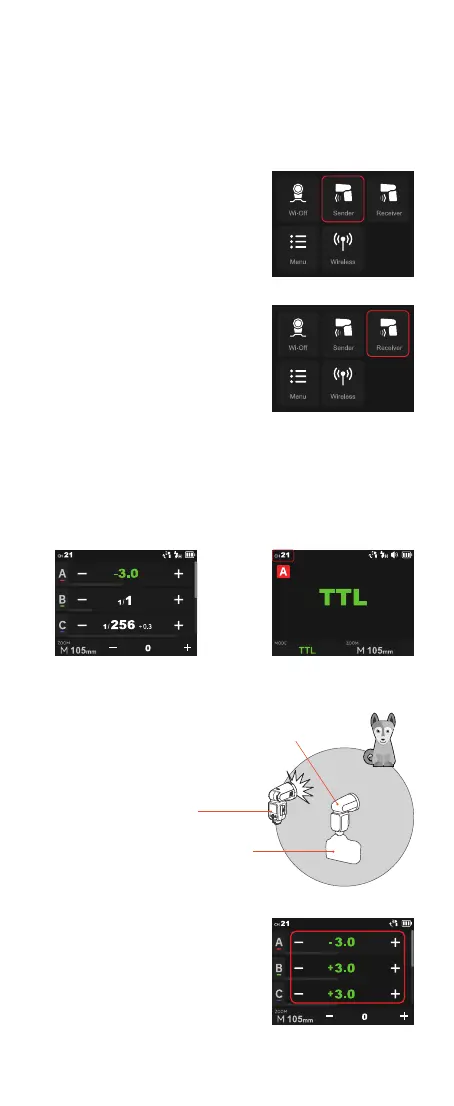
Click the “Sender” icon on the panel,
then the V100 attached to the camera is
set as the sender unit.
Click the “Receiver” icon on the panel,
then the V100 wirelessly controlled is set
as the receiver unit.
Set the wireless channels and IDs of sender unit and receiver unit to the
same. For example, if the sender unit channel is set to 1, then the receiver
unit channel needs to be 1 as well.
You can also use the wireless sync function to set the channels and ID to
the same quickly.
The transmission distance of the sender
unit and receiver unit is about 100m.
Click the “Sender” icon on the panel to
enter sender mode. Press and hold the
group box to switch to TTL auto flash
compensation amount.
Please set the sender unit's flash to
ON in order to make the sender unit re
flashes.
X2T can also be set as sender unit. X2T
can control V100's ZOOM value when
the ZOOM is adjusted to auto (A) mode.
Using Automatic Wireless Flash with a Single Receiver Unit
1. Sender Unit Setting
2. Receiver Unit Setting
3. Check the Communication Channel /ID
4. Position the Camera and Flashes
5. Set the Flash Mode to <TTL>
●
Transmission distance
is about 100m
Receiver
Sender
(This interface takes V100 C as an example,
other models interfaces may differ)
(This interface takes V100 C as an
example, other models interfaces
may differ)



 To Next Page