55
When stronger flash output or more convenient lighting operation is needed,
increase the number of receiver units and set it as a single receiver unit.
To add receiver units, use the same steps as setting “using automatic
wireless flash with a single receiver unit”. Any flash group can be set (A/B/
C/D/E).
When the number of receiver units is increased or the sender unit flash
ring is ON, automatic control is implemented to make all groups of flashes
re the same flash output and ensure the total flash output is up to standard
exposure.
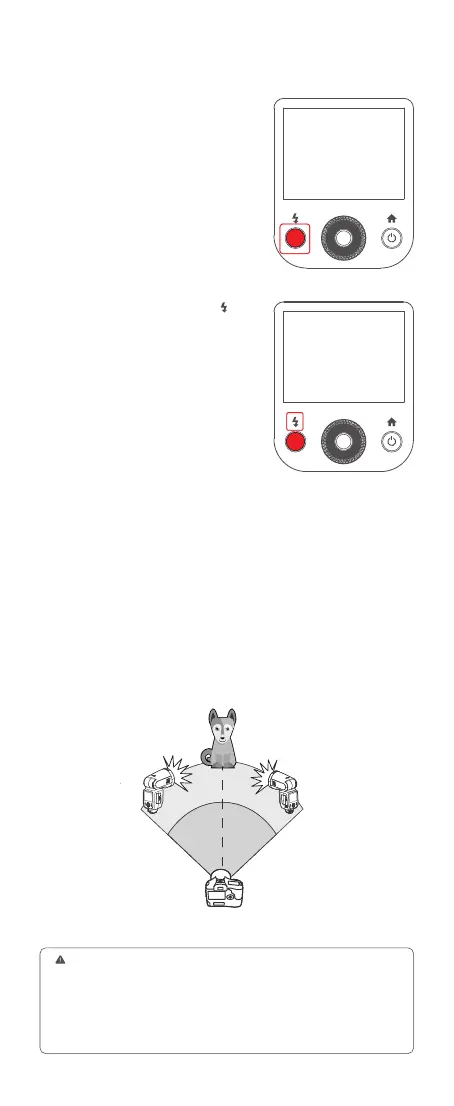
Check whether the sender unit’s flash
ready indicator is lightened.
Press the sender unit’s test button <
>.
Then, the receiver unit will re. If not,
adjust the distance from the sender unit.
Using Automatic Wireless Flash with Multiple Receiver Units
6. Check Whether the Flash is Ready
7. Check the Flash Operation
●
1. Press the depth-of-eld preview button on the camera to re a modeling
flash(V100 C).
2. If the receiver unit’s auto power off function is on, press the sender unit’s test
button to power it on. Please note that test ring is unavailable during the camera’s
regular metering time.
3. The effective time of receiver unit’s auto power off is changeable between
30min or 90min in the menu settings.



 To Next Page