58
Control with the Camera's Menu(Only available in
V100 C)
Global Shutter Sync Shooting(Only available in
V100 S)
If the camera flash is attached to an EOS camera which has a camera
control function, the flash can be controlled using the camera’s menu
screen.
By using a combination of V100 S and a camera equipped with global
shutter image sensor, flash photography can be synchronized with the
entire range of shutter speeds available on the camera, enabling more
effective flash exposures than conventional high-speed sync photography
(HSS).
The functions that can be set are as follows. The available settings vary
depending on the flash mode, wireless flash function settings, and other
conditions.
Flash Firing
E-TTL Balance
TTL Metering
Continuous Flash Control
Flash synchronization speed in aperture-priority mode
Flash Mode
Wireless Functions
Zoom (Flash Coverage
)
Shutter Sync
Flash Exposure Compensation
Function
On/Off
Ambience priority/Standard/Flash priority
Evaluative
(
Face priority
)
/ Evaluative / Average
E-TTL shooting every time / E-TTL shooting for the rst time
TTL flash metering
(
auto flash
)
/manual flash/multi flash
(
stroboscopic
)
Wireless flash
:
Off/Radio transmission
First-curtain Sync/Second-curtain Sync /High-speed Sync
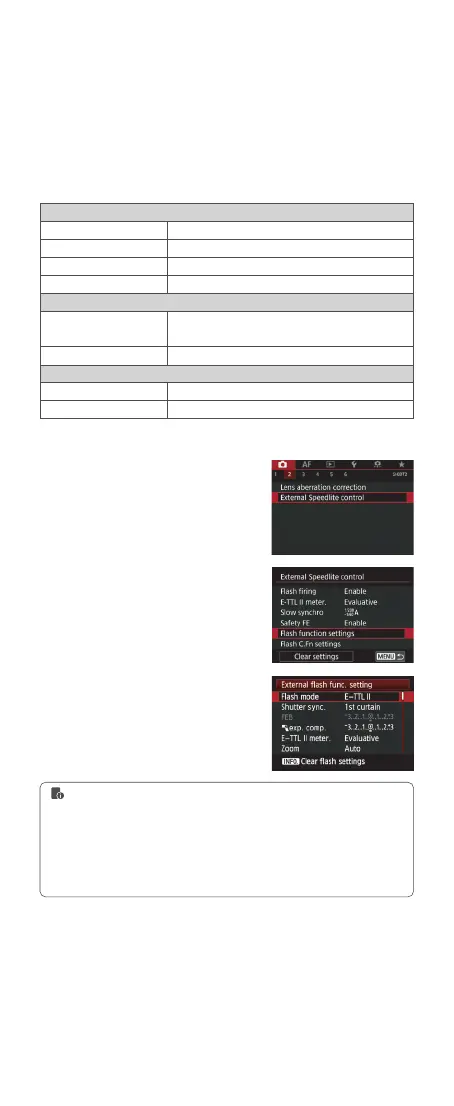
1. Select <Flash control> or <External
Speedlite control>.
2. Select <Flash function settings> or
<External func. setting >.
3. The setting screen and items
displayed vary depending on the camera.
Setting Camera Flash Functions
1. To clear all custom function settings, you can enter the [Clear settings] in step 2
and select [Clear all Speedlite C.Fn's] or [Clear ext. flash C.Fn set.].
2. If flash exposure compensation has already been set with the camera flash, flash
exposure compensation cannot be set with the camera. To set it with the camera,
the camera flash’s flash exposure compensation must be set to zero.
3. If any flash custom functions and flash settings other than flash exposure
compensation have been set by both the camera and the flash, the latest settings
will take effect.



 To Next Page