30 31
Name of Parts
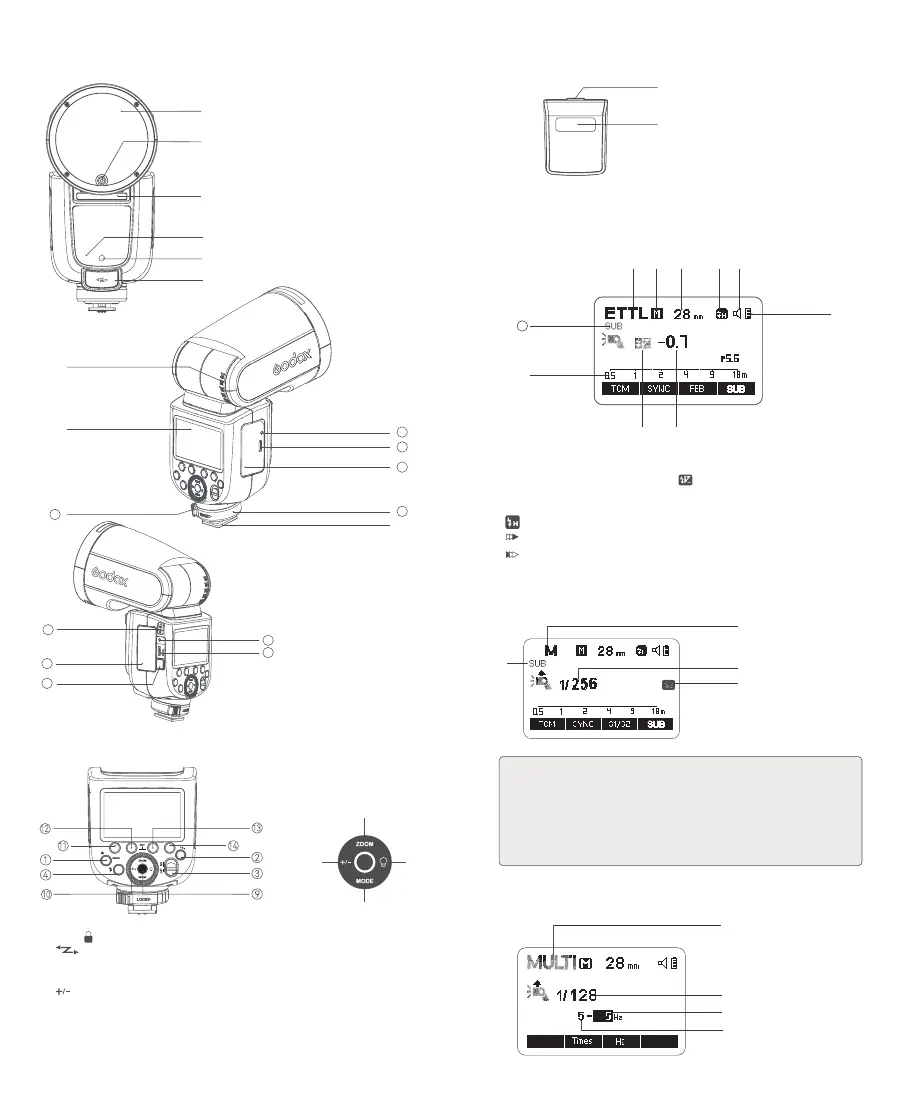
Body
Control Panel
1. MENU/< > Button
2. <
> Wireless Button
3. ON/OFF Power Switch
4. Test Button / Recycle Indicator
5. <
>FEC/Flash Output Setting Button
6. <ZOOM> Zoom Button
7. <MODE> Mode Button
8. LED Modeling Lamp Button
9. Set Button
10. Select Dial
11. Function Button 1
12. Function Button 2
13. Function Button 3
14. Function Button 4
⑥
⑤ ⑧
⑦
1. Flash Head
2. LED Modeling Lamp
3. Optical Sensor
4. Focus Assist Beam
5. External Flash Interface
6. External Charging Port
7. Bounce Angle Scale
8. Hot Shoe
9. LCD Panel
10. Hot Shoe Fixing Buckle
11. Lithium Battery
12. Hot Shoe Lock Ring
13. USB-C Charging Portt
14. Charging Indicator
15. TTL/M Mode Toggle Switch
16. Battery Compartment
17. Battery Remove Button
18. Sync Cord Jack
19. USB-C Upgrading Port
①
②
⑤
③
④
⑥
16
18
19
17
15
⑨
⑧
10
11
13
14
12
⑦
Detachable Sub Flash SU-1
1. Flash Tube
2. Detaching Pusher
①
②
LCD Panel
E-TTL/E-TTL II Auto Flash
1. ETTL: E-TTL II/E-TTL Auto Flash
2. A: Auto Zoom M: Manual Zoom
3. Zoom Display (Auto/28-105mm)
4.
: High-Speed Sync
:
Second-Curtain Sync
: First-Curtain Sync
5. Effective Flash Range/Shooting Distance (m/ft)
6.
:
Flash Exposure Compensation
7. Flash Exposure Compensation Amount
8. Battery Level Indication
9. Beeper
10. Sub Flash SU-1 ON
① ② ③ ④ ⑨
⑧
⑤
⑥ ⑦
10
Manual Flash
1. M: Manual Flash
2. Manual Flash Output
3. S1/S2 Optical Control
4. Sub Flash SU-1 ON
1. The display will only show the settings currently applied.
2. The functions displayed above function buttons 1 to 4, such as <SYNC and A/
B/C/D>, change according to settings’s status.
3. When a button or dial is operated, the LCD panel will be illuminated.
4.The <SUB> icon will display on the panel only after the sub flash is inserted into
the flash.
Note
:
③
①
④
②
SUBSUB
Multi Flash
1. MULTI: Stroboscopic Flash
2. Multi Flash Output
3. Flash Frequency
4. Number of Flashes
①
④
③
②



 To Next Page