32
33
The product can be used in combination with the following accessories sold
separately, so as to achieve the best photography effects:
Receiver Unit (2.4G Wireless Receiving)
1. Radio Transmission Shooting
2. Receiver Unit Group
3. Receiver Unit (2.4G Wireless Receiving)
4. 2.4G Wireless Receiving Channel
①
④
③
②
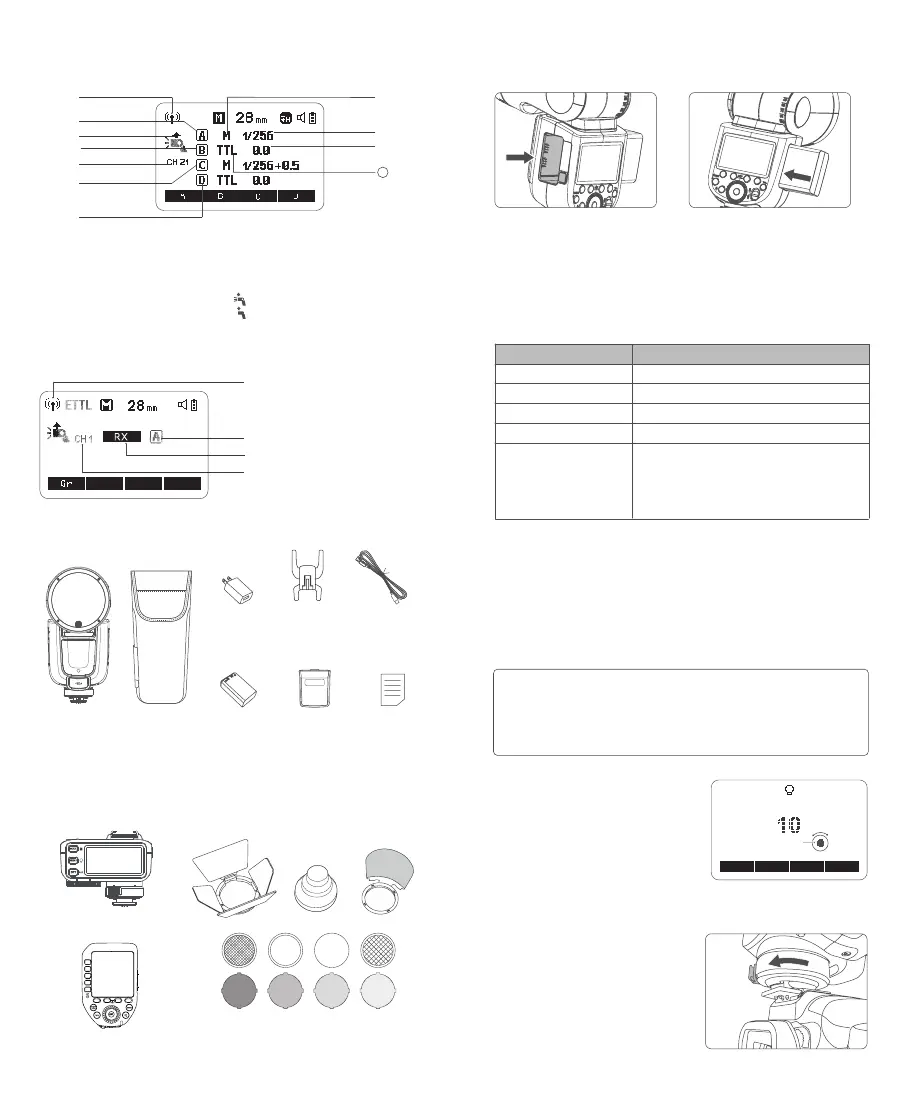
Radio Transmission Shooting:
1. Radio Transmission Shooting
2. Transmitter Channel
3. Group A: Receiver Unit Group A
4. Group B: Receiver Unit Group B
5. Group C: Receiver Unit Group C
6. Group D: Receiver Unit Group D
7. M: Manual Flash
8. Flash Output
9. Flash Exposure Compensation Amount
10.
: Transmitter Unit Flash ON
: Transmitter Unit Flash OFF
11. TTL: TTL Auto Flash
What's Inside
Separately Sold Accessories
Instruction
Manual×1
Storage Bag×1
TTL Wireless Flash Trigger X2T C
TTL Wireless Flash Trigger XProII C
Lithium
Battery×1
Accessory Kit for Round Flash Head AK-R1
Charger×1 USB-C Charging
Cable×1
Transmitter Unit (2.4G Wireless Transmitting)
Detachable Sub
Flash SU-1 x1
①
⑦
⑧
⑨
②
⑩
③
⑤
⑥
④
11
Mini Stand x1
Flash Body×1
Battery
Installing battery:Detaching battery
:
Press and hold the battery remove
button, then push the battery out
of the battery compartment.
Battery Level Indication
Make sure the battery pack is securely loaded in the flash. Check the battery
level indication on the LCD panel to see the remaining battery level.
Battery Level Indication
3 grids
2 grids
1 grid
Blank grid
Blinking
Meaning
Full
Middle
Low
Lower battery, please recharge it.
The battery level is going to be used out, and
the flash is not functional in this status.
Note: Please recharge the battery as soon as possible
(within 10 days). Then, the battery can be used or be
placed for long period.
Insert the battery into the battery
compartment in the direction
as referred below until it’s rmly
locked.
Power Management
Use ON/OFF power switch to power the flash unit on or off. Turn off if it will
not be used for an extended period of time.
Setting as a transmitter unit, the flash will turn the power off automatically
after a certain period (approx. 90 seconds) of idle use. Press the camera
shutter halfway or press any flash button will wake up the flash unit. Setting
as a receiver flash, it will enter sleep mode after 60 minutes (or 30 minutes)
of idle use. Pressing any flash button will wake it up.
1. Setting the C.Fn-STBY function to OFF is recommended when the flash is used
off camera.
2. Auto power off timer function of a receiver unit is set to 60 minutes by default.
Another option “30 minutes” is available in C.Fn-RX.
3. The LCD panel will lighten on when operating the buttons or select dial.
Note:
Modeling Lamp
Press the modeling lamp button to set
the modeling lamp, press the set button
to turn on or off the modeling lamp.
When turning the modeling lamp on, turn
the select dial to adjust its brightness in
10 levels (01~10).
Mounting/Detaching the Camera Flash
Mounting the camera flash:
Press the hot shoe xing buckle and
rotate it to the left, insert the camera
flash into the camera's hot shoe.
MODEL
on/off



 To Next Page