12
Continued overleaf
ADVANCED PROGRAMMING (MONITOR FUNCTIONS)
Continued from previous page.
No function.
Men 2:u
Then adjust the settings as required:
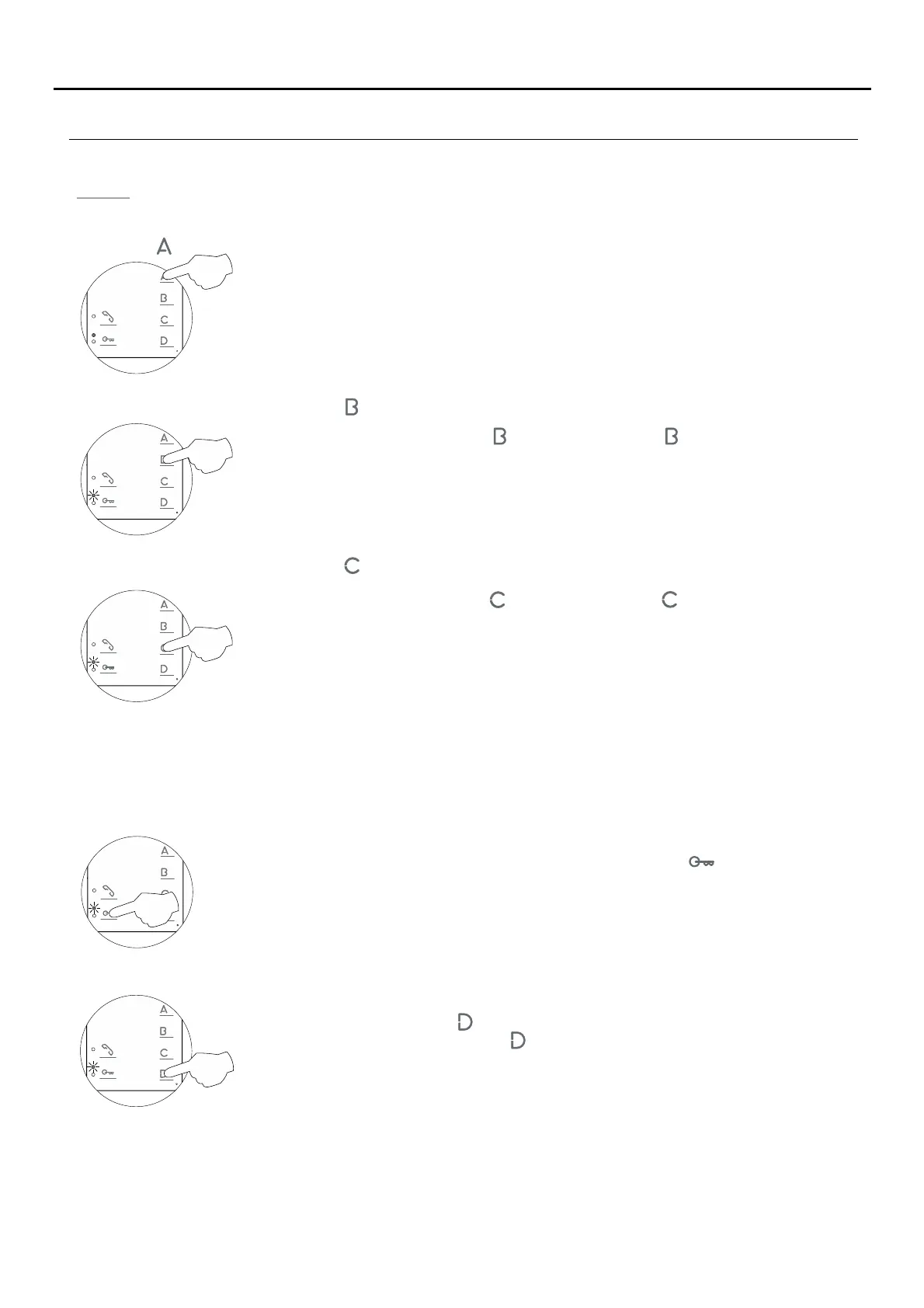
- Button has no function.
- Changing the function of button : Intercom function (default setting).
Select the function to assign to button : Each press on button selects a different function
which is indicated with blinks (1 to 4 blinks) of the programming LED and in the following
order: auxiliary device activation 'A1', call to secondary guard unit, second camera
activation '2C' and intercom. When the final selection is reached, the following press
returns the user to the first selection and 1 blink of the programming LED (carousel mode).
- Changing the function of button : Activation of auxiliary device 'A1' function (default setting).
Select the function to assign to button : Each press on button selects a different function
which is indicated with blinks (1 to 4 blinks) of the programming LED and in the following
order: auxiliary device activation 'A1', call to secondary guard unit, second camera
activation '2C' and intercom. When the final selection is reached, the following press
returns the user to the first selection and 1 blink of the programming LED (carousel mode).
If an apartment has Tekna Plus, Tekna Plus SE and Tekna HF Plus monitors, the Tekna Plus SE and Tekna HF Plus
monitors should be configured in 'Intercom with Tekna Plus monitors' mode, as the Tekna Plus monitor does not
allow an intercom call to a particular monitor in the apartment to be made (selective intercom call). So when an
intercom call is made, all of the monitors in the apartment will receive the call.
- Tekna Plus intercom monitors: Tekna Plus SE and Tekna HF Plus intercom monitors (default setting).
To activate the Intercom with Tekna Plus monitors mode: Press button and the programming
LED will indicate with 1 blink that the function is in 'Intercom with Tekna Plus monitors' mode or
with 2 blinks that the function is in 'Intercom with Tekna HF Plus/Tekna Plus SE monitors'
mode.
- Accessing 'Menu 3' or exiting programming mode:
To access press button and the programming LED will blink three times.'Menu 3,'
To exit programming mode, press button for 3 seconds, and the programming LED will turn
off (see p. 14).
TEKNA PLUS MONITORHF





 To Next Page