14
ADVANCED PROGRAMMING (MONITOR FUNCTIONS)
Continued from previous page.
Men 4:u
Then adjust the settings as required:
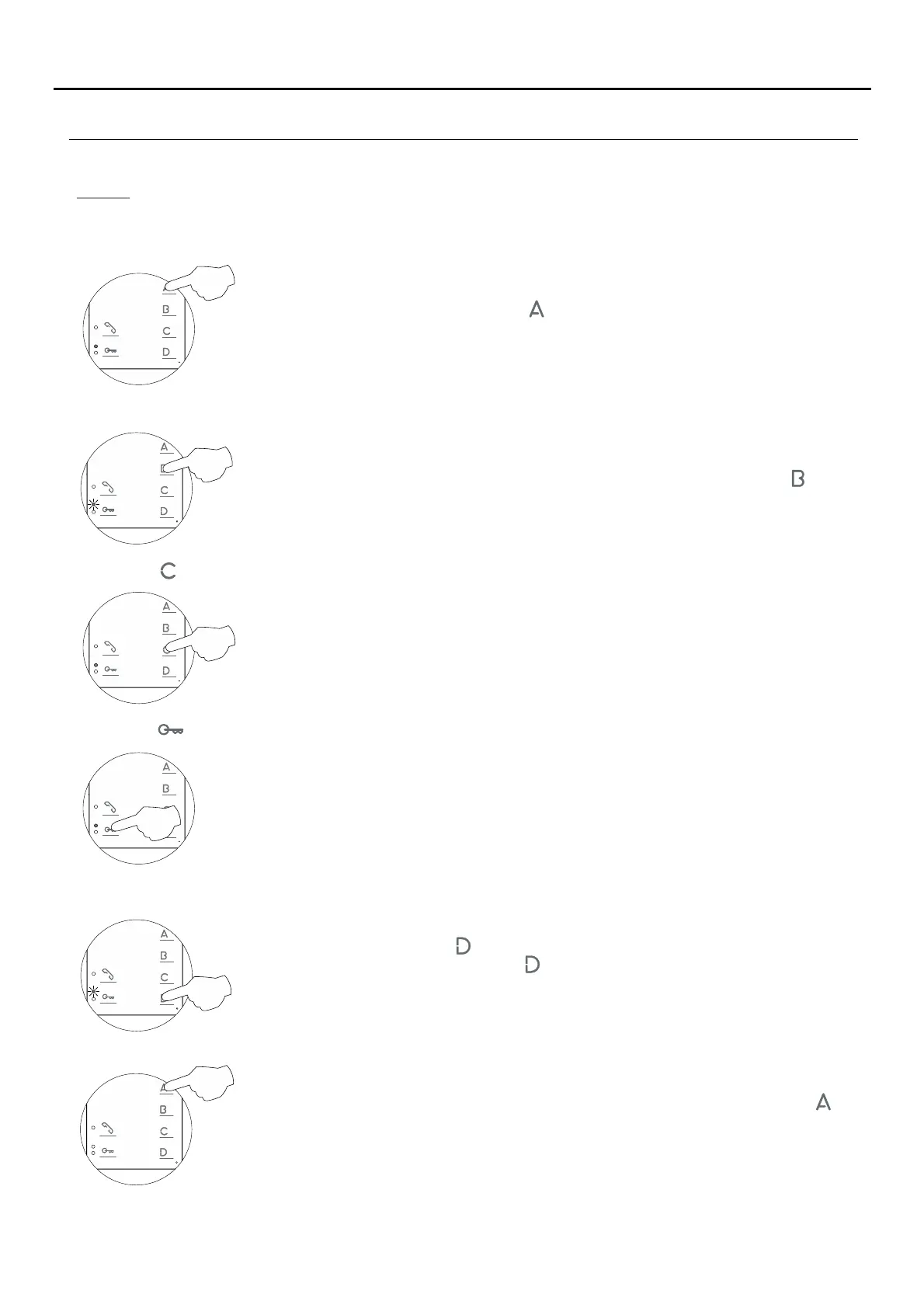
- Setting all of the monitor's advanced programming options to the ' 'default value
- Activating/deactivating the 'communication with hearing aid' function: Communication with hearing aid
activated (default value).
No function.
- Button has no function.
No function.
- Button has no function.
- Accessing 'Menu 1' or exiting programming mode:
To access 'Menu 1', press button and the programming LED will blink once (see p. 11).
To exit programming mode, press button for 3 seconds and the programming LED will
turn off.
When exiting advanced programming mode, the monitor will turn off: Press button for
2 seconds to turn the monitor back on. After any resetting of the monitor and for the
following 45 seconds, no operation with it can be performed.
- Turning on the monitor when exiting programming:
Setting to the 'default value': Press button and the monitor will indicate with two audible
tones that all of the options of the monitor's advanced programming (p. 11-14) are set to
their default setting.
To activate/deactivate the 'communication with hearing aid' function: Press button and the
programming LED will indicate with 1 blink that the function is activated or with 2 blinks that
the function is deactivated.
TEKNA PLUS MONITORHF





 To Next Page