26
860-7104-19 DTB Operation Manual
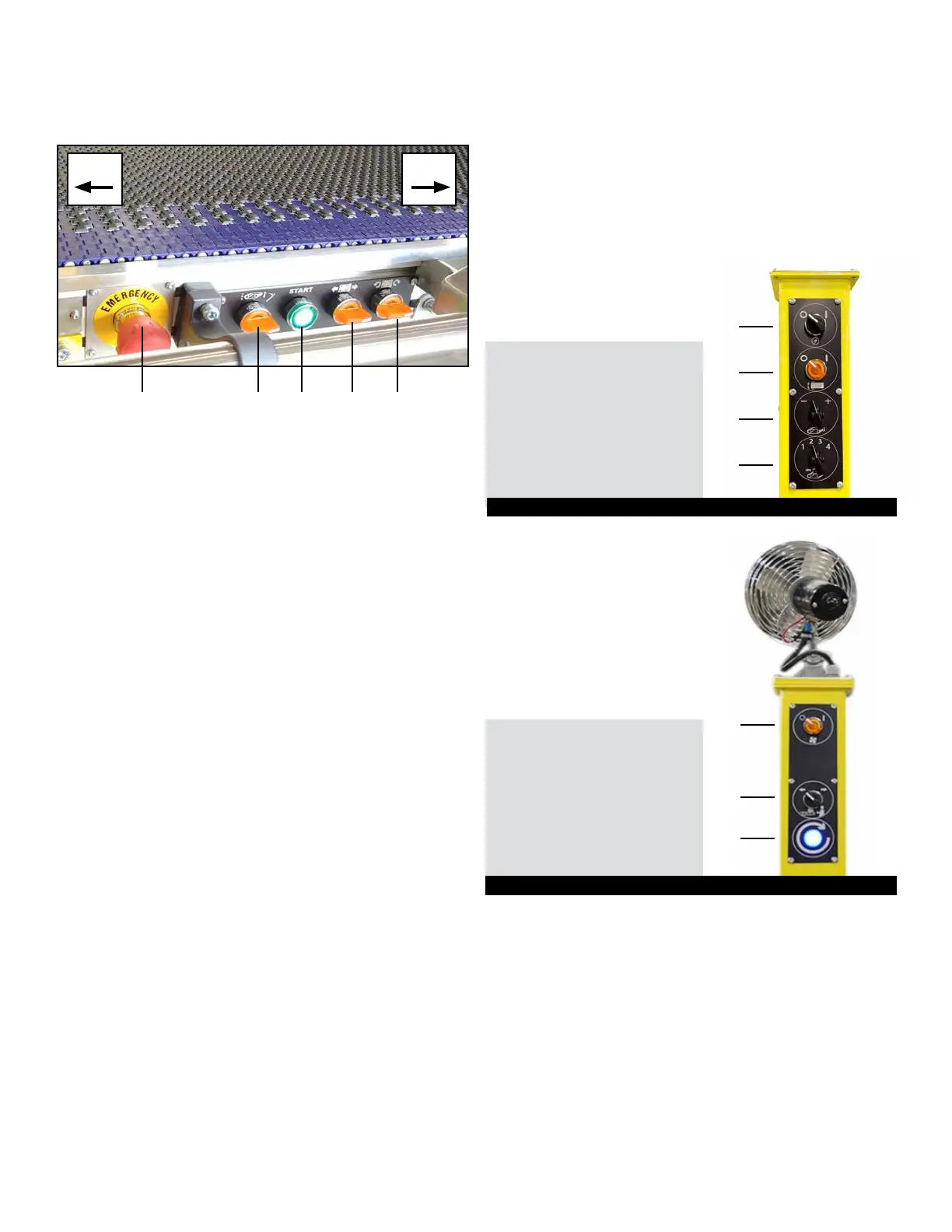
D - Machine Travel - Turn selector switch to move machine
forward or backwards. Hold selector switch in position
to maintain travel in desired direction.
E - Machine Rotate - Turn selector switch to rotate unit either
clockwise or counterclockwise. Hold selector switch in position
to maintain travel in desired direction.
CONTROLS ON MASTS
OPERATOR CONTROLS
CONTROLS ON PIVOTING CONVEYOR
Operator controls are mounted on both sides of front pivoting
conveyor. They control:
A - Emergency Stop (E-Stop) Button - See Emergency Stop
(E-Stop) Button section.
B - Belt Motion Selector Switch
To RUN the belts: Turn momentarily towards the front of the
machine to start the belts. Spring return to center.
To JOG the belts: When the belts are stopped, turn conveyor
selector switch towards the back of the machine and hold.
To turn OFF the belts for Restu-it
TM
:
Turn conveyor selector switch once towards the back of the
machine to stop belts on machine only. Conveyors connected to
the machine will continue to run.
To RESTART Restu-it
TM
belts: Turn conveyor selector switch
momentarily towards the front of the machine to start the belts and
connected conveyors. Spring return to center.
To RESTART belts after Pressure Sensing Mats have been
triggered:
1. Remove weight (product or person) from sensing mat(s).
2. Return to Operator Platform.
3. Turn Belt Motion Control towards the back of the machine. Hold
for only 1 second and release.
4. Turn conveyor selector switch momentarily towards the front of
the machine.
C - Start - Press to START.
A - Emergency Stop Button
B - Belt Motion Selector Switch (RUN/OFF/JOG)
C - Start Button
D - Machine Travel Selector Switch (FORWARD/REVERSE)
E - Machine Zero Turn Selector Switch
A B C D E
Back Front
A AC On/O Selector Switch
B Pivoting Conveyor
Side-to-Side On/O Lock
C Belt Speed
D Restung Modes
Selector Switch
A
B
C
D
Left Mast
A Fan On/O Switch
B Belt Direction
Selector Switch
C Safety Mat Reset Light
A
B
C
Right Mast (with fan)



 To Next Page