34
860-7104-19 DTB Operation Manual
FLEXIBLE CONVEYOR
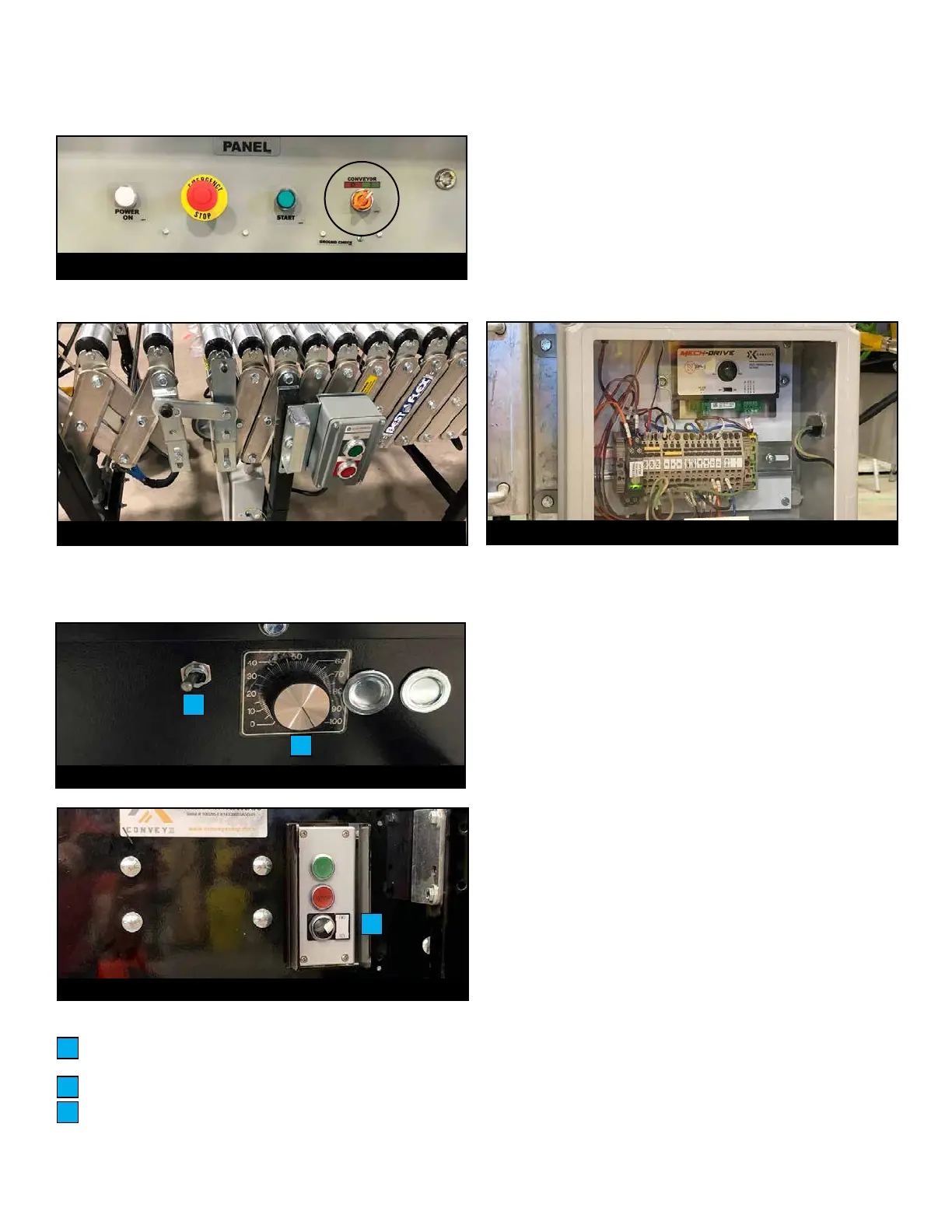
1. Ensure Conveyor Start/Stop Selector switch (located on
remote panel if equipped) is turned to ON.
2. Press START buttons (two in each conveyor section).
3. Verify that Conveyor direction is set according to operation. If
necessary, adjust in control box (FMH conveyors) or in Start/
Stop Box at the end of conveyor (ConveyX conveyors).
4. Adjust Speed Control dial on each Conveyor Control Box to
suit handling of product size/weight.
5. To start conveyor, rotate Belt Motion selector switch on
pivoting conveyor towards the front of the machine.
NOTE: If the blue light on the left mast is on, the sensing
mats need to be reset for belts to run. Turn Belt Motion
selector switch towards the back; hold for 2 seconds; the blue
light will turn o if the mats have been reset.
6. Adjust Speed Control dial to suit handling of product size or
weight.
7. To stop conveyors rotate Belt Motion selector switch on
pivoting conveyor towards the back of the machine. The belts
on the machine and connected conveyors will stop.
Box jams at ex conveyor will result in damaged O-Rings.
NEVER leave ex conveyor in cold containers/trailers. This will
stien O-Rings and cause premature wear.
Ensure direction of rollers matches loading operation.
To change directions of rollers:
1. Turn conveyor direction switch to OFF.
2. When rollers have come to a stop, change direction of switch.
NEVER overload ex conveyors.
NEVER allow motors to continue to run under a jammed product.
This will cause premature O-Ring damage.
NEVER unplug ex conveyors with power on. White light on
interconnection box will indicate power is present.
Conveyor Directional 3-Position Switch
(LOAD/STOP/UNLOAD)
Speed Control Dial
Conveyor Directional FWR/REV Switch
A
B
C
A
B
Conveyor Control Box (FMH)
Start/Stop Box (in each FMH conveyor section)
Conveyor Control Box (ConveyX)
Conveyor Start/Stop Selection Switch (if equipped)
C
Start/Stop Box (ConveyX)



 To Next Page