DVD ONLY DVD + VCR
AUDIO
OUT
R
L
R
L
Pr
Pb
Y
DIGITAL
AUDIO OUT
COAXIAL
COMPONENT
VIDEO OUT
VIDEO
OUT
VIDEO 1
IN
IN
(FROM ANT.)
OUT
(TO TV)
RF
S-VIDEO OUT
AUDIO
VIDEO
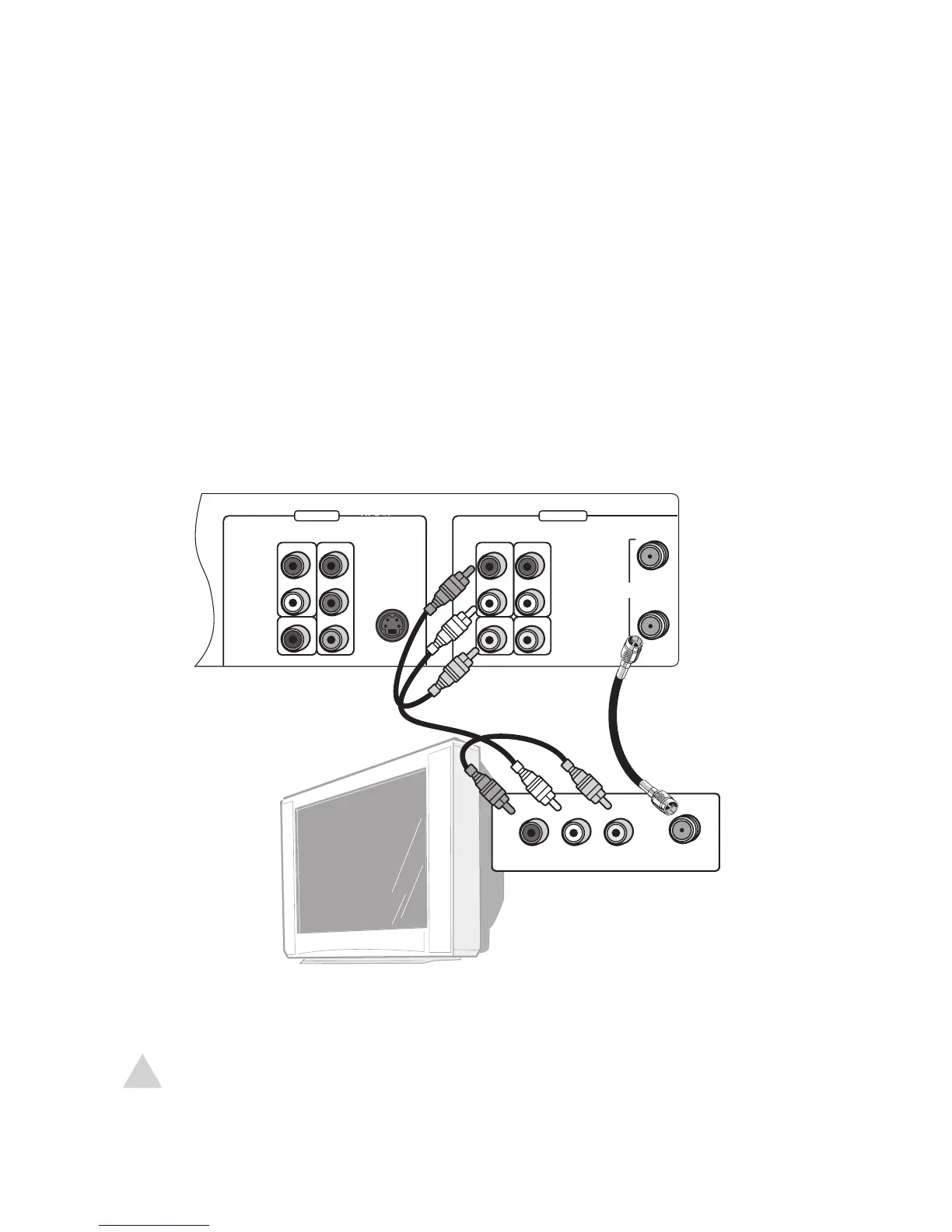
If your TV has standard RF or AV inputs:
Connect the supplied RF cable from the DVD+VCR to your TV as shown.
Connect the supplied audio/video cables from the DVD+VCR to your TV as shown.
Connect the supplied power cable from the DVD+VCR to a standard wall outlet.
Press POWER to turn on the DVD+VCR.
Turn on your TV and set it to channel 3 or 4 (for the RF connection) or the appropri-
ate Video input (for the AV connection).
• The GoVideo splash screen appears.
Continue with Chapter 3 to set up your DVD+VCR.
• If your TV has S-Video or Component Video inputs, see page 16.
• To change the RF Out channel to 3 or 4, see page 24.


 To Next Page