GP3D Root User Manual
12
4.1.8 Model view display
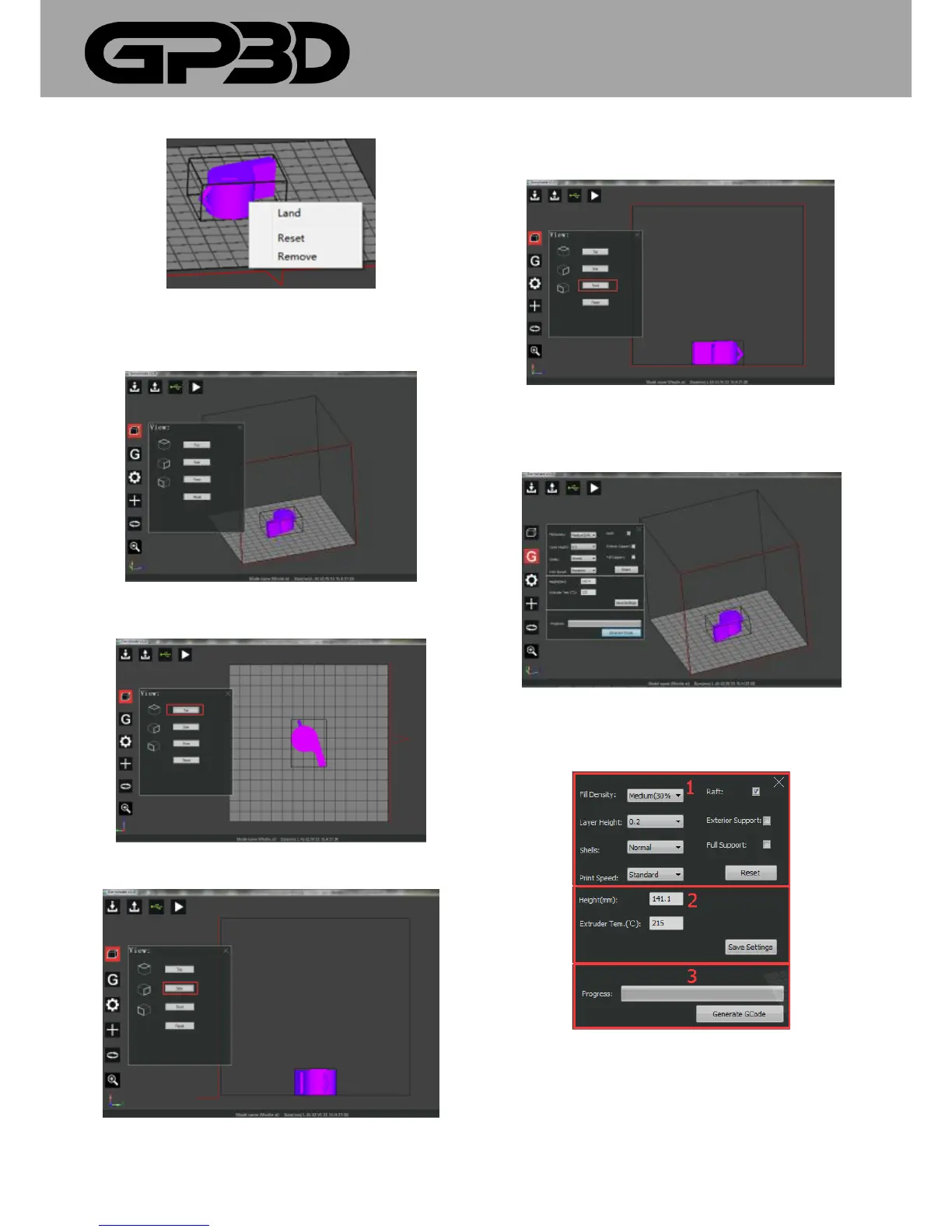
4.1.8.1 After the model is selected, click the menu icon “View”. The
following figure is the model view display in terms of “Reset”.
4.1.8.2 Click the menu icon “Top”, the model will be displayed at the
overlooking angle, as follows.
4.1.8.3 Click the menu icon “Side”, the model will be displayed at the right
viewing angle, as follows.
4.1.8.4 Click the menu icon “Front”, and the model will be displayed as
follows.
4.1.9 Print parameter settings
4.1.9.1 Click the icon “ GCode” and the setting dialog pops up
4.1.9.2 The dialog to generate GCode is divided into three parts, the
column “1” is to set model parameters, the column “2” is to set GP3D
Root parameters and the column “3” is to generate GCODE.
4.1.9.3 Model density refers to the filling density of the model, set by
percentage. Click “▼” to select different densities. (The default is medium
30%)



 To Next Page