GP3D Root User Manual
20
4.2 PRINT FROM PC
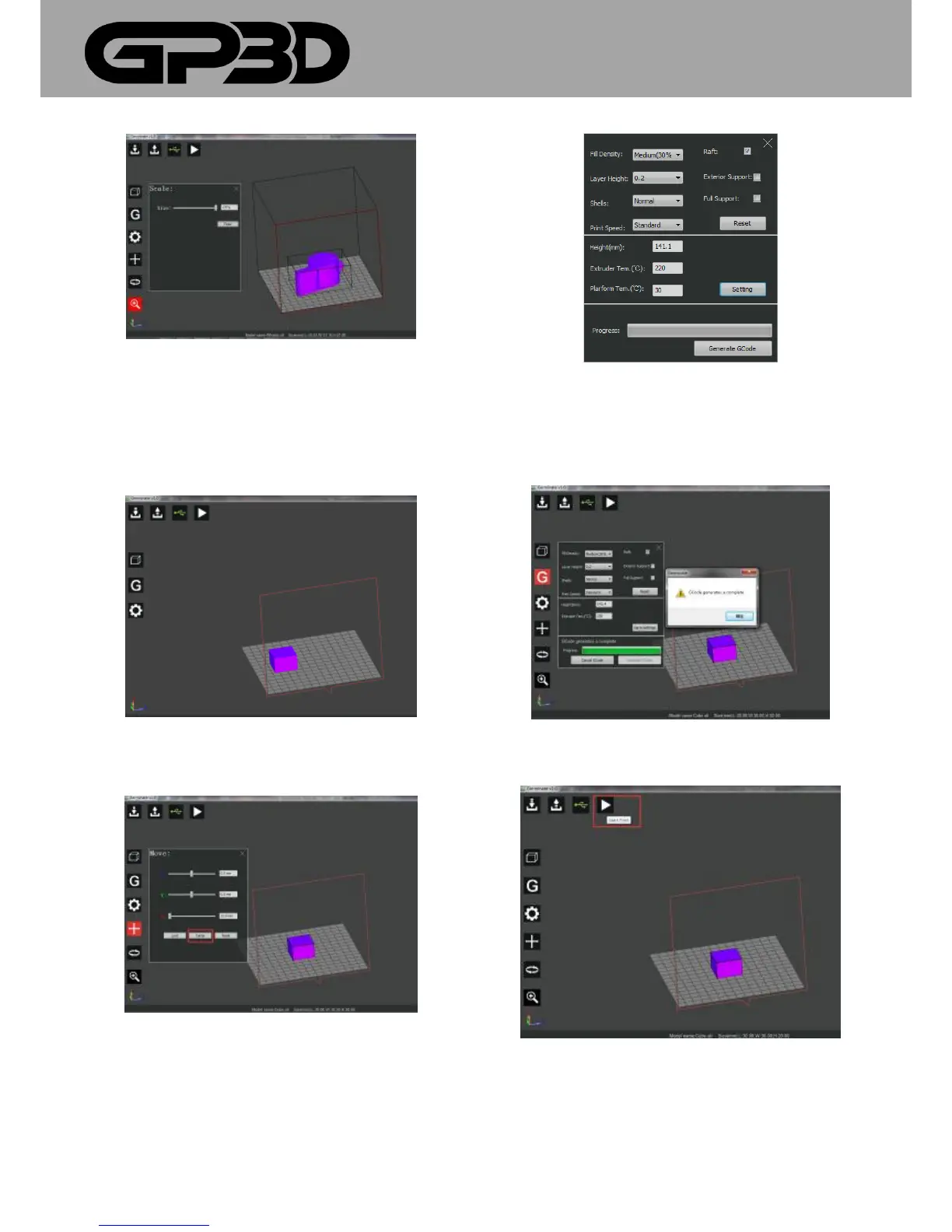
4.2.1 Software features are described above, this section takes the cube
model to introduce the whole process of online printing. After connecting
software to the GP3D Root, import the cube model, as shown below.
4.2.2 Select the model with the left mouse button, click the left menu
button to move the model to the center of the platform, and you can click
“center”, as shown below.
4.2.3 Click the left menu button to generate GCODE (PLA material used
for printing), set the nozzle temperature at 220 °C and the platform
temperature at 30 °C, and click “Setting”, as shown below.
4.2.4 Other parameters are set to default settings. Click “Generate GCODE”.
After GCODE is generated, click “OK” to close the prompt box popping
out.
4.2.5 Click the button “Start Print”, and the GP3D Root begins to work, as
shown below.
4.2.6 After the model is done printing follow steps in 3.2.8-9 to remove
the model.



 To Next Page