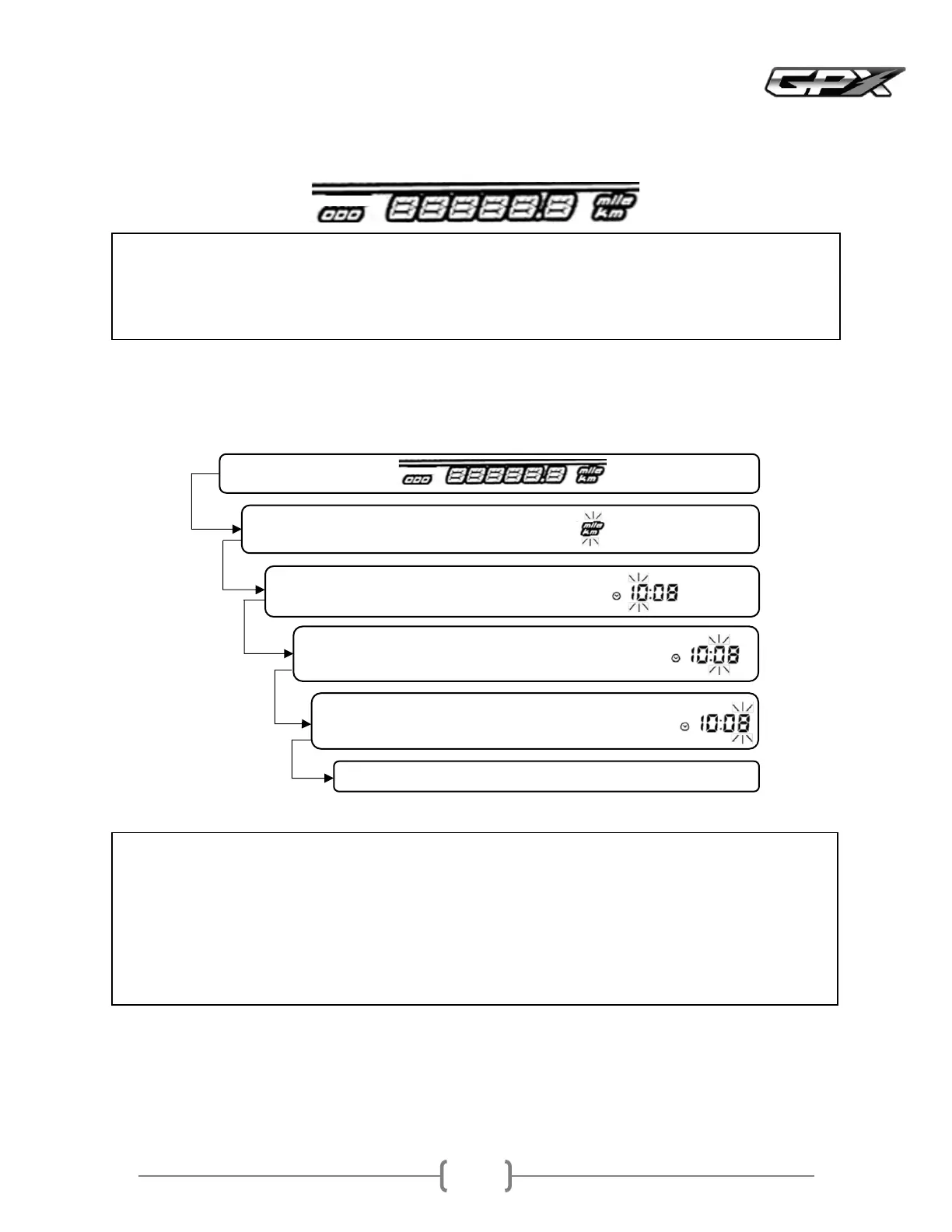
Total odometer ODO This odometer shows the total distance traveled by the motorcycleIt cannot be reset to zero
Note
• Even if the battery is removed, the data will still be stored in the meter panel
• When the number reaches , the number will return to and the odometer will start working again
• This ODO meter can be displayed in mph or kmh
• Note
• When the battery is removed, the watch will reset to and will start again when the battery is reconnected
• If the clock setting mode is entered and no operation is performed for about seconds, the watch will
automatically exit the setting mode
• If the key switch is turned off while setting the clock, the watch will exit the setting mode when the key switch is
turned on again
• The watch operates normally using the reserve power even when the key switch is turned off
The meter is in the category ODO
At the ODO meter section, when the distance meter starts blinking
The hour display will start blinking
You can set the hour at this point by pressing the MODE button once
The tens minute display will start blinking
You can set the tens minute at this point by pressing the MODE button once
The unit minute display will start blinking
The unit minute can be set at this point by pressing the MODE button once
gClock
This clock only shows 24hour mode
Setting the clock, follow the steps below



 To Next Page