Warning
Do not turn off the key switch while riding a motorcycle, as this will cause the engine to stall and cause an accident
Therefore, turn off the key only after the motorcycle is stationary
Always remove the key and do not forget to take it with you after locking your motorcycle
When the key is in the ONposition, the motorcycle battery will still run even if the engine is not startedTherefore,
make sure that after stopping the motorcycle, the key is turned to the OFFposition
Make sure that the key is removed from the luggage compartment before locking the seat
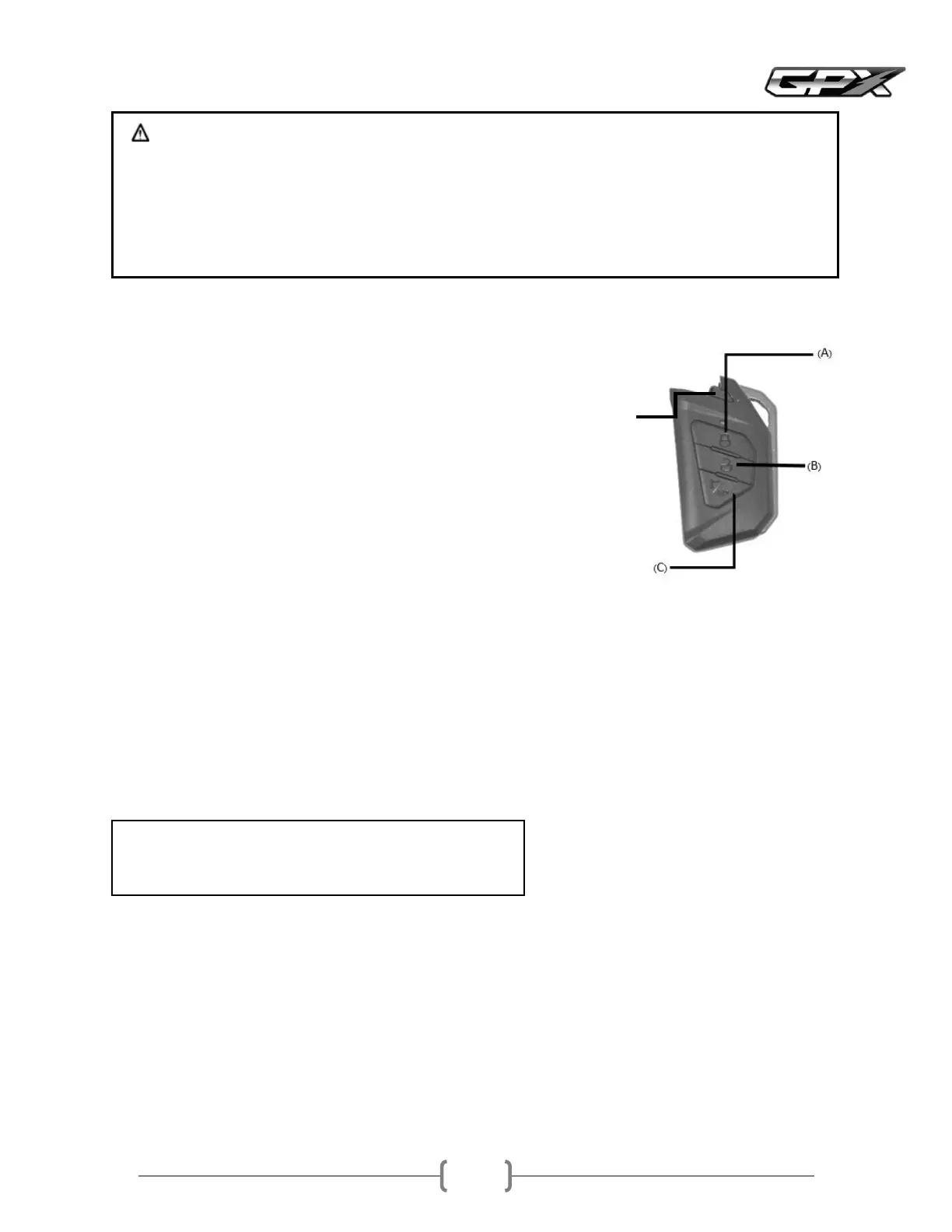
ALOCK button
Press the Lock button to lock the key switchWhen the locking system is
complete, a beepsound will be heard
BUNLOCK button
After pressing the key switch unlock button and not turning on the key switch, it can
be divided into cases
When within meter radius of the vehicle, after seconds, the system will
automatically lock
When beyond meter radius, after seconds, the system will automatically lock
When walking beyond meters radius, the system will automatically lock
immediately
CAntitheft alarm onoff button
Press to select the antitheft alarm on or off
On mode, when you press the button, you will hear a continuous beepsound in the on mode
When there is an impact on the vehicle, the antitheft alarm will sound
Silent mode, when you press the button, you will hear a beepsound once in the silent mode
When there is an impact on the vehicle, there will be no alarm sound
Press and hold the cbuttonIf the red light on the remote is flashing, this mode cannot be
unlocked by pressing the knob
Press and hold the cbuttonIf the green light on the remote is flashing, this mode can be
unlocked by pressing the knob
Note
In case the remote battery runs out, you can replace the battery
Battery typeCR
How to unlock the key switch to start the engine?
Unlock the key switch with the keyless system
When the key is brought within meter of the vehicle and the key switch is pressed in the center of the vehicle, the solenoid
will unlock the key switch so that the switch can be turned to the ONposition
Unlock the key switch with the key Remote
When the Unlockbutton on the remote is pressed, the solenoid will unlock the key switch so that the switch can be turned
to the ONposition
Use a spare key
Smart Key System Keyless



 To Next Page