NOil Change Indicator Light
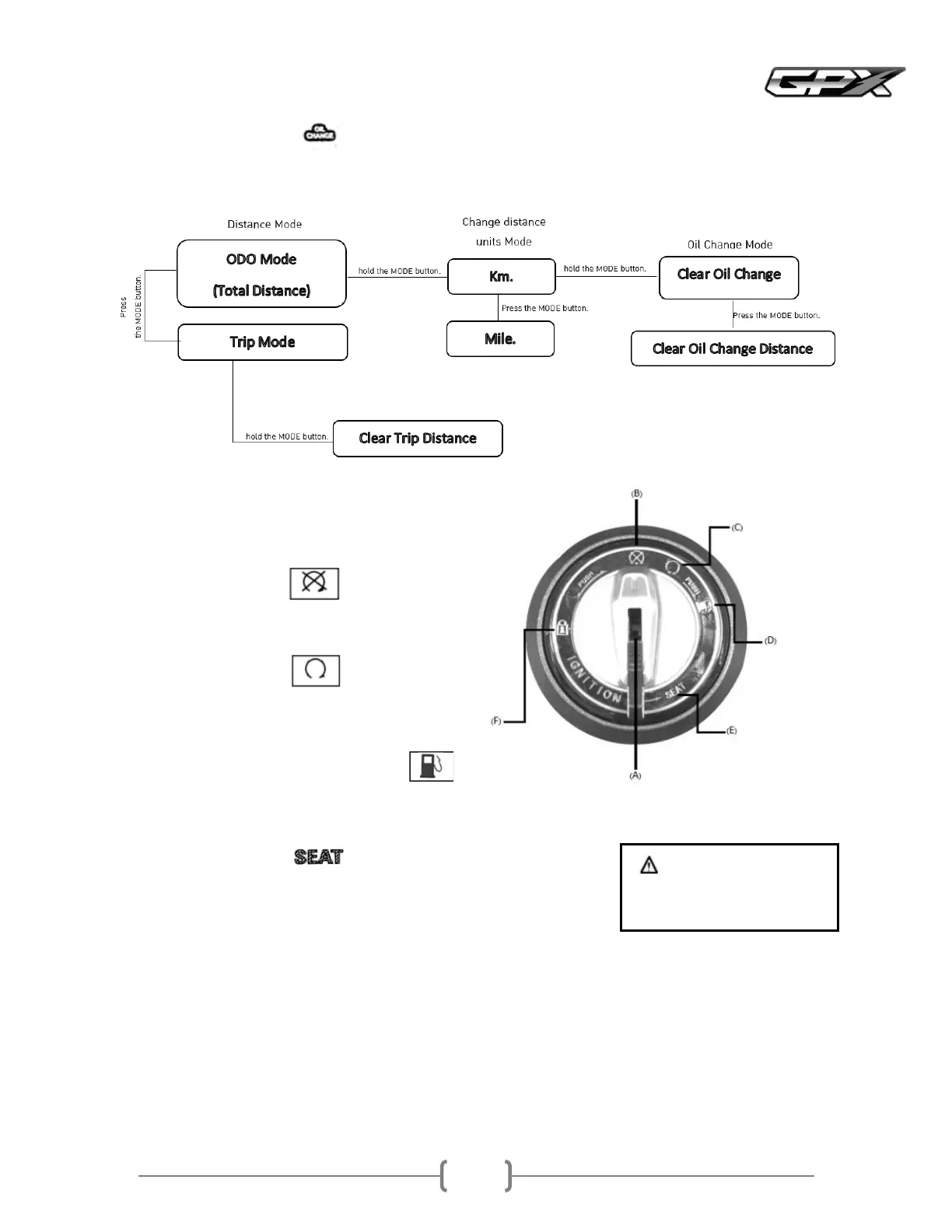
The Oil Change indicator light will light up when the oil change period is reached
Steps to clear the Oil Change indicator light
AKeyhole
Insert the starter key into the keyhole to start the engine
BOFFPosition:
Turn off the engine from this position
The key can be removed
CONPosition:
The engine can be started in this position
The key cannot be removed
DPosition Open the fuel tank cap
How to openFrom the ONposition, press and turn the key or knobto the right clockwiseto open the fuel tank
cap
How to lockPush the fuel filler cap and it will lock automatically
EPosition Open Seat
How to openFrom the OFFposition, turn the key or knob
to the left counterclockwiseto open the seat
How to lockPress the seat firmly, the seat will be locked
automatically
FLOCKposition
Turn the steering wheel to the left and press the key switch or knobdown and turn it slightly to the left
counterclockwiseto the LOCKposition
The steering wheel will be locked in this position
The key can be removed
To unlock, simply turn the key from the LOCKposition to the OFFposition
Warning
Be sure to have your keys with
you before you lock your seat



 To Next Page