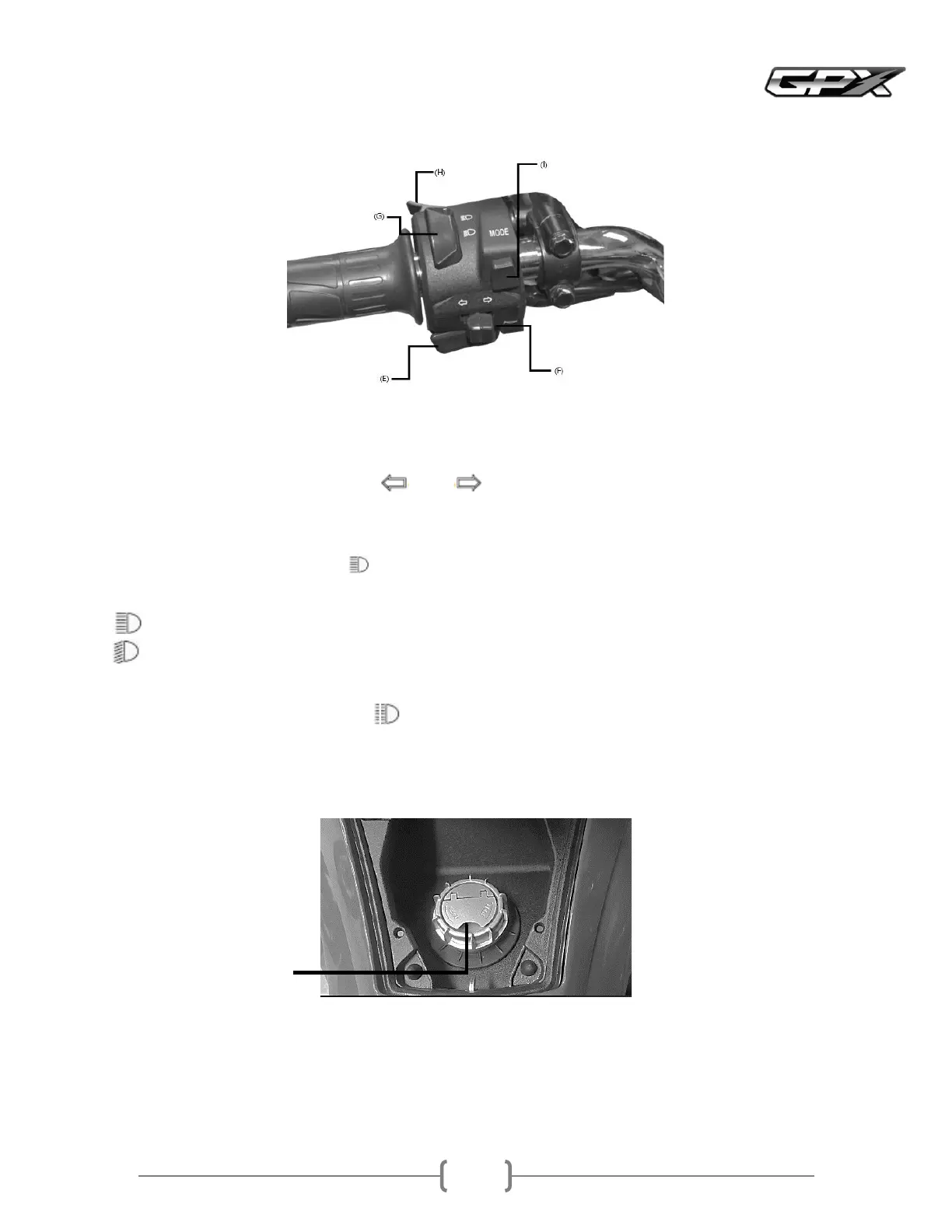
EHorn switch
Press the horn button when the ignition switch is onThe horn will sound
FTurn Signal Switch
When the turn signal switch is pushed to the left or right, the related turn signal will flash on and offTo stop
flashing, push the switch in
GHighLow Beam Switch
You can select high and low beam with this switchWhen the high beam is off, the high beam indicator light will light
uppage
HPassenger light switch
When you press the passenger light buttonthe high beam will illuminate to signal the driver of the car in front that
you are about to passThe passenger light will be turned off as soon as the button is released
IMODE switch
Used to set various functions of this motorcycle
High beam
Low beam Please use low beam when driving in the city
Turn the ignition key to the Fuel Capposition page to unlock the fuel cap
To open the fuel cap A, turn it counterclockwise
Insert or secure the fuel cap
Fill with fuel
Close the fuel cap and turn it clockwise until it locks
Press the fuel cap to close it



 To Next Page