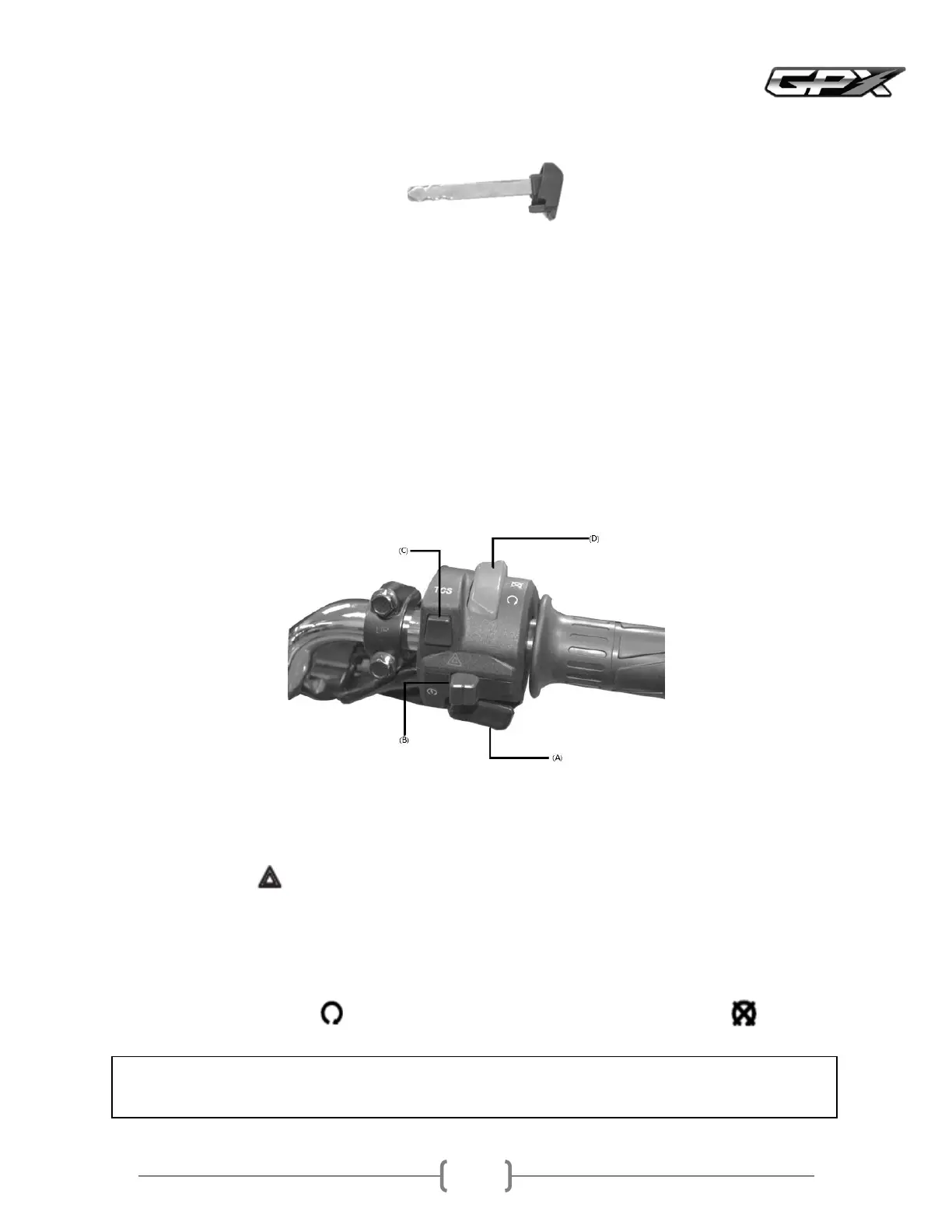
CTCS switch if equipped
Press the TCS button to turn the traction control system on or off when the ignition switch is on
Automatic key lock system
When parking and turning off the engine, if the remote control is within meter radius, the system will automatically lock
the key switch for seconds, but the key switch can be unlocked by pressing the key switch
When parking and turning off the engine, and the remote control is moved away from the vehicle more than meters
away, the system will automatically lock and the key switch cannot be turned on until the remote control is brought within
meter radius
Setting the sensitivity of the alarm
Key switch is in the OFF position
Press and hold the Lock button on the remote control until you hear a beep
Press the Unlock button not holding it downto select the sensitivity level of the antitheft alarm by listening to the sound
Beep time, the system is strongest
Beep times, the system is most sensitive
Press the Lock button to confirm note that the turn signals on the dashboard are off
AStart switch
This start button operates the electric starterTo start the engine, turn the ignition switch on; press this button while holding
the front or rear brake lever to start the engine
Push the switch to the positionWhen the key switch is in the ONposition, all turn signals and indicator lights will
This switch should normally be in position to allow the motorcycle to runIn an emergency, switch to turn off
• Note
Although the engine stop switch can turn off the engine, it does not completely shut off the electrical circuit
Spare key
In case the remote is damaged, lost or the battery runs out, you can use the spare key ato start the car by inserting it into
the keyhole page



 To Next Page