to resume scanning. Alternatively, you may press MAN to monitor
an active object. Although
PAUSE and MAN both stop the
scanner on the active object, there are some small differences in
how they operate.
PAUSE pauses the scanner but keeps the
scanner in scan mode, resulting in faster stop/start operation.
MAN stops scan mode completely, and allows you to browse the
file system to select other objects to monitor.
While the scanner is Manual Mode, you can browse through the
stored objects in your scanner and select one object to monitor.
Use the and keys on the 5-way pushbutton pad to scroll
through the objects assigned to the current Scan List. The and
keys on the 5-way pushbutton pad are used to browse up and
down through the Scan Lists, respectively. Only Scan Lists that
contain objects are shown when browsing. A quick low-high wrap
beep is played when the scanner reaches the last occupied Scan
List and wraps back to the beginning.
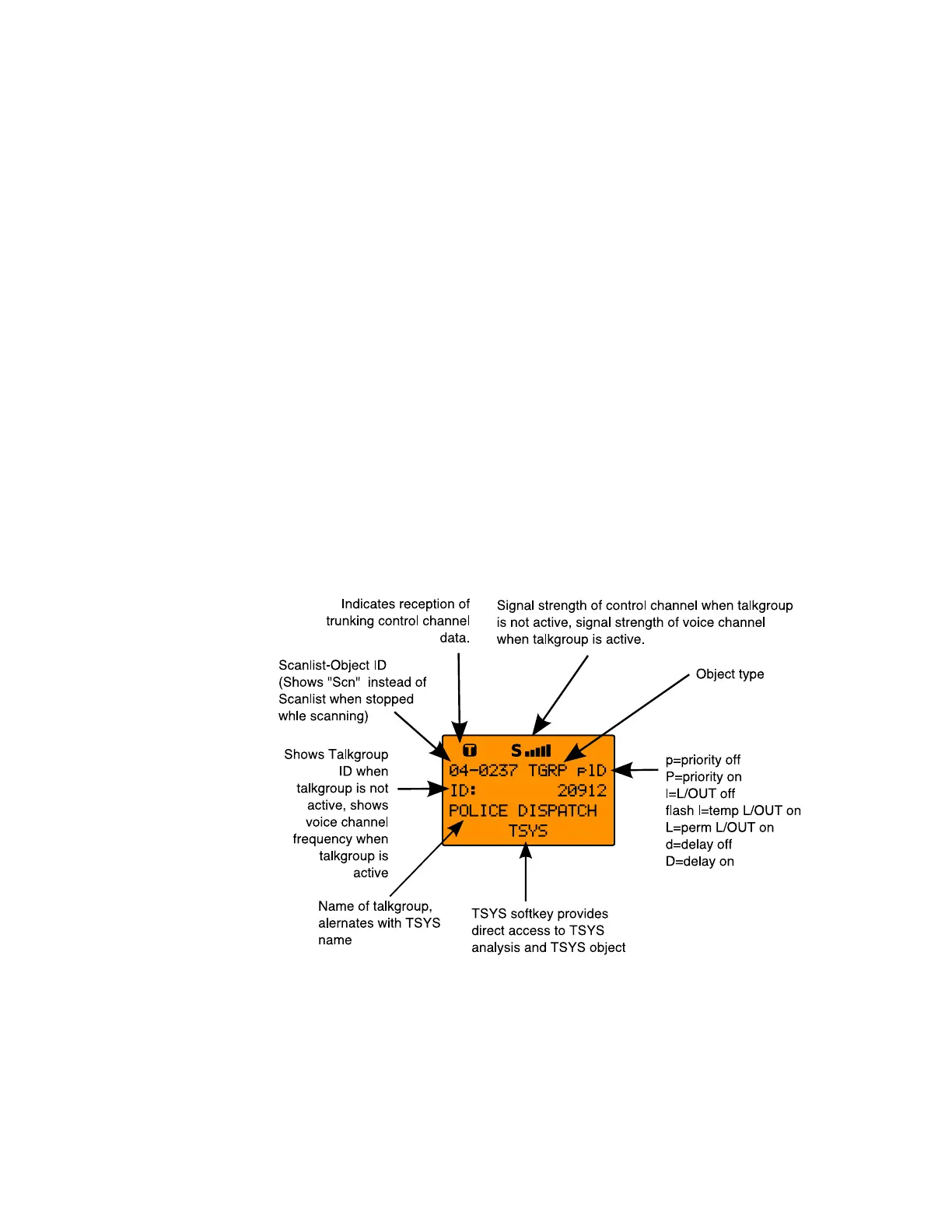
When the scanner is stopped on a TGRP while scanning, or
paused in Manual Mode, the display will appear as follows:
When the scanner is stopped on a conventional channel while
scanning, or while paused in Manual Mode, the display will
appear as follows:
0716 User Manual Page 44



 To Next Page