910FS Splicer
Greenlee / A Textron Company 4455 Boeing Dr. • Rockford, IL 61109-2988 USA • 815-397-7070
19
Upgrading Software
The 910FS software can be upgraded using the online software upgrade tool
at www.greenlee.com.
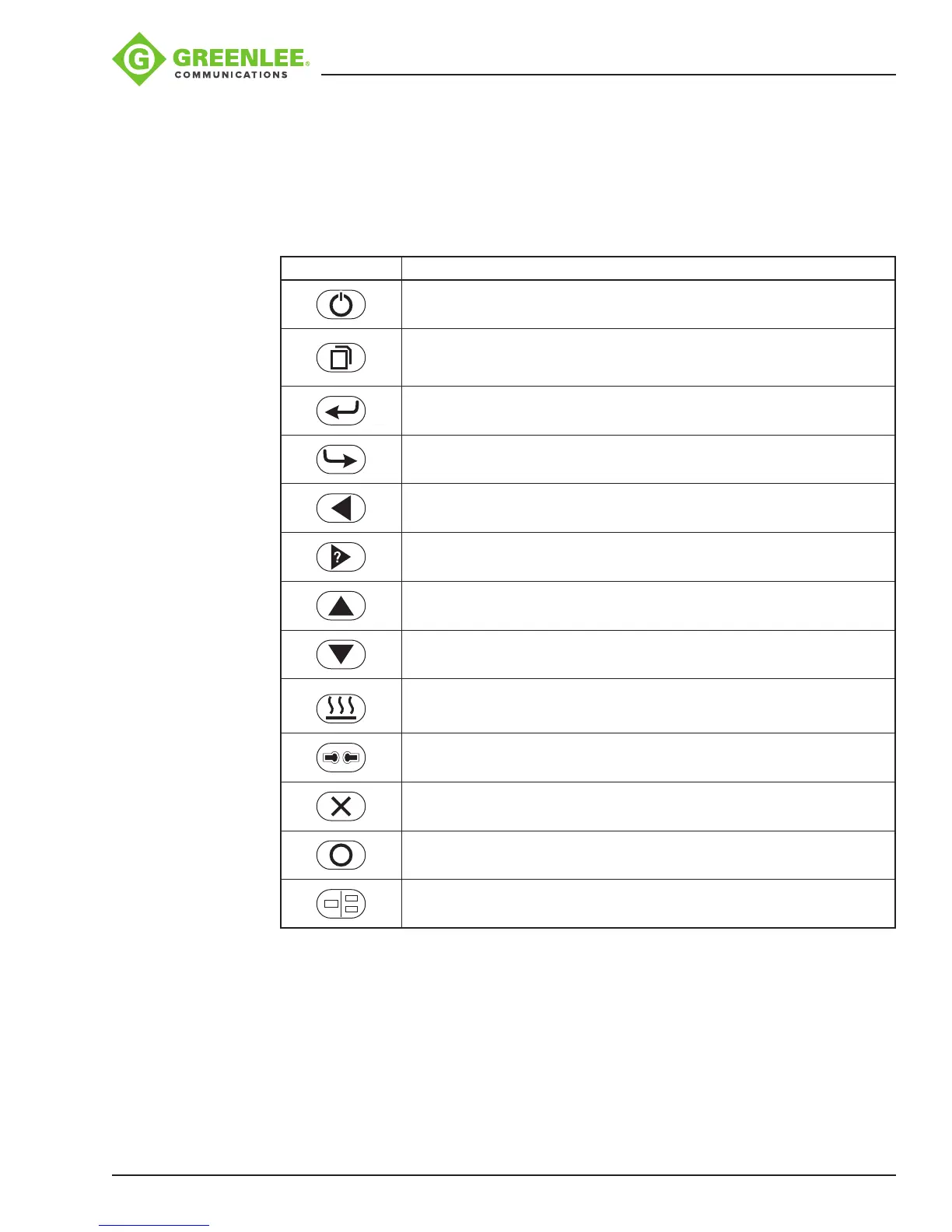
Button Functions
Button Description
Turns the splicer ON/OFF
Menu key
Enter key
Return/Exit key
Left key
Right key/Help key
Up key/Bright key for LCD
Down key/Dark key for LCD
Start/Stop heating protection
Re-calibrates arc power
Resets the motor position
Starts splicing work
Switches between X, Y and X/Y views
Appendixes
Refer to the following appendixes at the end of this manual for additional operating
information:
• Appendix A—910FS Fusion Splicer Cleaning
• Appendix B—Practice Splicing
• Appendix C—Greenlee Splice-on Connectors


 To Next Page