910FS Splicer
Greenlee / A Textron Company 4455 Boeing Dr. • Rockford, IL 61109-2988 USA • 815-397-7070
22
Splice Mode Menu (S–Mode)
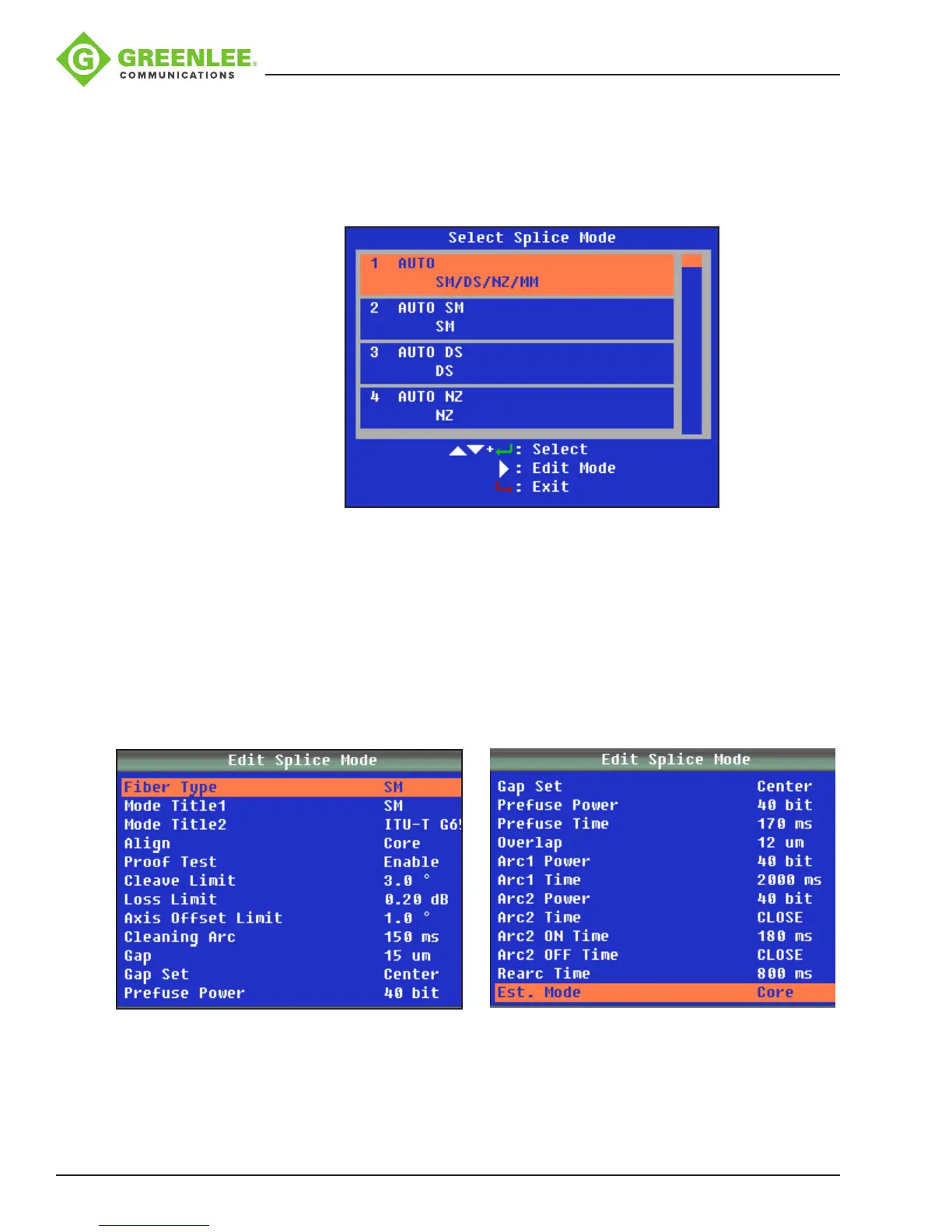
(1) Select Splice Mode
Select “S–Mode” to access the available splicing modes. Use p and q to highlight the
desired splicing mode. Then press
8
to conrm.
Select an appropriate splice mode for the type of ber to be spliced, and press porq
to select the splice mode. Then press
8
to conrm.
Note: “1 AUTO SM/NZ/DS/MM” mode is recommended for splicing in most cases. In
this mode, the splicer automatically adjusts splice parameters according to the ber
type.
(2) Edit Splice Mode
Splicing parameters in each splice mode can be modied.
In “Select Splice Mode” menu, press u to enter “Edit Splice Mode” and modify the
splice mode as shown below.
Press porq to select the parameter to be modied, and then press
8
to enter the
parameter setting.
Press porq to modify the parameter, and then press
8
to conrm.


 To Next Page