910FS Splicer
Greenlee / A Textron Company 4455 Boeing Dr. • Rockford, IL 61109-2988 USA • 815-397-7070
26
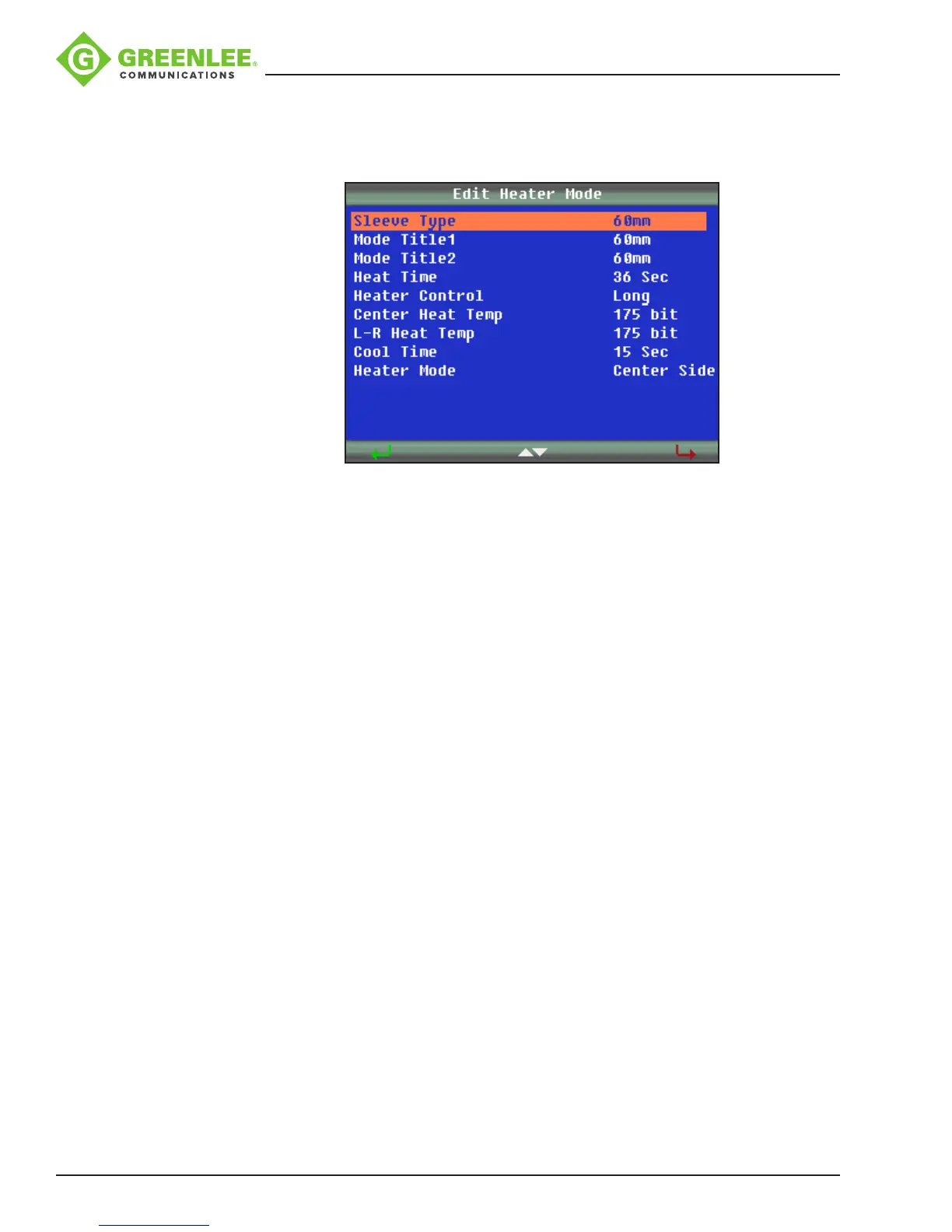
In “Select Heater Mode”, press u to enter the “Edit Heater Mode” menu as shown
below.
Press porq to select the parameter to be modied, and then press
8
to enter the
parameter setting.
Press porq to modify the parameter, and then press
8
to conrm.
Edit Mode for Heater Settings
• Sleeve Type: Enter the protection sleeve name.
• Mode Title1: Enter the heater mode setting name.
• Mode Title2: Enter the alternate heater mode setting name.
• Heat Time: Enter the heater duration.
• Heater Control: Enter the splice protector size as Long, Mid or Micro.
• Center Heat Temp: Enter the center of the oven temperature.
• L-R Heat Temp: Enter the left- and right-hand sides oven temperature.
• Cool Time: Disable it when not needed. Also, to disable the beep. (The “beep” is
activated when the “cool time” has been set as “x” seconds; there is no “beep”
when the cool time has been set to zero seconds.)
• Heater Mode: Enter the mode as center and sides activated or center only
activated.


 To Next Page