910FS Splicer
Greenlee / A Textron Company 4455 Boeing Dr. • Rockford, IL 61109-2988 USA • 815-397-7070
37
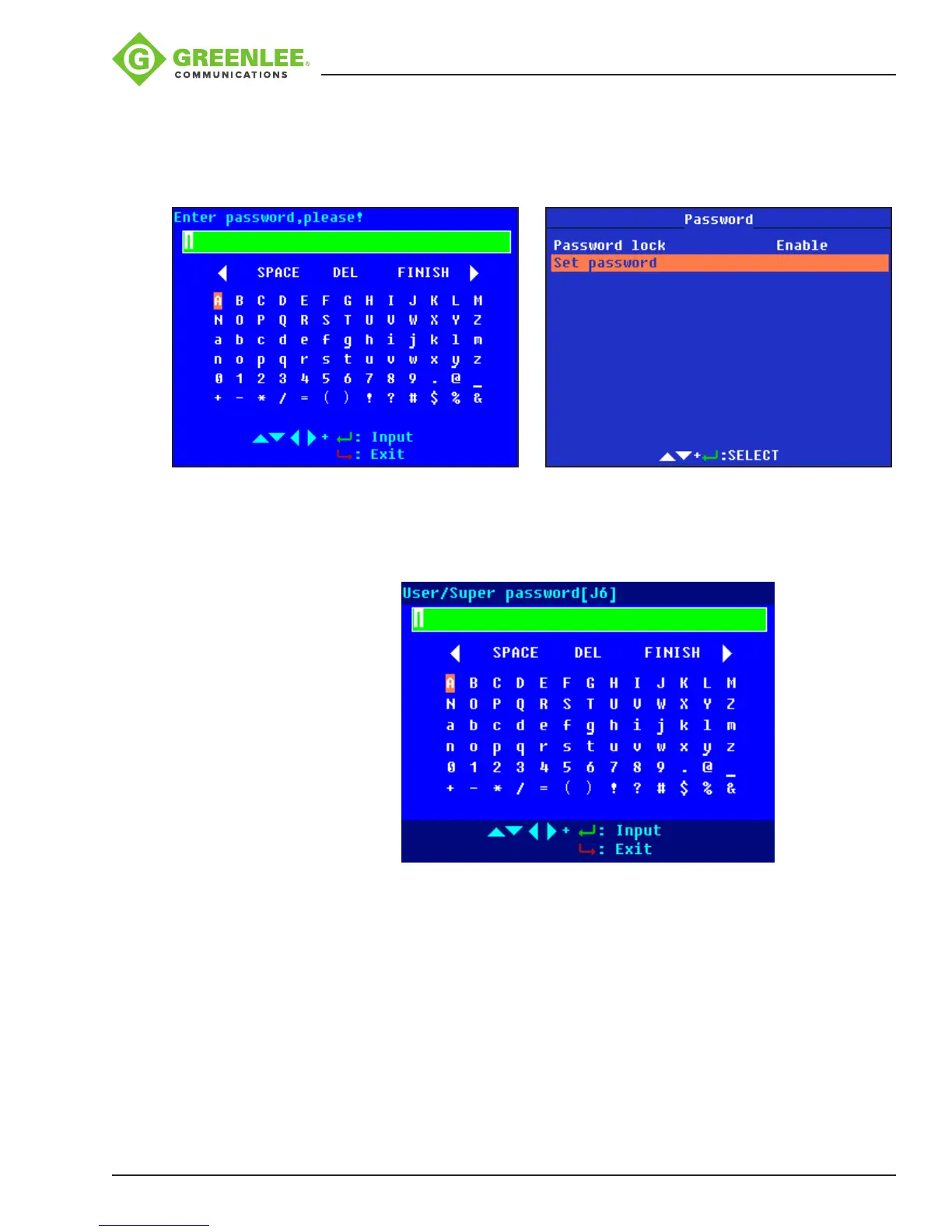
When the password function is enabled, select “Set Password” and press
8
to set the
password. Use pqt u to select characters, add spaces, delete characters, or conrm.
(The password max. length is 8, and it can be uppercase letters, lowercase letters,
numbers, or symbols ). Finish setting by selecting “FINISH”.
When the splicer is restarted, the password interface is displayed. Customer can use the
password to unlock.
To cancel the password function, select “Set password”, and then select “FINISH”
(inputnothing for password).
For service:
In the password interface, there is “Super password,” and the “[XX]” following is the
coordinate of “super-password.xlsx.” By using the super password, the user or service
staff can unlock the splicer to renew the password. The super password is obtained
from Greenlee customer service. For each restart, the [XX] is changed, so the user
cannot use the last super password again and needs to contact customer service.


 To Next Page