-24-
Model G7947/G7948 (Mfd. Since 01/21)
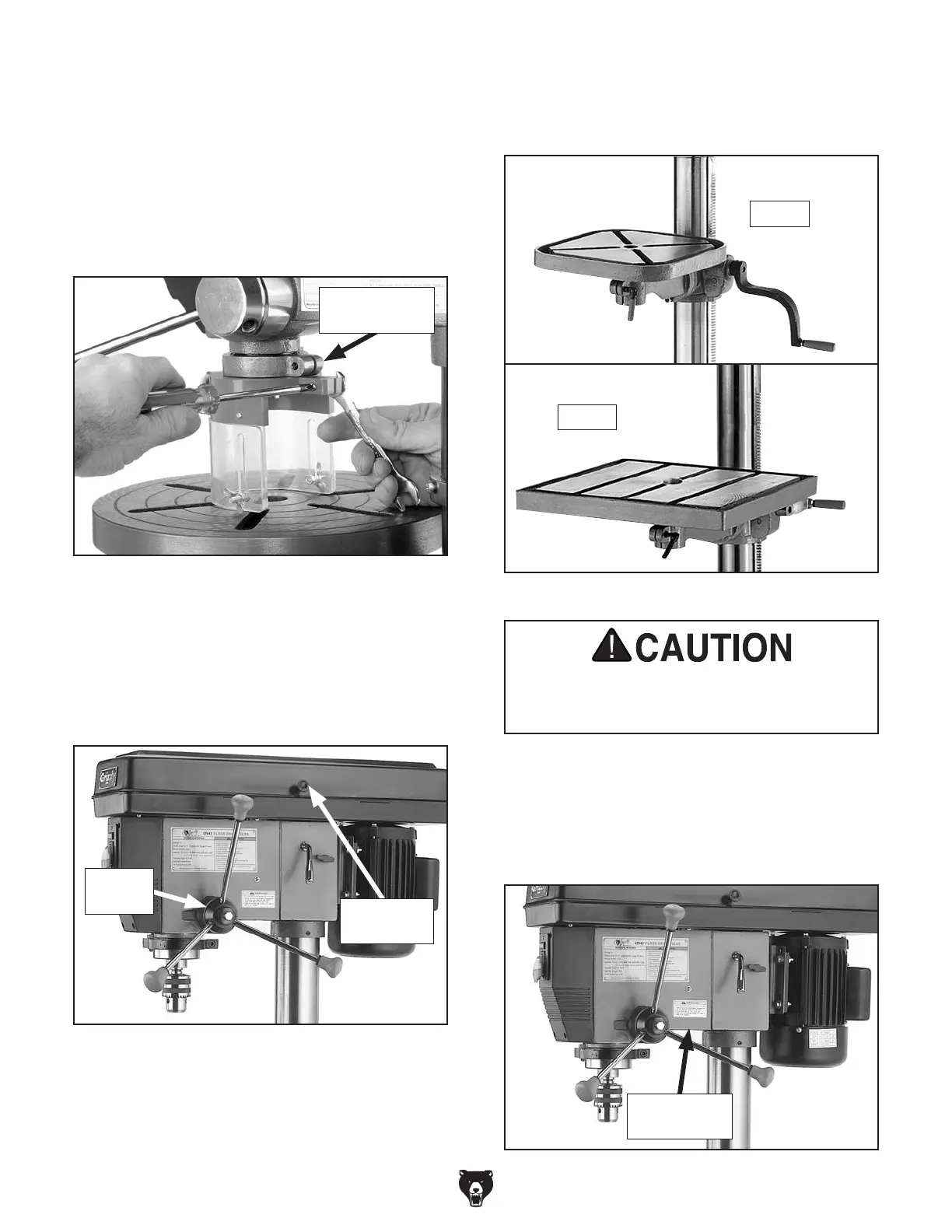
20. To install chuck guard, place chuck guard
over flange of depth gauge mount, as shown
in Figure 23, then tighten Phillips head screw
and hex nut to secure it.
Note: To prevent the guard from slipping off,
move the table up to support it. Or, have an
assistant hold the guard in place while you
secure it.
Figure 23. Installing chuck guard assembly.
Depth Gauge
Mount
21. Thread handles into spindle hub, as shown in
Figure 24, and tighten.
22.
Remove screw that fastens belt cover in
place and replace with belt cover knob (see
Figure 24 for location).
24.
Tighten small locking lever to secure table
in table support assembly. The table should
now be installed as shown in Figure 25.
Figure 25. Tables installed.
25.
Remove dust plug from light socket (120V
operation only).
26.
Install a 60W or smaller light bulb in location
shown in Figure 26 (120V operation only).
Using light bulbs at 240V will cause bulbs
to explode. The light socket is not wired or
intended to be wired for 240V operation.
Figure 24. Downfeed handles and belt cover
knob installed.
Belt Cover
Knob
Spindle
Hub
Figure 26. Light bulb access location.
Light Bulb
Access Here
23. Insert table shaft into table support assembly.
G7947
G7948


 To Next Page