EasyManua.ls Logo

Grizzly G7945 - User Manual

Grizzly G7945
52 pages
Print Icon
To Next Page IconTo Next Page
Loading...
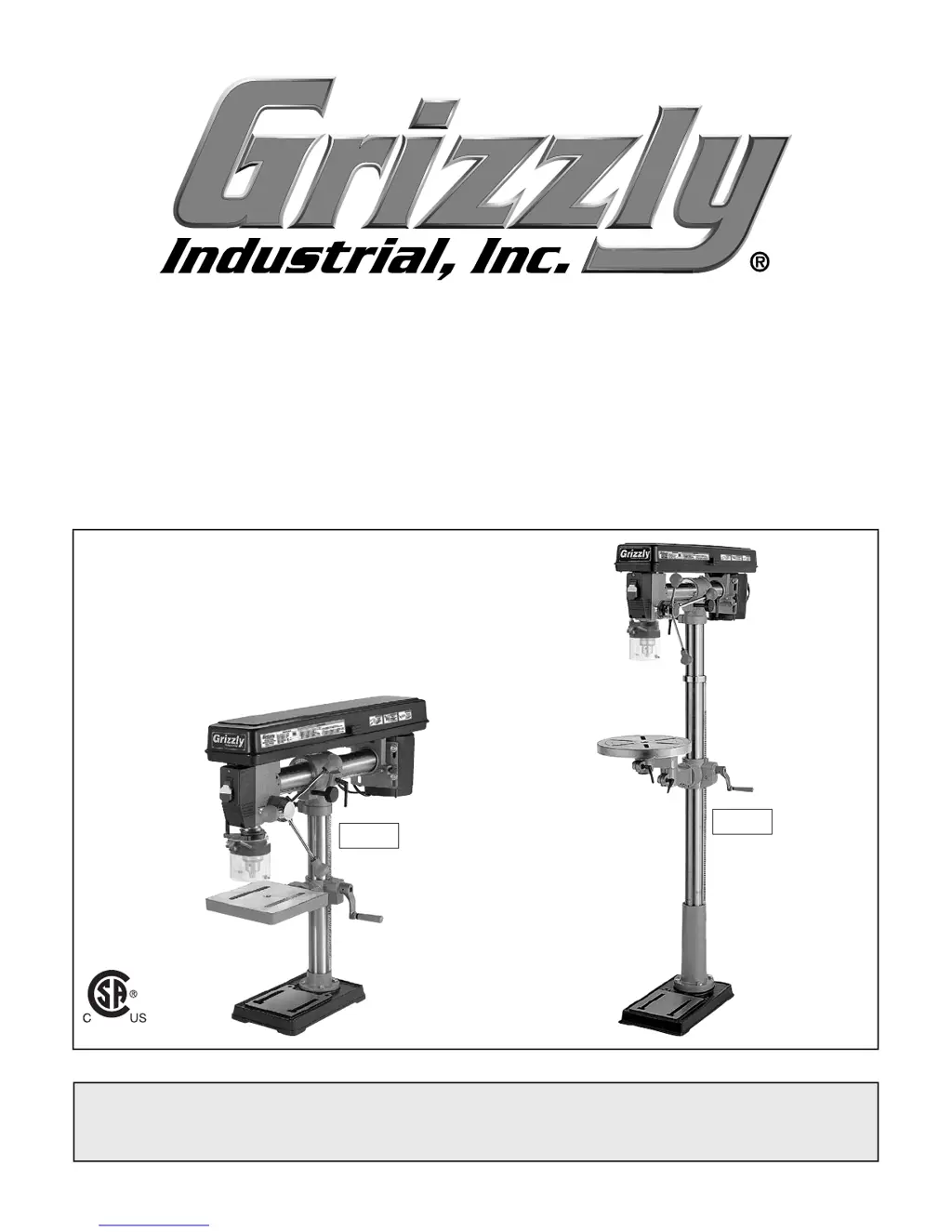
MODEL G7945 G7946
RADIAL DRILL PRESS
OWNER'S MANUAL
(For models manufactured since 09/17)
COPYRIGHT © JANUARY, 2001 BY GRIZZLY INDUSTRIAL, INC. REVISED MAY, 2018 (ABKB)
WARNING: NO PORTION OF THIS MANUAL MAY BE REPRODUCED IN ANY SHAPE
OR FORM WITHOUT THE WRITTEN APPROVAL OF GRIZZLY INDUSTRIAL, INC.
#DS3698 PRINTED IN CHINA
V2.05.18
184841
G7945
G7946

Other manuals for Grizzly G7945

Questions and Answers

  • R
    Russell LarsenAug 19, 2025
    How to troubleshoot a Grizzly Power Tool that won't start or trips a breaker?
    • S
      saundersjamesAug 19, 2025
      If your Grizzly Power Tool doesn't start or a breaker trips, here's what to check: * Make sure the disabling key is inserted and working. If not, insert or replace it. * Verify you're using the correct power supply voltage and circuit size. * Check for tripped circuit breakers or blown fuses. Ensure the circuit is correctly sized and free of shorts. Reset the breaker or replace the fuse. * Inspect the motor wiring connections. Correct them if they're incorrect. * Look for broken, disconnected, or corroded wires and fix them. * Test and replace the start capacitor if it's faulty. * Adjust or replace the centrifugal switch if it’s faulty (if available). * Test, repair, or replace the motor if it’s faulty.
  • D
    Debra LucasAug 21, 2025
    What to do if my Grizzly Power Tool stalls or lacks power?
    • S
      Steve FreemanAug 21, 2025
      If your Grizzly Power Tool is stalling or seems underpowered, consider the following: * Ensure you're using the correct cutter or bit for the job. * Reduce the feed rate or cutting speed. * Check the belts to ensure they are free of oil, properly tensioned, and not slipping. Replace if necessary, and ensure pulleys are aligned. * If the machine is undersized for the task, use a different machine. * Clean the motor, let it cool down, and reduce the workload if the motor is overheated. * Tighten any loose pulleys and replace broken or missing parts. * Adjust or replace the centrifugal switch if it’s faulty (if available). * Test, repair, or replace the motor if it’s faulty.
  • R
    Robert WilliamsAug 26, 2025
    Why does my Grizzly Power Tool leave a bad surface finish?
    • M
      Michael KimAug 26, 2025
      If you're experiencing a bad surface finish with your Grizzly Power Tool, consider these points: * Adjust the spindle speed to be appropriate for the workpiece material. * Sharpen the cutting tool or select a tool that is better suited for the operation. * Check to ensure the cutting tool is rotating in the proper direction. * Make sure the workpiece is properly clamped on the table or in a vise. * Fully retract the spindle and lower the headstock to increase rigidity if the spindle is extended too far down during operation.
  • S
    Sarah DavisAug 27, 2025
    What causes a Grizzly Power Tool to vibrate or chatter?
    • A
      Autumn HoganAug 27, 2025
      If your Grizzly Power Tool's workpiece or tool vibrates or chatters during operation: * Tighten the table lock levers. * Ensure the workpiece is properly clamped on the table or in a vise. * Adjust the spindle speed correctly or use a slower feed rate. * Fully retract the spindle and lower the headstock to increase rigidity and decrease vibration if the spindle or quill is extended too far down.
  • B
    bennettandrewAug 29, 2025
    What to do if my Grizzly Power Tool spindle overheats?
    • J
      Jaime SanchezAug 30, 2025
      If the spindle of your Grizzly Power Tool overheats, allow the drill to cool down, especially if it has been operated at high speeds for an extended period.
  • D
    denise42Sep 1, 2025
    Why is my Grizzly Power Tool losing power in the spindle?
    • W
      Wesley KnightSep 1, 2025
      If your Grizzly Power Tool is experiencing a tool that's loose or a lack of power in the spindle, check the following: * Remove and reinstall the tool to ensure it is correctly installed in the spindle taper. * Clean any debris from the tool or spindle taper mating surfaces. * Lessen the depth of cut and allow chips to clear if you're taking too big of a cut. * Properly tension the V-belts if they are loose. * Ensure you are using the correct voltage.
  • B
    Brittany ChapmanSep 3, 2025
    How to fix a Grizzly Power Tool headstock that's hard to raise?
    • P
      Paula DoyleSep 3, 2025
      If the headstock on your Grizzly Power Tool is hard to raise, check these: * Loosen or replace the headstock lock nuts if they are at fault. * Fix or replace any broken or loose parts of the rack and pinion. Clean and lubricate the rack and pinion if it's jammed with grime or debris.
  • S
    Sherry VelezSep 5, 2025
    What causes the spindle on my Grizzly Power Tool not to return to the highest position?
    • J
      Julie CarrSep 5, 2025
      If the spindle on your Grizzly Power Tool does not return to the highest position, it might be due to: * Poorly adjusted return spring: Increase the return spring tension. * Worn return spring: Replace the return spring.
  • P
    Patricia AllenSep 7, 2025
    What to do if the depth stop on my Grizzly Power Tool is inaccurate?
    • T
      Taylor HallSep 7, 2025
      If the depth stop on your Grizzly Power Tool is producing inaccurate results, calibrate the depth stop.
  • E
    Ebony ReyesSep 9, 2025
    Why does my Grizzly G7945 not start or trip the breaker?
    • V
      Vickie JohnsonSep 10, 2025
      If your Grizzly Drill machine doesn't start or the breaker trips, several factors could be at play. First, check the power plug and receptacle to ensure they are making good contact and are wired correctly. A faulty start capacitor could also be the culprit, requiring replacement. Ensure the motor connection is correctly wired. Verify that all hot lines and grounds are operational and have the correct voltage. Other potential issues include a faulty safety switch key or ON/OFF switch, both of which may need replacement. Inspect the cable and wiring for breaks or high resistance, repairing or replacing as necessary. Finally, the motor itself might be at fault, requiring testing, repair, or replacement.

Summary

Introduction

Contact Information

Provides contact details for Grizzly Technical Support and Documentation Manager.

Manual Accuracy

Explains the commitment to accuracy and where to find updates or report discrepancies.

Machine Description

Details the functional and operational similarities and differences between G7945 and G7946 models.

Identification of Controls and Features

Right-Side Controls

Identifies and labels controls located on the right side of the drill press.

Left-Side Controls

Identifies and labels controls located on the left side of the drill press.

Controls and Components

Section 1: Safety

Safety Instructions for Machinery

Provides essential safety guidelines, warnings, and symbol explanations for operating machinery.

Additional Safety for Drill Presses

Section 2: Power Supply

Availability and Requirements

Details power supply circuit requirements and availability considerations for machine installation.

Full-Load Current Rating

Explains amperage draw and its relation to circuit sizing and potential overloading.

120 V Circuit Requirements

Specifies the voltage, cycle, phase, and amperage needed for the 120V power supply circuit.

Section 3: Setup

Needed for Setup

Lists items required but not included for the assembly and setup of the machine.

Unpacking Instructions

Guides on how to unpack the machine, inspect for damage, and retain packaging materials.

Inventory

Cleanup Procedures

Site Considerations

Weight Load

Advises on ensuring the installation surface can support the machine and workpiece weight.

Space Allocation

Recommends providing adequate space around the machine for operation and maintenance.

Physical Environment

Outlines optimal environmental conditions (temperature, humidity) for safe operation and longevity.

Electrical Installation

Guides on placing the machine near a power source and protecting cords from hazards.

Lighting Considerations

Emphasizes the need for adequate lighting to ensure safe operation and visibility.

Mounting to Workbench (G7945)

Anchoring to Floor (G7946)

Mounting to Mobile Base (G7946)

Assembly Procedures

Joining Drill Chuck and Arbor

Test Run Procedure

Section 4: Operations

Operation Overview

Provides a basic understanding of how the machine is used during operation for novice operators.

Choosing Speeds

Drill Bit Speed Chart

Presents a chart with recommended RPMs for various drill bits and materials.

Changing Speeds

Drilling Operation

Installing and Removing Drill Bits

Adjusting Depth Stop

Setting Depth Stop

Instructions on how to set the depth stop for repeatable drilling depths.

Setting Spindle Return Distance

Guides on setting the return height nut for spindle return distance.

Adjusting Table

Adjusting Table Height

Details on how to adjust the table's height using the lock lever and crank.

Adjusting Table Tilt

Adjusting Table Rotation

Steps for rotating the table on models that support this adjustment.

Adjusting Distance from Column

Procedure for adjusting the table's distance from the machine's column.

Adjusting Headstock

Tilting the Headstock

Guides on how to tilt the headstock to various angles using the lock lever.

Returning Head to Vertical Position

Procedure for returning the headstock to its upright 90° position.

Adjusting Headstock Forward;Backward

Instructions for moving the headstock forward or backward using the adjustment knob.

Section 5: Accessories

Drill Press Vise

Description and benefits of the G5753 Drill Press Vise.

Keyless Drill Chuck

Details on the industrial-grade G8581 keyless drill chuck for quick bit changes.

Sanding Drum Set

Information about the G2500 20-piece sanding drum set for various applications.

Basic Eye Protection

Lists various safety glasses and face shields recommended for eye protection.

Section 6: Maintenance

General Maintenance

Provides a schedule for ongoing and monthly checks to ensure proper operation and safety.

Cleaning and Protecting

Guides on cleaning the machine and protecting unpainted cast-iron surfaces from rust.

Lubrication Guidelines

Information on which parts require lubrication and which do not.

V-Belts Inspection

Instructions for regularly inspecting V-belts for tension and wear.

Section 7: Service and Troubleshooting

Troubleshooting Guide

Lists common symptoms, possible causes, and solutions for motor, electrical, and operational issues.

Calibrating Depth Stop

Tensioning Spindle Return Spring

Section 8: Wiring

Wiring Safety Instructions

Provides critical safety warnings and guidelines for working with the machine's electrical system.

Section 9: Parts Identification

G7945;G7946 Main Parts

Diagram and list of main component parts for both G7945 and G7946 models.

G7945 Column Parts

G7946 Column Parts

Labels and Cosmetics

Warranty and Returns

Grizzly G7945 Specifications

General IconGeneral
BrandGrizzly
ModelG7945
CategoryDrill
LanguageEnglish

Related product manuals