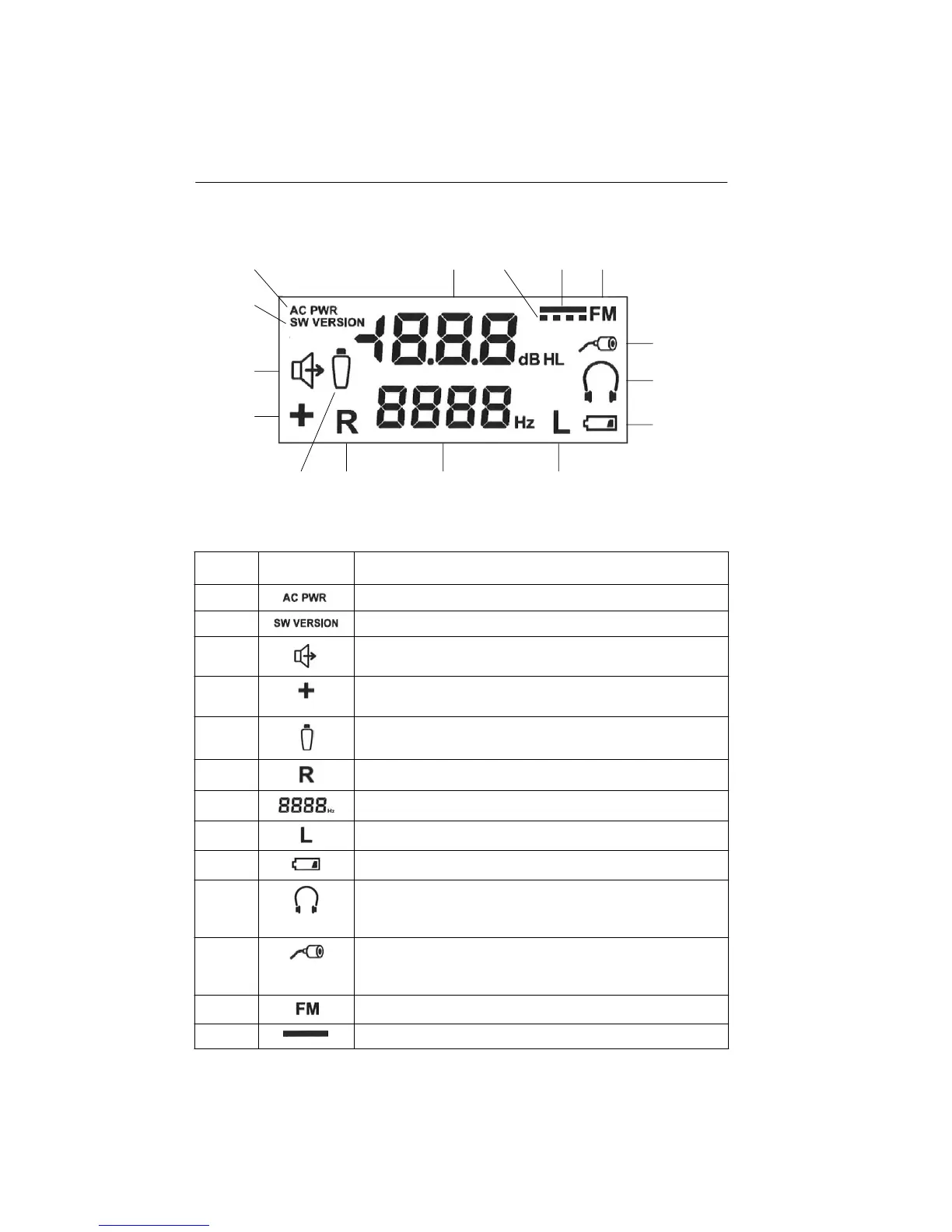
Figure 4 - LCD Display
Icons/LEDs Description
Indicates power is on.
Indicates the current software version.
When displayed, the stimulus is being presented.
When displayed, an additional 10dB is available at the test
frequency.
When displayed, indicates the Patient Response button is being
pressed.
Stimulus is being presented to the right ear.
Stimulus frequency indicator.
Stimulus is being presented to the left ear.
Indicates the battery is low.
The headphone calibration file is applied to the stimulus and
Headphones should be used. Press this button twice to activate
the calibration file.
The insert phone calibration file is applied to the stimulus and
Insert phones should be used as the transducer
.
Press
this button twice to activate the calibration file.
The stimulus is a Frequency Modulated (FM) tone.
The stimulus is a continuous tone.
1718-0100 Rev. E
LCD display
1
2
3
4
15 14 13 12
11
10
9
1
2
3
4
5
6
7
8
9
10
11
12
13



 To Next Page