Chapter 4: Control Panels
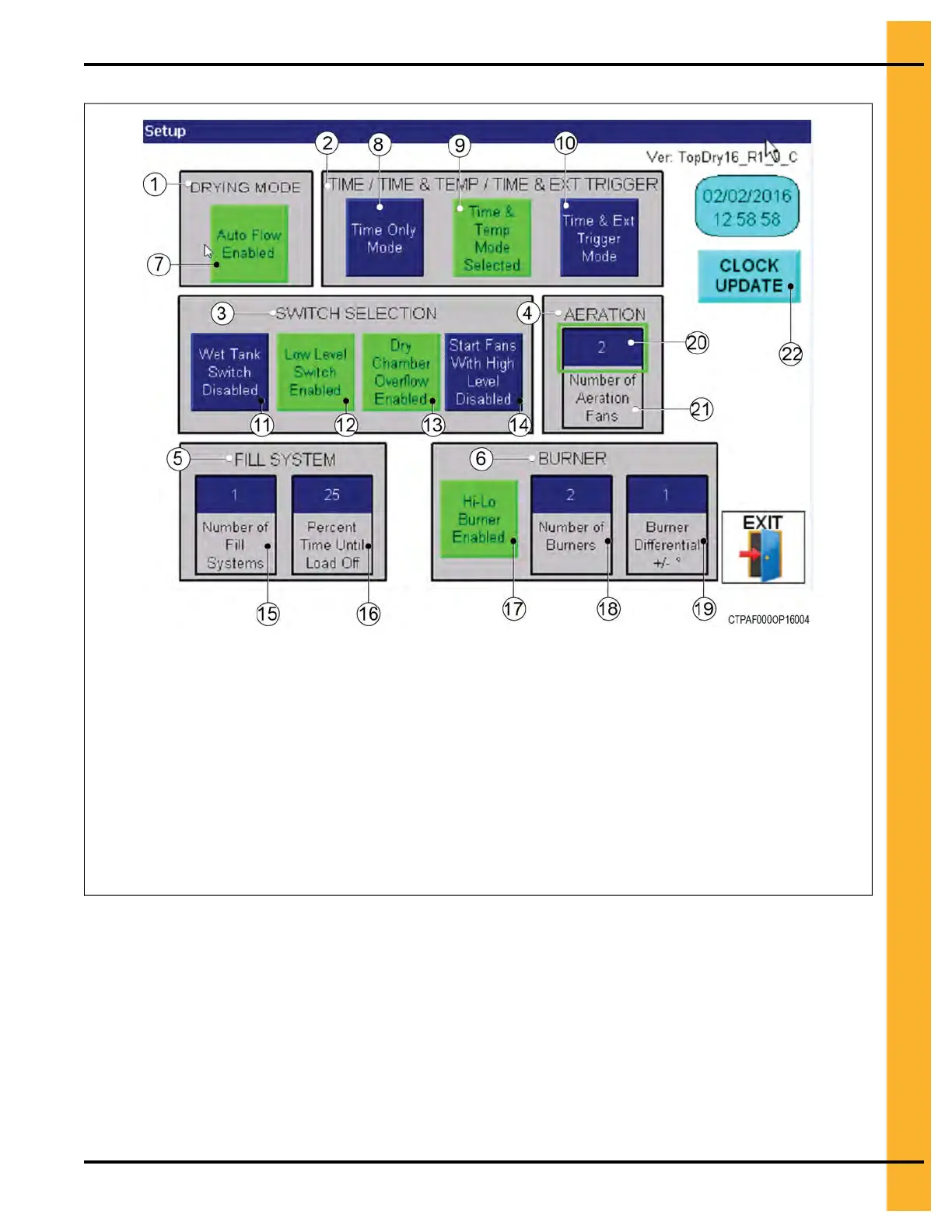
Figure 4-4 The setup menu
Item — Name
1 — Drying mode
2 — Discharge mode
3 — Switch selection
4 — Aeration
5 — Fill system
6 — Burner
7 — Auto flow enabled
8 — Time only mode
9 — Time and temperature mode
10 — Time and external trigger mode
11 — Wet tank switch
Item — Name
12 — Low level switch
13 — Drying chamber overflow
14 — Start fans with high level
15 — Number of fill systems
16 — Percentage time until load off
17 — Hi-Lo burner
18 — Number of burners
19 — Burner differential
20 — Selection area
21 — Number of aeration fans
22 — Clock update
To configure the TopDry Terminal to your system:
1. Click the Setup icon from the main menu.
2. Set the following parameters:
NOTE: The current settings are highlighted in green.
Drying Mode — The mode of operation for the dryer. Toggles between the “Auto Flow Enabled” for
autoflow operation and “Auto Batch Enabled” for autobatch operation.
Pneg–4900 TopDry Terminal™ 39


 To Next Page
 Loading...