www.gtec-power.de 24
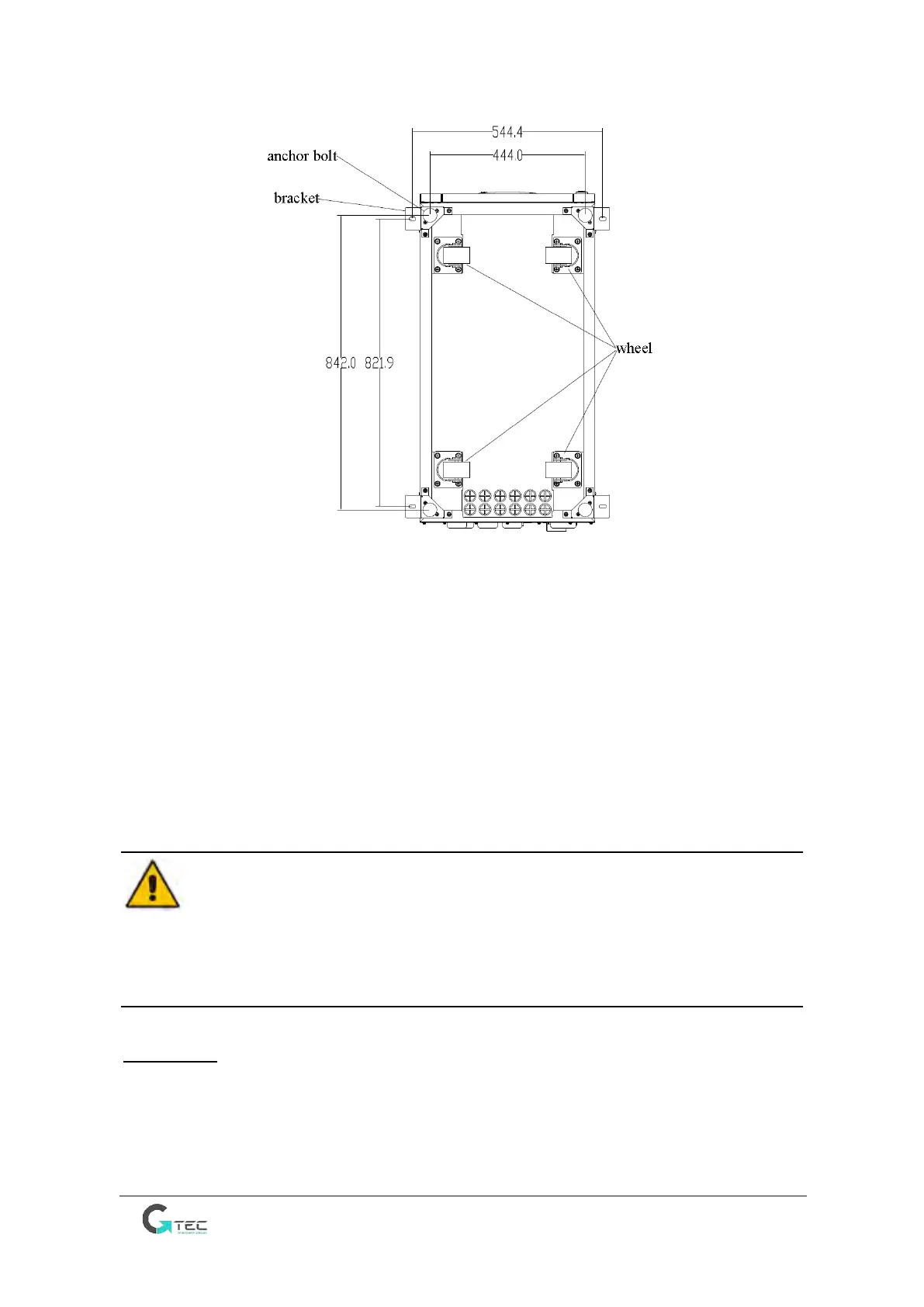
(b) 30kVA and 40kVA (Bottom, unit: mm)
Figure 2-4 Supporting structure (Bottom View)
The steps to position the cabinet are as follows:
1. Ensure the supporting structure is in good condition and the mounting floor is smooth and strong.
2. Retract the anchor bolts by turning them counter clockwise using wrench, the cabinet is then
supported by the four wheels.
3. Adjust the cabinet to the right position by the supporting wheels.
4. Put down the anchor bolts by turning them clockwise using wrench, the cabinet is then supported
by the four anchor bolts.
5. Ensure the four anchor bolts are in the same height and the cabinet is fixed and immovable.
Attention
Auxiliary equipment is needed when the mounting floor is not solid enough to support the cabinet,
which helps distribute the weight over a larger area. For instance, cover the floor with iron plate or
increase the supporting area of the anchor bolts.
2.4 Battery
The UPS can contain internal batteries, but it also have the external battery connection terminals for
more choice.
Three terminals (positive, neutral, negative) are drawn from the battery group and connected to UPS
system. The neutral line is draw from the middle of the batteries in series (See Figure 2-5)



 To Next Page