www.gtec-power.de 28
2.6.4 Connecting Power Cables
The steps of connecting power cables are as follows:
1. Verify that all the external input distribution switches of the UPS are completely open and the
UPS internal maintenance bypass switch and internal battery switch are open, Attach necessary
warning signs to these switches to prevent unauthorized operation.
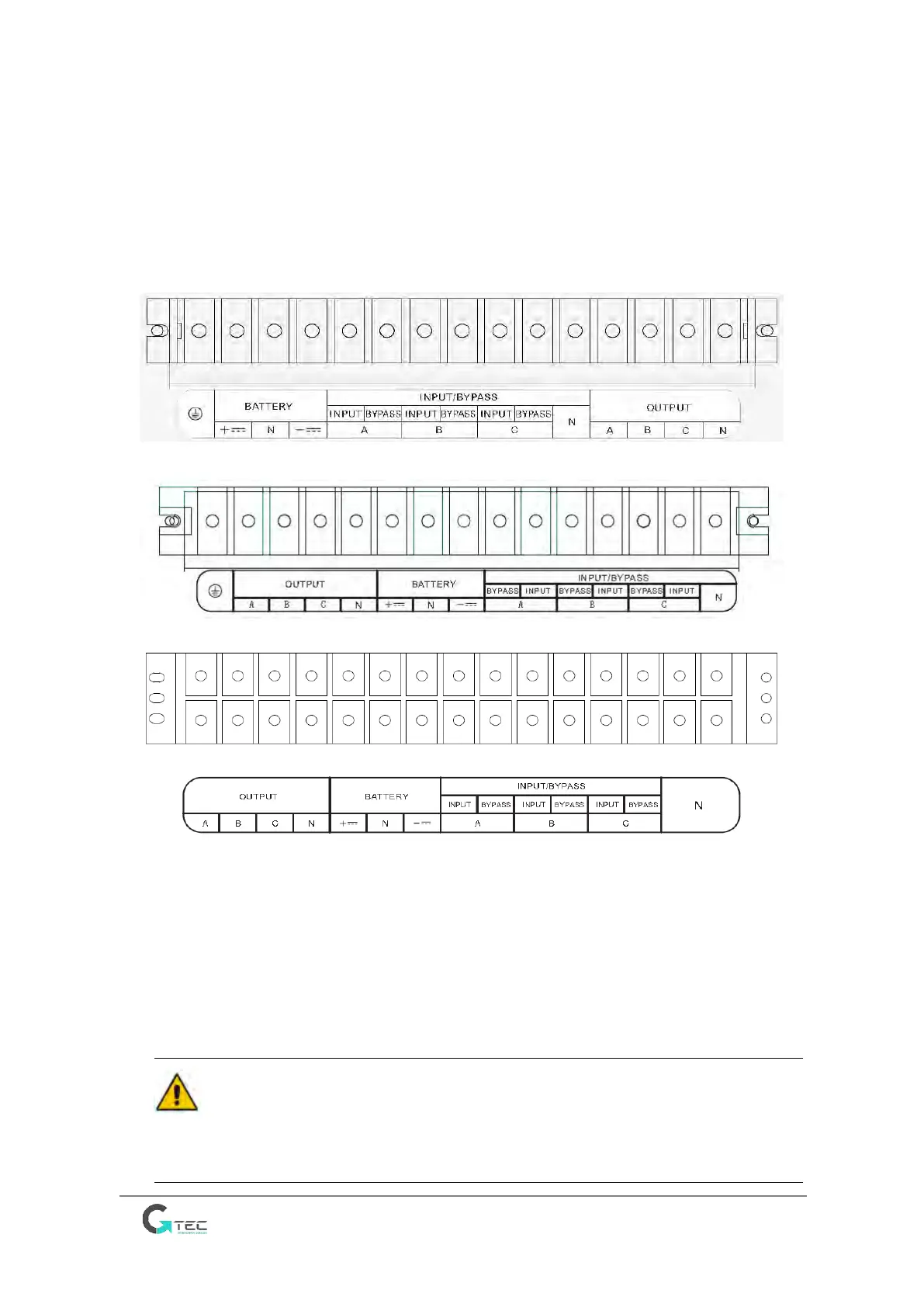
2. The connection terminals are in the rear of UPS, remove the metal protective cover, the
terminals are shown in Figure 2-7
(a) Connection terminals for 10kVA and 15kVA
(b) Connection terminals for 20kVA
(c) Connection terminals for 30kVA and 40kVA
Figure 2-7 Cable connection terminals (phases name A-B-C is equivalent to L1- L2-L3 or R-S-T)
3. Connect the protective earth wire to protective earth terminal (PE).
4. Connect the AC input supply cables to the main input terminal and AC output cables to the
output terminal.
5. Connect external battery cables to the battery terminal.
6. Check to ensure there is no mistake and re-install all the protective covers.
Attention
The operations described in this section must be performed by authorized electricians or qualified
technical personnel. If you have any difficulties, contact the manufacturer or agency.



 To Next Page