English
.26
.27
4.2 Filling the coffee bean container
When this light flashes, the machine needs
to be filled with coffee beans:
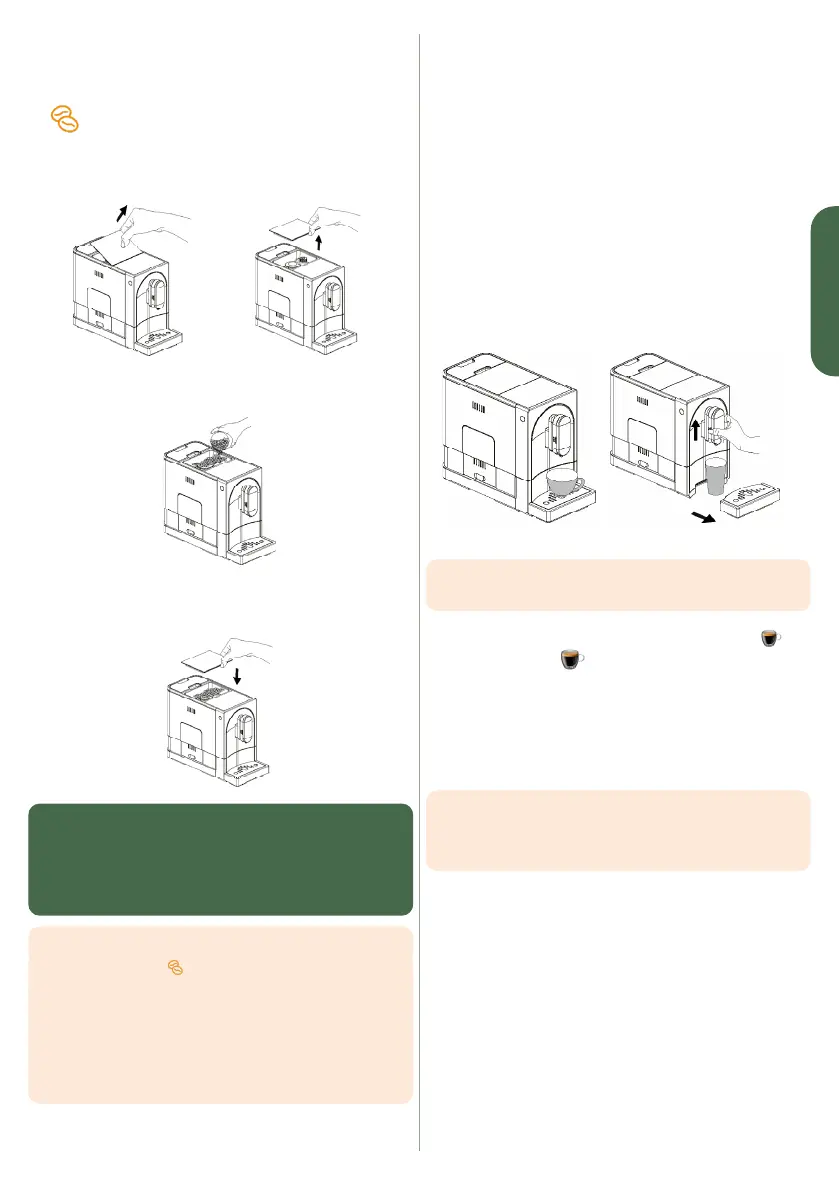
1. Remove the lid from the coffee bean container
2. Gently pour in the coffee beans.
3. Put the lid back on the container. If you are having diffi-
culty closing it properly, it is because there are too many
beans - remove a little.
WARNING: Only fill the coffee bean container with coffee
beans. Ground coffee, instant coffee, freeze-dried or
caramelised coffee beans, or any other object, can damage
the machine. Roasted coffee beans lose their aroma. Only
fill the coffee bean container with the amount of coffee
required for the next 3 to 4 days.
TIPS:
• The light
will automatically switch off
when you will start a new beverage.
• A residual amount of coffee beans will remain in
the grinder: the first two beverages prepared after
the beans have been changed may contain remnants
of the previous coffee beans.
• The coffee bean container can hold a maximum
of about 150 to 180 g of coffee beans.
4.3 Preparing your Espresso or Lungo
1. Turn on the unit by pressing the ON/OFF button.
The machine is now in standby mode. Make sure that the
external drip tray and its stainless steel grate are properly
positioned and that the water tank is full. As soon as the
machine is switched on, it automatically rinses itself using
approximately the same amount of water as a small coffee
cup, except if the machine was stopped since several
minutes.
2. The machine is now ready
3. Place a cup under the spout and adjust the height of the
spout according to the type of cup. Depending on the
height and width of the cup (higher or wider), you can
remove or shift the outer drip tray:
TIPS : The distance between the spout and the cup should be
as little as possible.
4. Select the desired coffee by pressing the Espresso
or Lungo button
5. The selected button lights up, the bean grinder starts and
the backlight on the spout indicates that the machine is
making your coffee.
6. The dispensing of the beverage stops automatically.
Remove your cup and enjoy!
TIPS: Espresso is a stronger coffee. You can change the
factory settings for either beverage (Espresso/Lungo)
by following the instructions in section 4.9 Changing
the beverage settings before and during preparation.


 To Next Page