GB
26 Modus 600RT
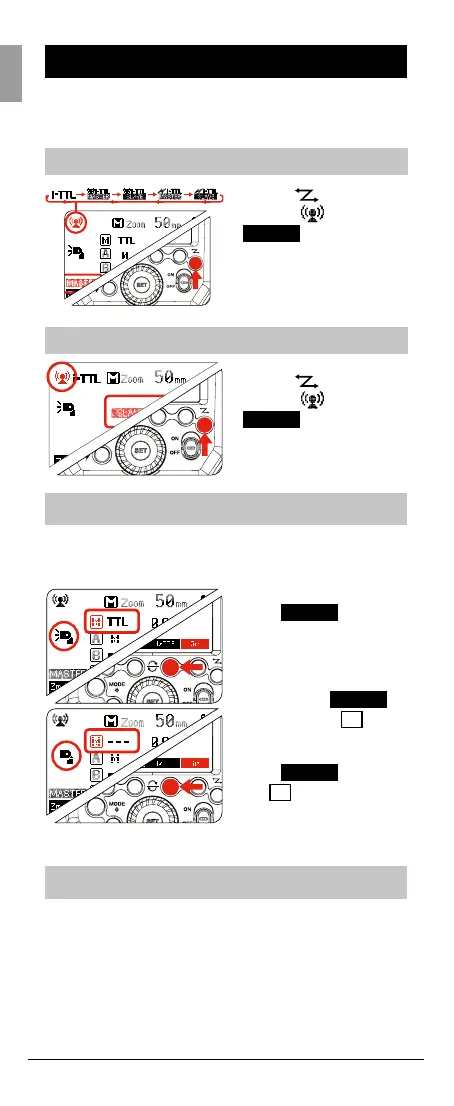
Wireless Settings
You can switch between normal ash and wireless ash.
For normal ash shooting, be sure to set the wireless
setting to OFF
Master Unit Setting
Slave Unit Setting
Master Unit Flash ON/OFF
You can switch ON or OFF the “Master” unit ash that is
controlling the wireless “Slave” units. When Master ash is
ON, it will ash as group M
Setting the group mode - TTL / M / OFF
From the “Master” Modus Speedlight each Group M
(master speedlight) / A / B / C “mode” setting can be
adjusted individually.
Press < > button
so that <
> and <
MASTER
> are displayed
on the LCD panel.
Press <
> button
so that <
> and <
SLAVE
> are displayed
on the LCD panel
1. Press Function Button
4 <
Gr
> and one
Group M/A/B or C will
be highlighted
2. Press Function
Button 4 <
Gr
>
again until <
M
> is
highlighted
3. Press Function Button
3 <
MODE
> until
<
M
> is <--->. The
master speedlight is
now OFF



 To Next Page