GB
28 Modus 600RT
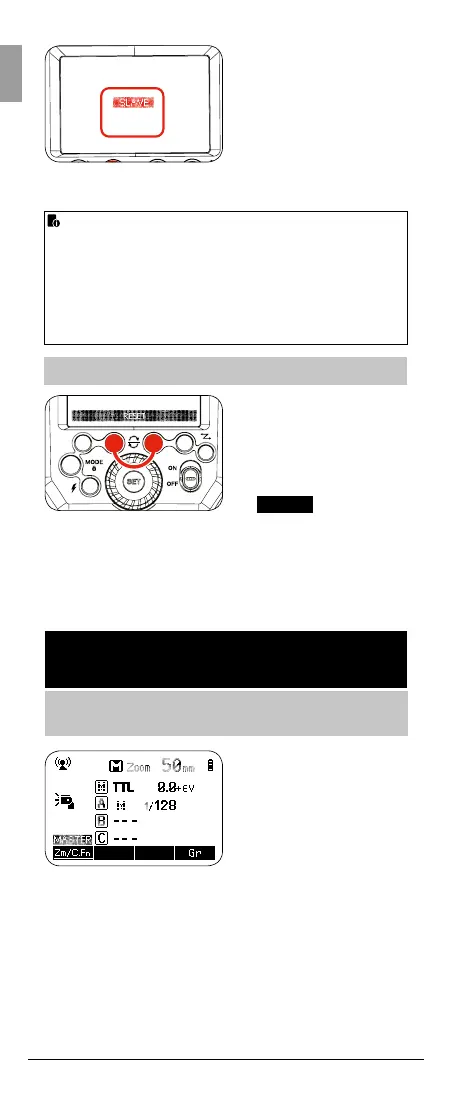
4. A red LCD will show
“Slave OK”. This slave
Modus 600 RT is now
DCM matched
5. DCM match the same
way, any additional slave
Modus 600RT while the
Master is still on
• To reset the Modus
600RT to factory default
settings press function
buttons 3 & 4 at the
same time and hold
until the LCD shows <
RESET
> release the
buttons
• When the Modus
600RT is reset the DCM
is also reset back to
open channel and the
previous DCM is lost
1. Master Unit Setting
• Attach a Modus 600RT
to the camera and set
it as the master unit
(Page 26)
• The Viper TTL
Transmitter can also be
used as a master unit
to control the wireless
slave Modus 600RT
(Page 38)
i-TTL Fully Automatic Wireless
Flash Shooting
Basic Automatic Wireless Flash shooting
with a Single Slave Unit
Once all slave units are DCM matched, reboot all master and
slave’s by turning OFF/ON
• Once all devices are DCM matched they will memorieze
the unique ID even it power is removed. Therfore you only
need to DCM your set once
• If you add more speedlights or Viper TTL units to your
range then you need to carry out the DCM matching for all
your units again
Modus 600 RT - Reset



 To Next Page