EasyManua.ls Logo

Hakko Electronics FM-202 - Specifications; FM-202 Soldering Station Specs; Station Unit Specifications; Soldering Iron Specifications

Hakko Electronics FM-202
26 pages
Print Icon
To Next Page IconTo Next Page
To Previous Page IconTo Previous Page
Loading...
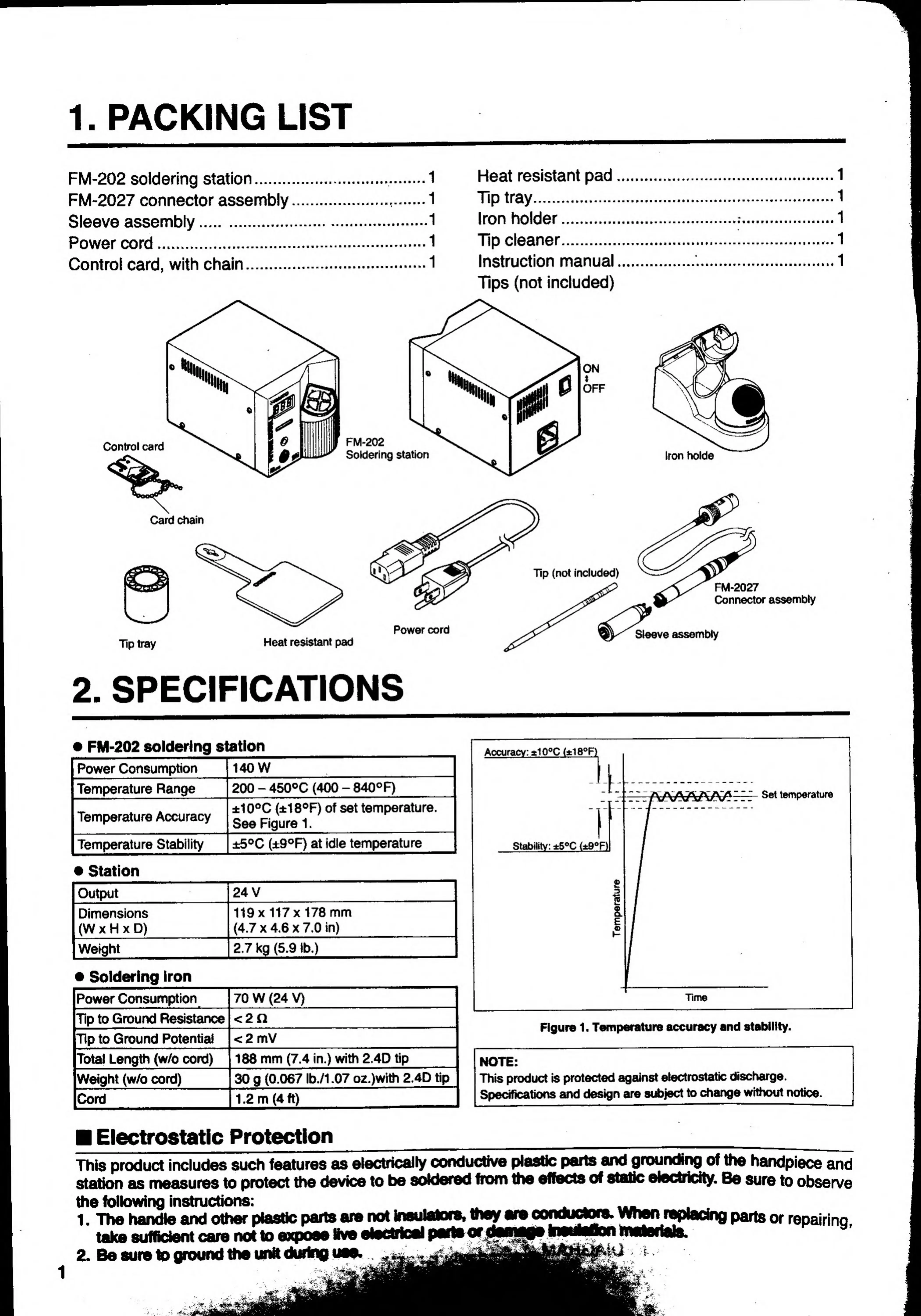
1.
PACKING
LIST
FM-202
soldering
station.
FM-2027
connector
assembly
Sleeve
assembly.
Power
cord.
Control
card,
with
chain
Heat
resistant
pad
Tip
tray.
Iron
holder.
Tip
cleaner.
Instruction
manual
Tips
(not
inciuded)
Control
card
I
^
låj
s
d
OPP
FM-202
Soldering
station
Card
Chain
Tip
(not
inciuded)
Iron
holde
Power
cord
Tip
tray
Heat
resistant
pad
FM-2027
Connector
assembly
Sleeve
assembly
2.
SPECIFICATIONS
»
FM-202
solderlng
station
Power
Consumption
140
V
Temperature
Range
200
-
Accuracv:
±10®C
(±18®R
Temperature
Accuracy
Temperature
Stability
Station
Output
_
Dimensions
(W
X
H
X
D)
_
Weight
_
Soldering
Iron
Power
Consumption
Tip
to
Ground
Resistance
Tip
to
Ground
Potential
Total
Length
(w/o
cord)
Weight
(w/o
cord)
_
Cord
140W
200
-
450^C
(400
-
840°f)
±10°C
(±18®F)
of
set
temperature
See
Rgure
1.
_
±5®C
(±9®F)
at
idle
temperature
Set
temperature
Stability:
±5®C
{±9®Fl
24
V
_
119x117x178
mm
(4.7
X
4.6
X
7.0
in)
2.7
kg
(5.9
Ib.)
70
W
(24
V)
_
<2n
_
<2
mV
_
188
mm
(7.4
in.)
with
2.4D
tip
_
30
g
(0.067
Ib./1.07
oz.)with
2.4D
tip
1.2
m
(4
ft)
_
Time
Figur«
1.
Temperature
accuracy
and
stability.
NOTE:
This
product
is
protected
against
electrostatic
discharge.
Specifications
and
design
are
subject
to
change
without
notice.
Electrostatic
Protection
____
This
product
inciudes
such
features
as
electrically
eondudive
plastic
parts
aiHf
g
rourxlitrg
of
the
handpiece
and
station
as
nneasures
to
protect
the
device
to
be
soWered
from
the
effects
of
stalle
electricity.
Be
sure
to
observe
the
following
instructions:
_.
.
...
1
.
The
handle
and
other
plastic
parts
are
not
Inaulalora,
they
ara
c
onduclWB.
When
tylacing
parts
or
repairino.
take
sufficient
care
nd
10
axpoaa
Ilve
elecWoal
paiew^
2.
Be
sure
to
ground
the
unit
durfng
uaa.
i

Related product manuals