EasyManua.ls Logo

Hakko Electronics FM-202 - Appendixa.22

Hakko Electronics FM-202
26 pages
Print Icon
To Next Page IconTo Next Page
To Previous Page IconTo Previous Page
Loading...
14.
APPENDIXA
How
to
enter
the
tip
identification
number
into
the
FM-202:
1.
Insert
the
card
to
uniock
the
system.
2.
Press
the
@
button
and
hold
for
more
than
one
second.
The
station
will
go
into
Tip
ID
input
mode.
The
tens
place
digit
begins
to
flash.
Refer
to
the
tip
identification
number
marked
on
the
bar
code
sticker.
NOTE;
When
the
O
button
is
pressed
for
less
than
one
second,
the
stored
Tip
ID
settings
are
displayed.
3.
Entering
a
value
in
the
tens
place
digit
Using
the
A
or
button,
enter
a
value
in
the
tens
place
digit.
When
the
entered
value
is
displayed,
press
the
button.
The
units
digit
begins
to
flash.
4.
Entering
a
number
in
the
units
digit
Perform
the
same
steps
used
to
enter
the
value
in
the
tens
place
digit.
After
entering
a
number
in
the
units
digit,
press
the
e
button.
The
display
shows
lS*f
I
will
be
flashing.
Now
the
tip
identification
number
has
been
stored.
The
temperature
will
be
controlled
using
this
tip
identification
num¬
ber.
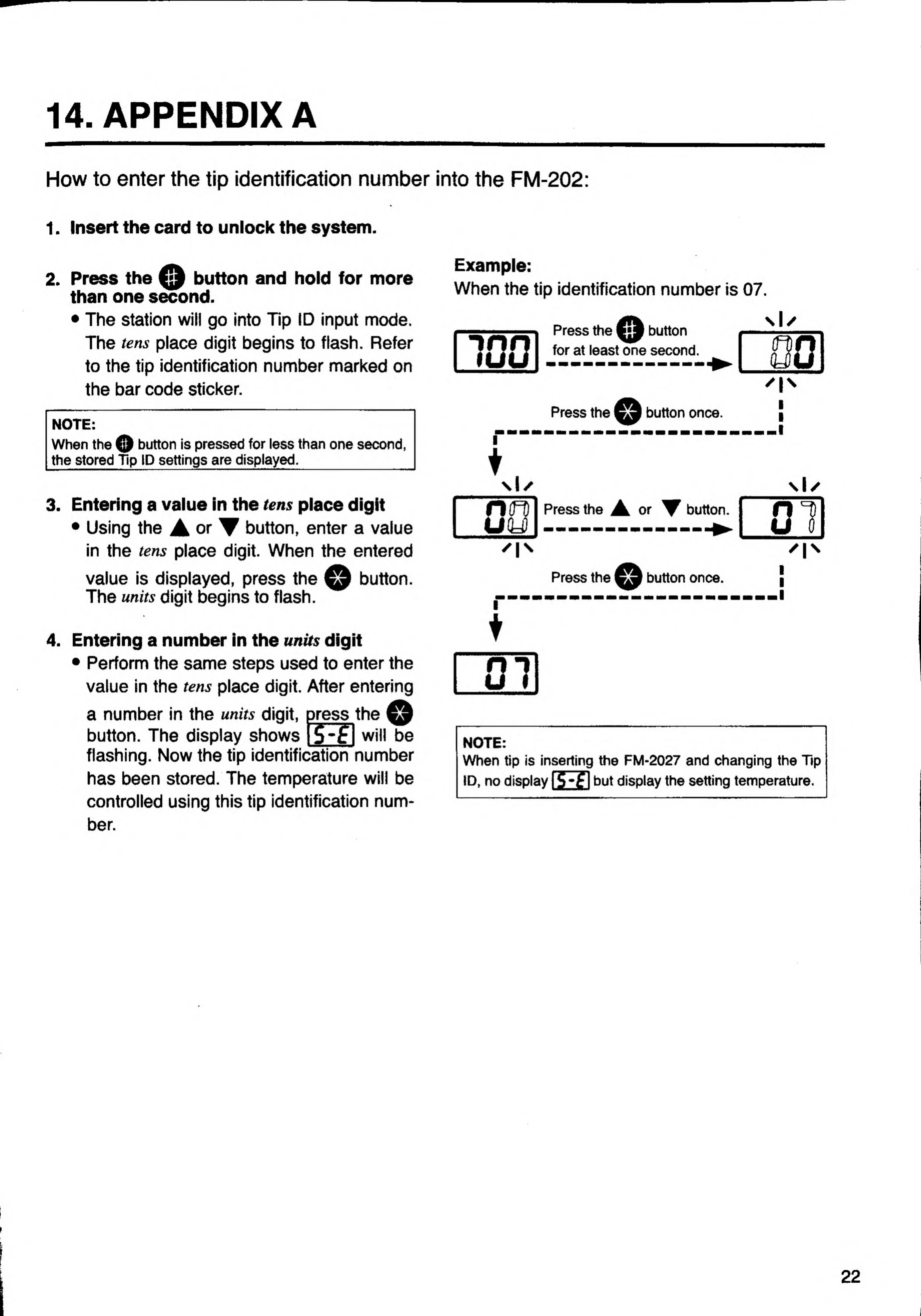
Example:
When
the
tip
identification
number
is
07.
"inn
lUU
Press
the
o
button
for
at
least
one
second.
Press
the
button
once.
Press
the
or
button.
Press
the
button
once.
NOTE:
When
tip
is
inserting
the
FM-2027
and
changing
the
Tip
ID,
no
display
IS*f
I
but
display
the
setting
temperature.
22

Related product manuals