EasyManua.ls Logo

Hakko Electronics FM-202 - Tip Identification and Entry; Entering Tip ID Data

Hakko Electronics FM-202
26 pages
Print Icon
To Next Page IconTo Next Page
To Previous Page IconTo Previous Page
Loading...
7.
TIP
IDENTIFICATION
NUMBER
Entering
the
Tip
ID
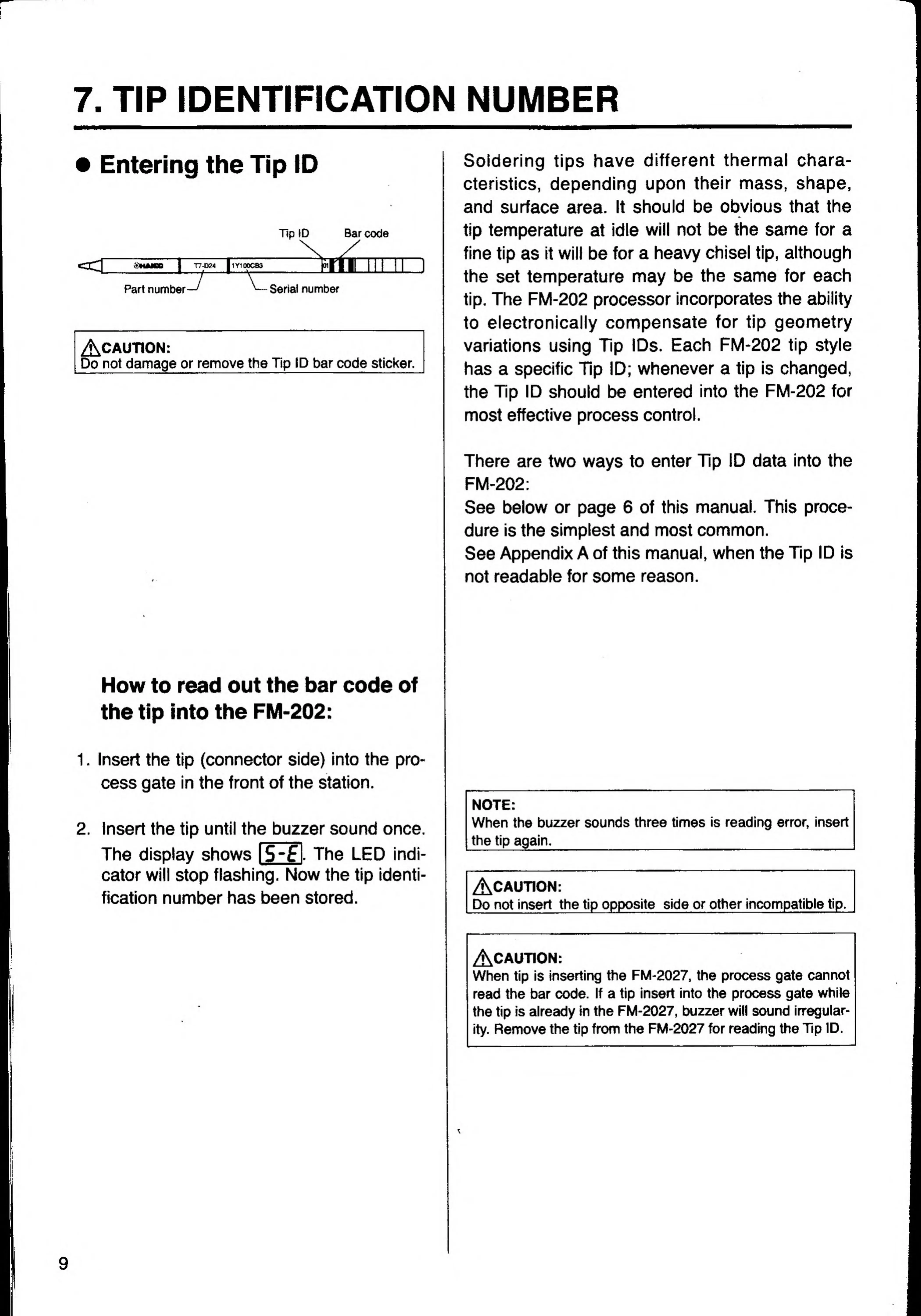
Tip
ID
Bar
code
I
T7-D24
I1Y100CB3
ail
Part
number
Serial
number
AcaUTION:
Do
not
damage
or
remove
the
Tip
ID
bar
code
sticker.
Soldering
tips
have
different
thermal
chara-
cteristics,
depending
upon
their
mass,
shape,
and
surface
area.
It
should
be
obvious
that
the
tip
temperature
at
idle
will
not
be
the
same
for
a
fine
tip
as
it
will
be
for
a
heavy
chisel
tip,
although
the
set
temperature
may
be
the
same
for
each
tip.
The
FM-202
processor
incorporates
the
ability
to
electronically
compensate
for
tip
geometry
variations
using
Tip
IDs.
Each
FM-202
tip
style
has
a
specific
Tip
ID;
whenever
a
tip
is
changed,
the
Tip
ID
should
be
entered
into
the
FM-202
for
most
effective
process
control.
There
are
two
ways
to
enter
Tip
ID
data
into
the
FM-202:
See
below
or
page
6
of
this
manual.
This
proce¬
dure
is
the
simplest
and
most
common.
See
Appendix
A
of
this
manual,
when
the
Tip
ID
is
not
readable
for
some
reason.
How
to
read
out
the
bar
code
of
the
tip
into
the
FM-202:
1.
Insert
the
tip
(connector
side)
into
the
pro¬
cess
gate
in
the
front
of
the
station.
2.
Insert
the
tip
until
the
buzzer
sound
once.
The
display
shows
l5-f
I
The
LED
indi-
cator
will
stop
flashing.
Now
the
tip
identi-
fication
number
has
been
stored.
NOTE:
When
the
buzzer
sounds
three
times
is
reading
error,
insert
the
tip
again.
_
_
/jV^CAUTION:
Do
not
insert
the
tip
opposite
side
or
other
incompatible
tip.
ACAUTION:
When
tip
is
inserting
the
FM-2027,
the
process
gate
cannot
read
the
bar
code.
If
a
tip
insert
into
the
process
gate
while
the
tip
is
already
in
the
FM-2027,
buzzer
will
sound
irregular-
ity.
Remove
the
tip
from
the
FM-2027
for
reading
the
Tip
ID.

Related product manuals