EasyManua.ls Logo

Hakko Electronics FM-202 - Page 9

Hakko Electronics FM-202
26 pages
Print Icon
To Next Page IconTo Next Page
To Previous Page IconTo Previous Page
Loading...
button
down
for
at
least
one
When
the
station
is
ON
and
the
controi
card
is
in
the
station,
the
data
entry
procedure
is:
a.
Hold
the
second.
The
current
temperature
setting
will
be
dis¬
played,
then
the
hundreds
digit
will
begin
to
flash.
This
indicates
that
the
station
has
en-
tered
the
temperature
setting
mode.
Follow
steps
1-4
on
the
preceeding
page.
NOTE:
When
the
Q
button
is
pressed
for
less
than
one
second,
the
current
temperature
setting
is
displayed.
Replacing
the
tip
ACAUTION:
The
tip
may
be
hot.
Avoid
holding
the
hot
tip
for
a
long
time
even
if
using
the
heat-resistant
pad.
Otherwise
burns
may
result.
Removing
the
tip:
Holding
down
the
look
release
buttons
in
the
sleeve
assembly,
pull
out
the
tip
to-
gether
with
the
sleeve
assembly
from
the
connector.
^CAUTION:
Be
sure
to
keep
the
lock
release
buttons
held
down
while
pulling
out
the
sleeve
accembly.
Failure
to
do
so
will
damage
the
locking
mechanism.
Be
sure
to
pull
out
the
tip
only
after
separating
the
sleeve
assembly
from
the
connector.
Otherwise,
the
sleeve
assembly
may
fali
down
and
break.
Holding
the
front
end
of
the
sleeve
as¬
sembly,
pull
out
the
tip.
Inserting
the
tip;
Holding
the
front
end
of
the
tip,
insert
it
into
the
sleeve
assembly.
^CAUTION:
Insert
the
tip
into
the
sleeve
assembly
untit
it
clicks
into
place.
When
you
hear
it
diks,
avoid
forcing
the
tip
into
the
sleeve
assembly.
Insert
the
“ID”
end
of
the
tip
into
the
pro-
cess
gate
until
the
buzzer
sounds
so
that
the
tip
ID
can
be
read
out.
Insert
the
tip
securely
into
the
connector.
NOTE:
Improper
insertion
of
the
tip
will
cause
pear
on
the
display.
-t
to
ap-
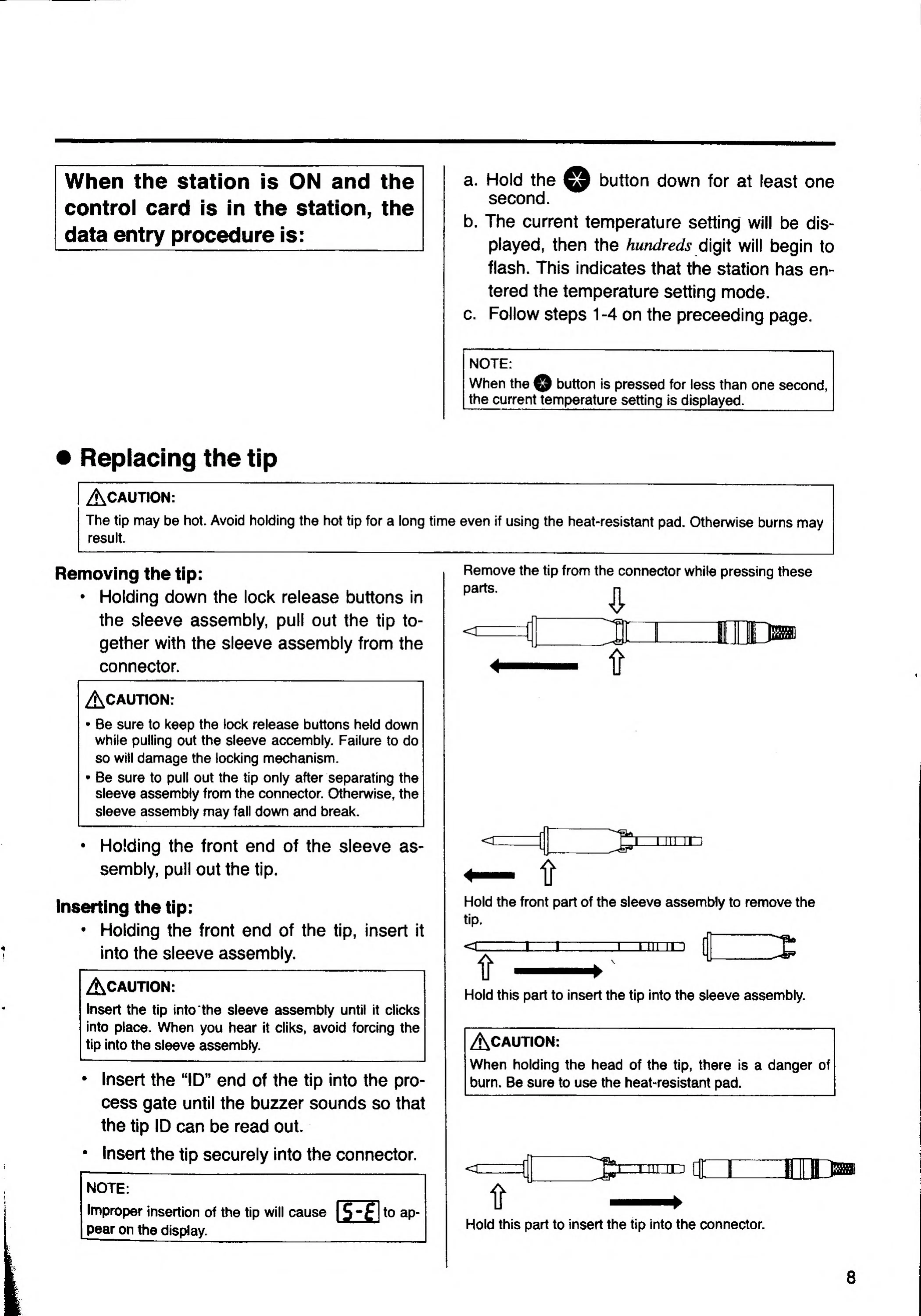
Remove
the
tip
from
the
connector
while
pressing
these
parts.
^
tr
Hold
the
front
part
of
the
sleeve
assembly
to
remove
the
tip.
II
\
Hold
this
part
to
insert
the
tip
into
the
sleeve
assembly.
Hold
this
part
to
insert
the
tip
into
the
connector.

Related product manuals