EasyManua.ls Logo

Hakko Electronics FM-202 - Changing Temperature Settings

Hakko Electronics FM-202
26 pages
Print Icon
To Next Page IconTo Next Page
To Previous Page IconTo Previous Page
Loading...
Control
card
Each
FM-202
comes
with
a
small
card,
which
inserts
into
the
Card
slot
on
the
front
of
the
unit.
This
card
is
used
when
entering
data
for
the
process
Control
funetion
(a
temperature
value
is
to
be
changed,
or
data
are
to
be
entered).
Any
FM-202
card
can
be
used
with
any
FM-202
sol¬
dering
station.
Changing
the
temperature
setti
ng
Example:
700
to
840°F
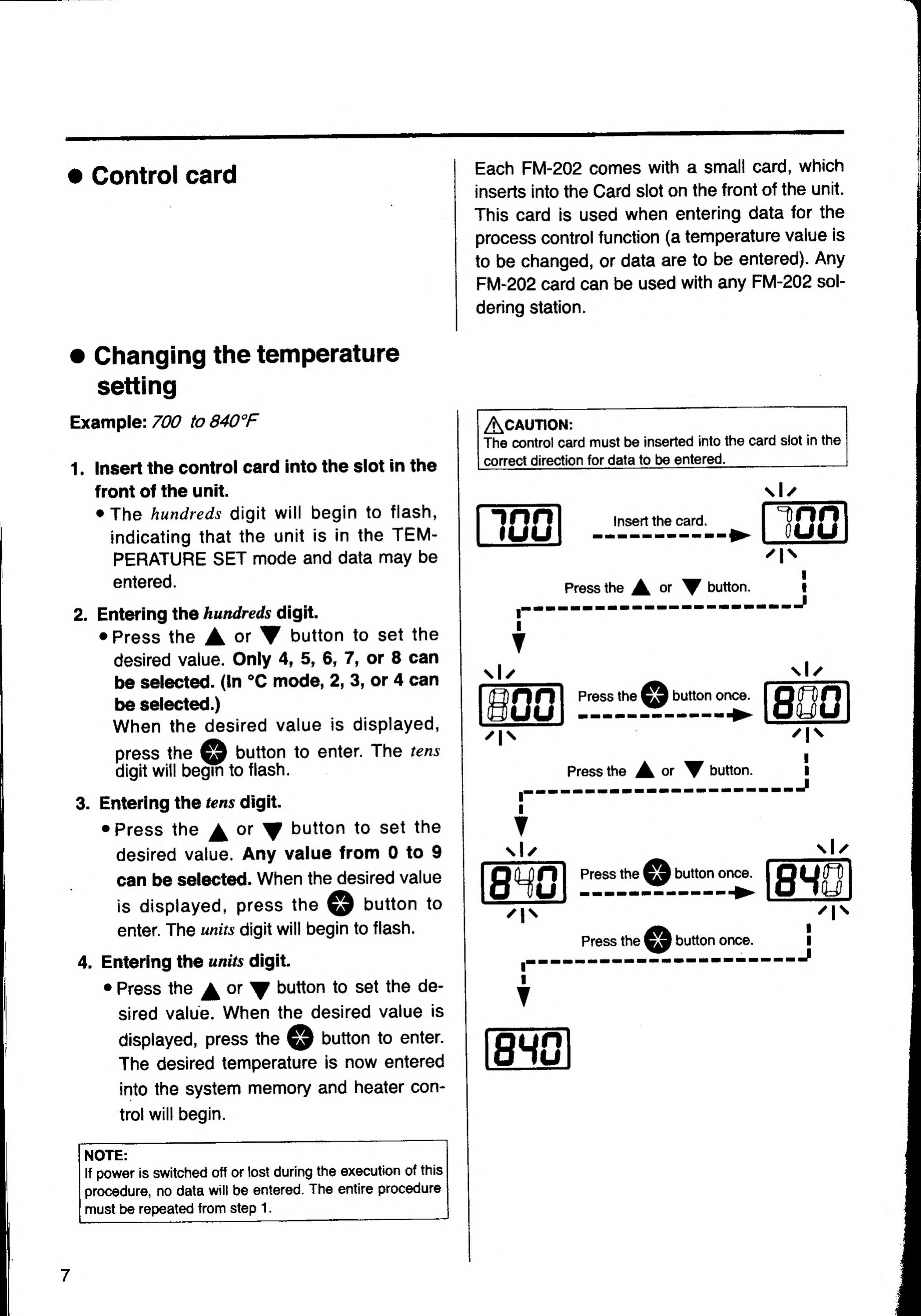
1.
Insert
the
control
card
into
the
slot
in
the
front
of
the
unit.
The
hundreds
digit
will
begin
to
flash,
indicating
that
the
unit
is
in
the
TEM¬
PERATURE
SET
mode
and
data
may
be
entered.
2.
Entering
the
hundreds
digit.
Press
the
A
or
button
to
set
the
desired
value.
Only
4,
5,
6,
7,
or
8
can
be
selected.
(In
<’C
mode,
2,
3,
or
4
can
be
selected.)
When
the
desired
value
is
displayed.
button
to
enter.
The
tens
press
the
_
digit
will
begin
to
flash.
3.
Entering
the
tens
digit.
Press
the
A
or
button
to
set
the
desired
value.
Any
value
from
0
to
9
can
be
selected.
When
th
is
displayed,
press
the
button
to
enter.
The
units
digit
will
begin
to
flash.
4.
Entering
the
units
digit.
Press
the
or
^
button
to
set
the
de¬
sired
value.
When
the
desired
value
is
displayed,
press
the
button
to
enter.
The
desired
temperature
is
now
entered
into
the
system
memory
and
heater
con-
trol
will
begin.
ACAUTION:
The
Control
card
must
be
inserted
into
the
card
slot
in
the
correct
direction
for
data
to
be
entered.
_
\\y
100
Insert
the
card.
Tinn
ouu
^1^
Press
the
or
button
I
T
Press
the
button
once
Press
the
A
or
button
I
T
HO
Press
the
button
once.
'1^
Press
the
button
once,
I
I
I
J
\l/
I
^1^
I
I
.J
>01
^1^
I
I
j
NOTE:
If
power
is
switched
off
or
lost
during
the
execution
of
this
procedure,
no
data
will
be
entered.
The
entire
procedure
must
be
repeated
from
step
1.
7

Related product manuals