7. MAINTENANCE
■ Cleaning the tip using the iron holder
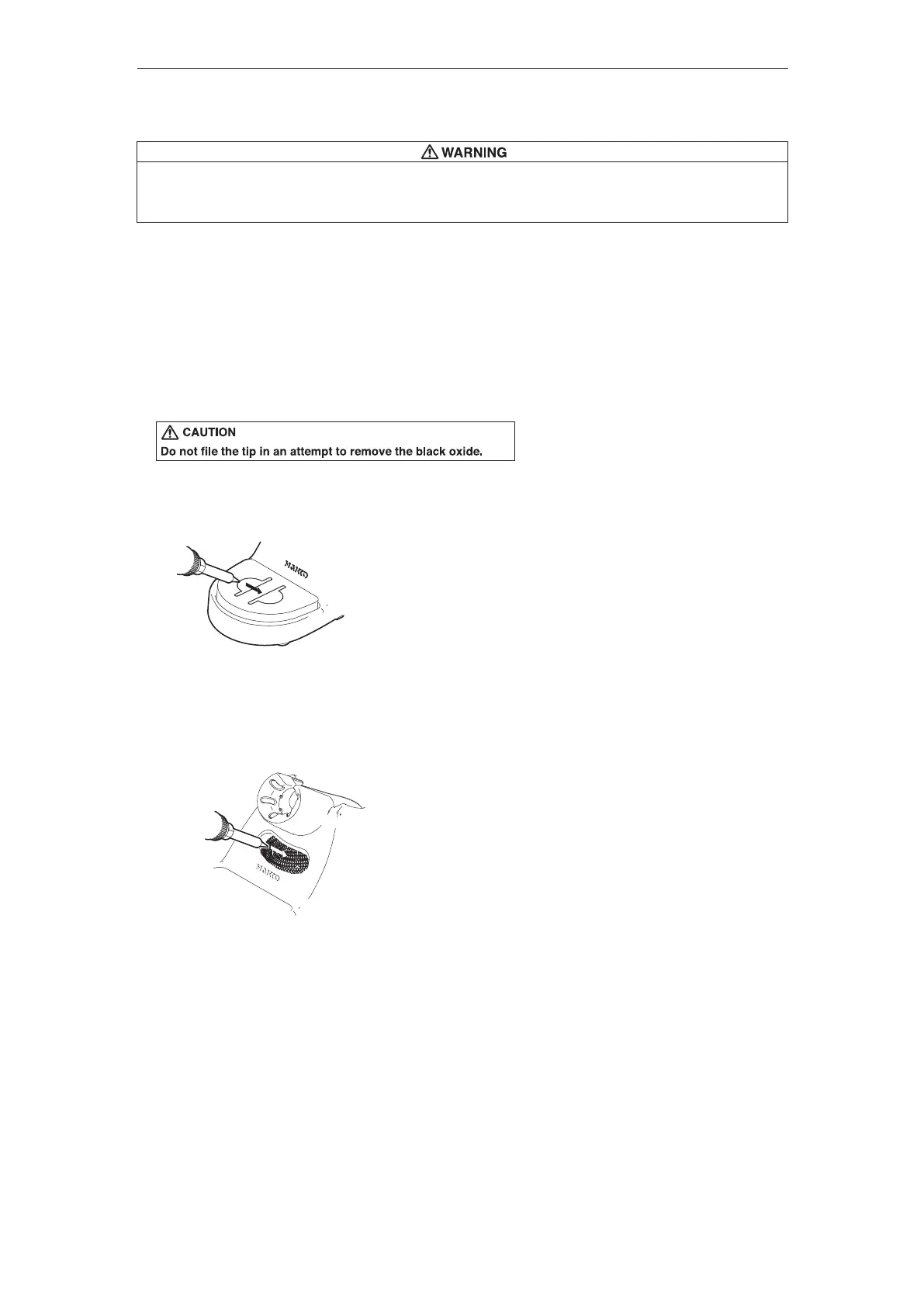
1. Using the cleaning sponge
Use the cleaning sponge that comes with the product
to clean the tip. It offers wide-ranging uses, from simple
removal of excess solder to complete elimination of
matter occurring as a result of oxidization.
2. Using the cleaning wire
Material that is not removed easily with the cleaning
sponge can likely be removed using the cleaning wire.
●Tip Maintenance
1. Set the temperature to 482℉ (250℃).
2. When the temperature stabilizes, clean the tip with the cleaning sponge and check the condition of the tip.
3. If the solder plated part of the tip is covered with black oxide, apply fresh solder containing flux, and clean
the tip again. Repeat until all the oxide is removed, then coat the tip with fresh solder.
4. If the tip is deformed or heavily eroded, replace it with a new one.
Performing proper and periodic maintenance extends product life. Efficient soldering depends upon
the temperature, quality and quantity of the solder and flux.
Apply the following service procedure as dictated by the conditions of usage.
Since the soldering iron can reach a very high temperature, please work carefully. Except the case
especially indicated, always turn the power switch OFF and disconnect the power plug before performing
any maintenance procedure.















 To Next Page