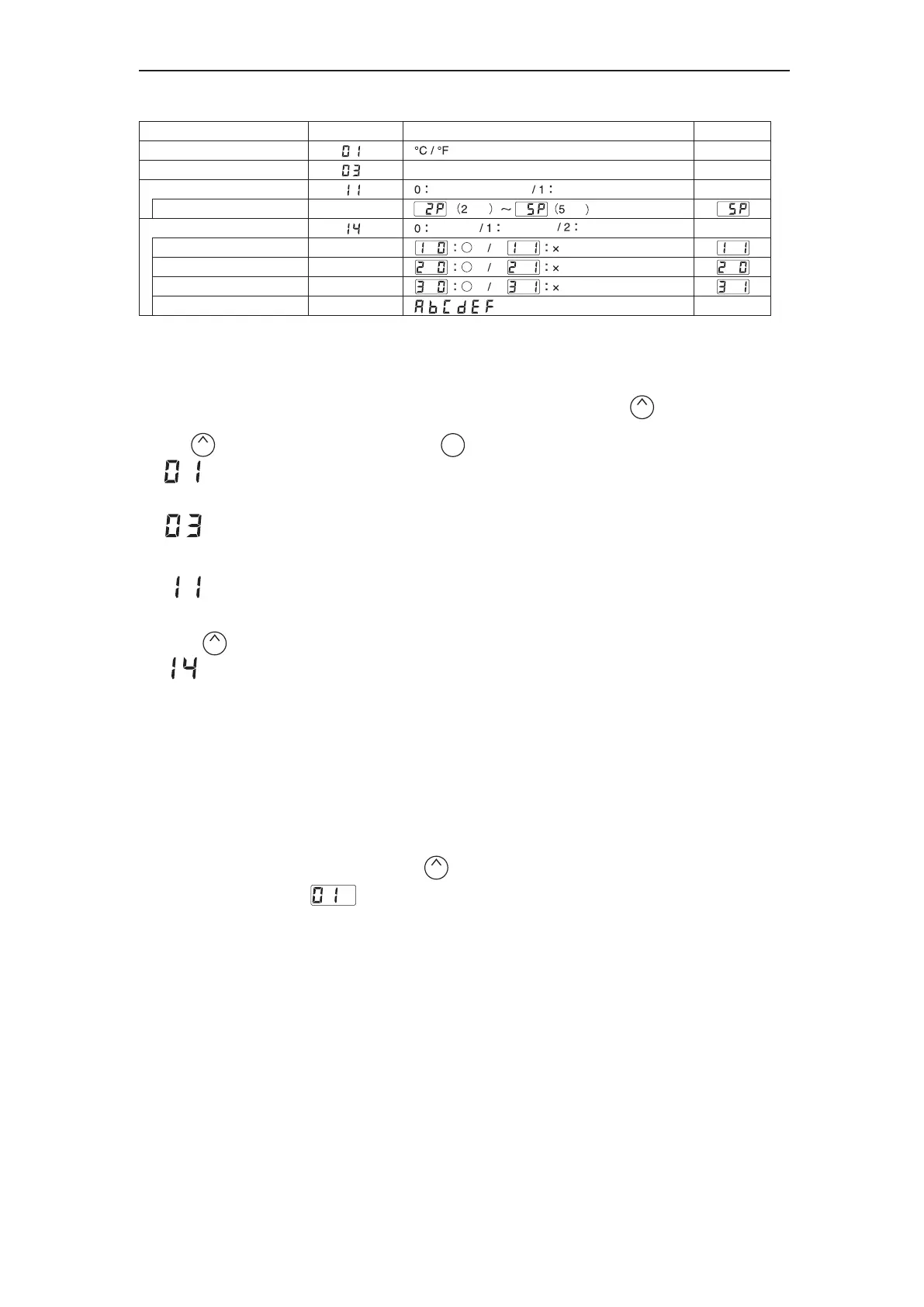
*It is displayed only when "1:Preset mode" is selected in the setting mode.
**It is displayed only when "1:Custom" is selected in the password setting.
***It is displayed only when either "1:Custom" or "2:valid" is selected in the password setting.
The HAKKO FX-888D has the following four parameters. Turn the power on while pressing the button.
Perform the setting to select the desired parameter No..
Press the button to change the values, and press the button to execute.
6. PARAMETER SETTING
The FX-888D has the following parameters.
℃ or ℉ temperature display seletion
The displaed temperature can be switched between Celsius and Fahrenheit.
Low temperature error setting
If the sensor temperature goes below the low-limit temperature although heating element is on,
an error will be displayed.
Setting mode selection
Temperature setting can be switched between the normal mode and the preset mode.
If selecting the preset mode, you will be asked for the number of preset you required.
Press the button to set the number.
Password setting
Select "Open", "Partial" or "Restricted" for password setting.If selecting Restricted, perform the setting
for password. If selecting Partial, choose whether or not the password function is needed when moving
to the temperature setting mode, the preset mode and the adjust mode and set the password.
● :
● :
● :
ParameterNo.
Initial value
Value
The normal mode
The preset mode
Open Partial
Restricted
Select three letters
pcs
pcs
Parameter name
℃/F selection
Low temperature error setting
Setting mode selection
The number of preset *
Password setting
Temperature setting mode **
Preset selection mode **
Adjust mode **
Password ***
UP
UP
UP
ENTER
● :
℉
270℉
0
0
-
■Parameter entering mode
1. Turn off the power switch.
2. Turn on the power switch while pressing the button.
3. When the display shows , the station is in parameter entering mode.
UP
54〜270℉ (30〜150℃)















 To Next Page