First Edition: March 31, 2007
4-4 Jack (FX-951/FH-200)
4-4 Jack
(1) Perform the procedures in Section 4-1. (Open the case).
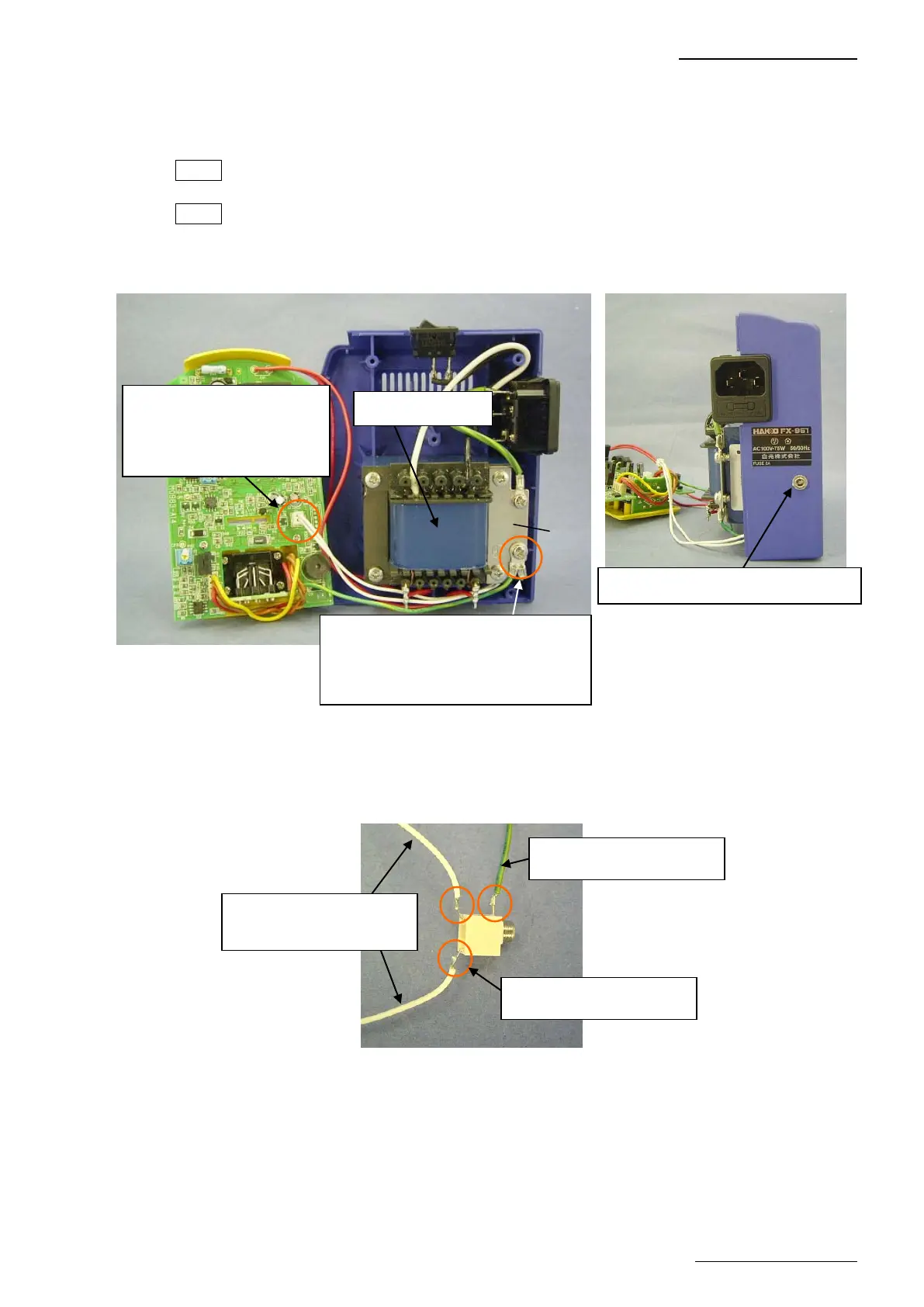
(2) Disconnect the connector for jack from the P.W.B. (4-4-1)
(3) Disconnect the grounding wire for jack from the grounding plate. (4-4-1)
NOTE This grounding wire is attached together with the grounding wire for P.W.B.
(4) Remove the 4 screws securing the transformer, grounding plate and chassis. (4-4-1)
NOTE The external tooth lock washer is installed in only one place. Be careful not to lose it.
(5) Remove the nut outside the case to remove the jack from the case. (4-4-2, 4-4-7, 4-4-8)
(6) Desolder the 3 soldered sections of the jack.
4-4-1
Connector in disassembly
procedure (2)
The connector for jack is
inserted.
Grounding wire in disassembly
procedure (3)
Secured together with the grounding
wire for P.W.B.
Transformer
Nut in disassembly procedure (5)
Grounding
plate
4-4-3
Grounding wire for jack
White lead wire to be
connected to the P.W.B.
3 soldered sections















 To Next Page