24
Capture Jet
®
Water Wash
Operation & Maintenance & Service Manual
CJOWWM/012009/rev1/EN
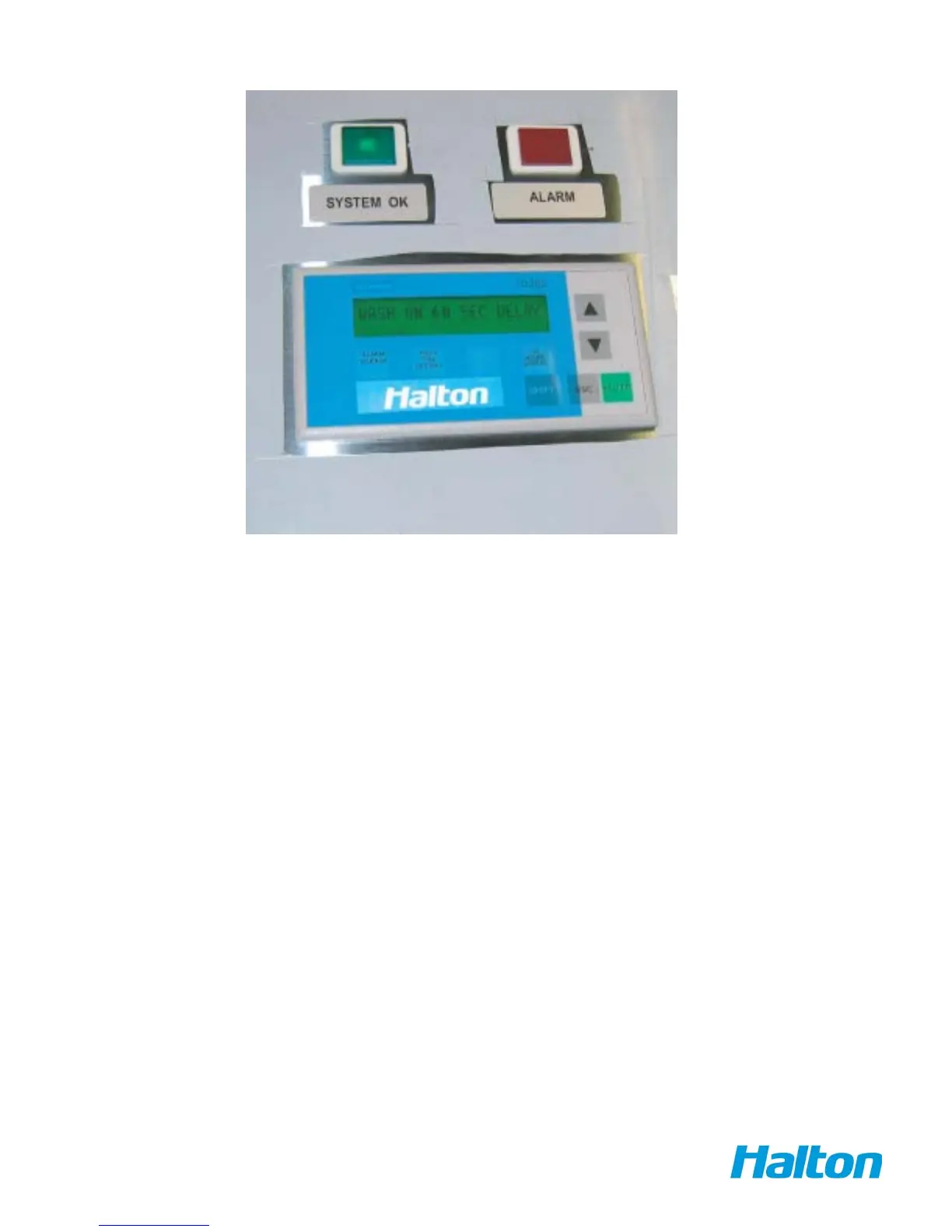
FRONT PANEL APPEARANCE
There are two indicator lights located at the top of the panel:
• Green light –“System OK” indicates when system is in normal operating mode and no alarms are occurring.
• Red light –“Alarm” indicates when there is a failure appearing in the system
• TD 200 Siemens display ( text display )- shows text messages (displayed in two rows) system status
• Soft touch buttons on the display( square shape –located bellow messaging display):
• Wash time button to set the time for washing cycle (second button from left) - For 1 SQ.
• Wash time button to set the time for washing cycle (third button from left) - For 2 SQ.
• Wash time button to set the time for washing cycle (shift & second button from left) - For 3 SQ.
• Wash time button to set the time for washing cycle (shift & third button from left) - For 4 SQ.



 To Next Page