37
16. UNDOK –everything in the palm of your hand
The UNDOK app, developed by Frontier Silicon, gives you
full control of radios and speakers from your smartphone.
Whether you aresetting up the device for the rst time,
specifying settings for the equaliser and multi-room, or
managing your favourite stations –the UNDOK app lets
you access all the features from your smartphone or tablet,
thereby offering you greater convenience.
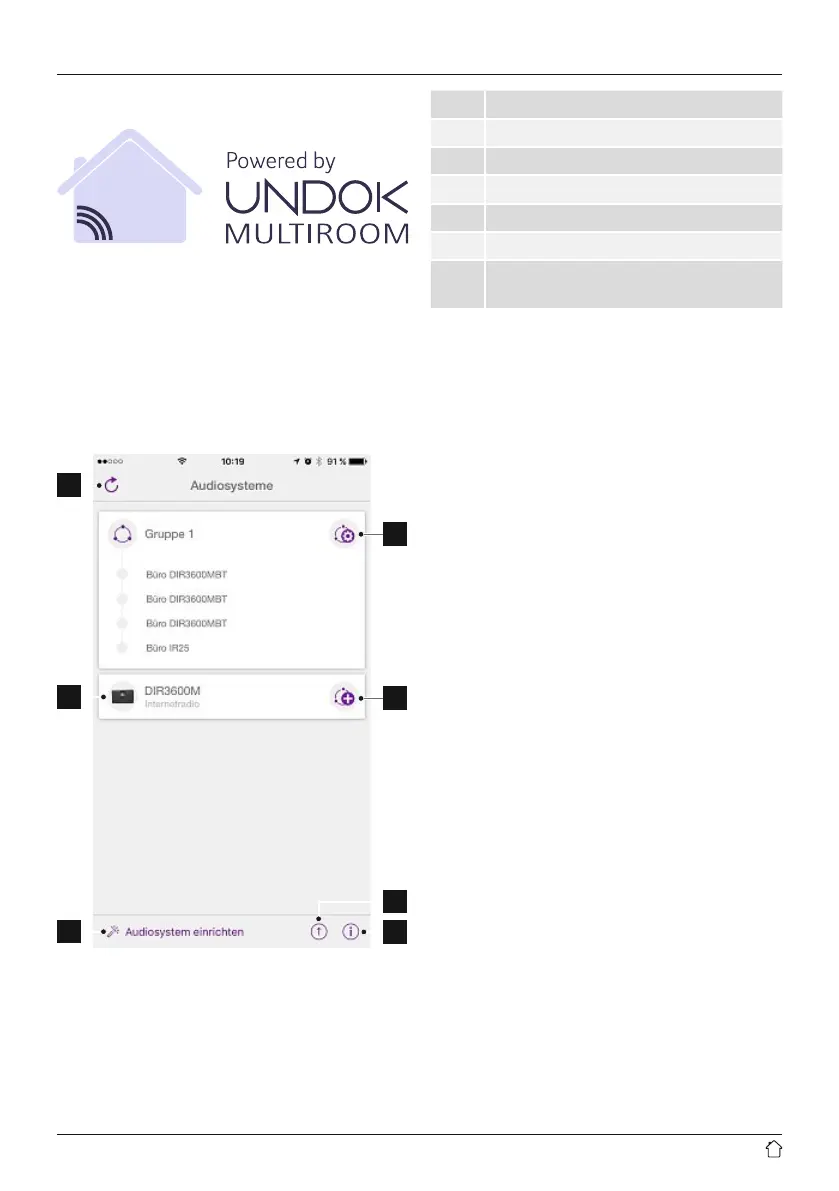
16.1 Interface/layout of the UNDOK home screen
1
2
3
4
5
7
6
1 Update the audio system list
2 Preview for ungrouped radios
3 Set up new audio system
4 Icon formanaging an existingmulti-room group
5 Create anew multi-room group with this device
6 Check for system update for all devices
7
Further information, such as app info, change
app theme, and data logging
16.2 First-time setup of the device with UNDOK
The rst time you switch on an UNDOK-enabled product
from Hama, or when you have set it to the factory settings,
it creates amicroaccess point –aseparate Wi-Fi network
that you can connect to with your tablet or smartphone.
16.2.1 Procedure for iOS users
• Open theUNDOKapp on your iPhoneoriPad.
• Tapthe Setupaudio system menu item.
• Makesurethat theradioorspeaker is in SETUP mode.Set
the product to the factorysettings,ifnecessary. Conrm the
query with Next.
• TheUNDOK app now promptsyou to connect to the
product’sWi-Fi networkusing theiPhone/iPad settings
–todoso, switchtothe systemsettings on youriPhone
andselectthe Wi-Fi network (for example,Setup Hama
DIR3120LED).Thenreturn tothe UNDOK app and tap Next.
• Now choose anamefor theradio(forexample, Oce
DIR3120)and conrm yourentrywith Next.
• Thistakes youtothe date and time settings –hereyou set
thetime format, time source and timezone.
• The various network conguration options arethen offered
to you(whereapplicable, Wi-Fi, WPS and Ethernet). Tap
the desired method; theUNDOK appswitchestothe next
window.
• Depending on theselected method, you cannow select
and congurethe desired Wi-Fi network, set up aWPS
connection or set up theconnection using aLAN cable.
• Finally,the radioconnects to thenetwork; by tapping Start
using my audiosystem, youwillbeabletouse thedevice in
the UNDOK app.



 To Next Page