38
16.2.2 Procedure for Android users
• Open the UNDOK app on your tablet or smartphone.
• Tapthe Set up audio system menu item.
• Make surethat the radio or speaker is in SETUP mode.
Set the product to the factory settings, if necessary.
Conrm the query with Next.
• On the following page, you will nd alist of all
available Wi-Fi networks as well as the suggested
audio systems; the Hama product (for example, Setup
Hama DIR3120LED) should be listed here. Tapthe
corresponding Wi-Fi network.
• Now choose aname for the radio (for example, Oce
DIR3120) and conrm your entry with Next.
• This takes you to the date and time settings –hereyou
set the time format, time source and time zone.
• The various network conguration options arethen
offered to you (whereapplicable, Wi-Fi, WPS and
Ethernet). Tapthe desired method; the UNDOK app
switches to the next window.
• Depending on the selected method, you can now select
and congurethe desired Wi-Fi network, set up aWPS
connection or set up the connection using aLAN cable.
• Finally,the radio connects to the network; by tapping
Start using my audio system, you will be able to use the
device in the UNDOK app.
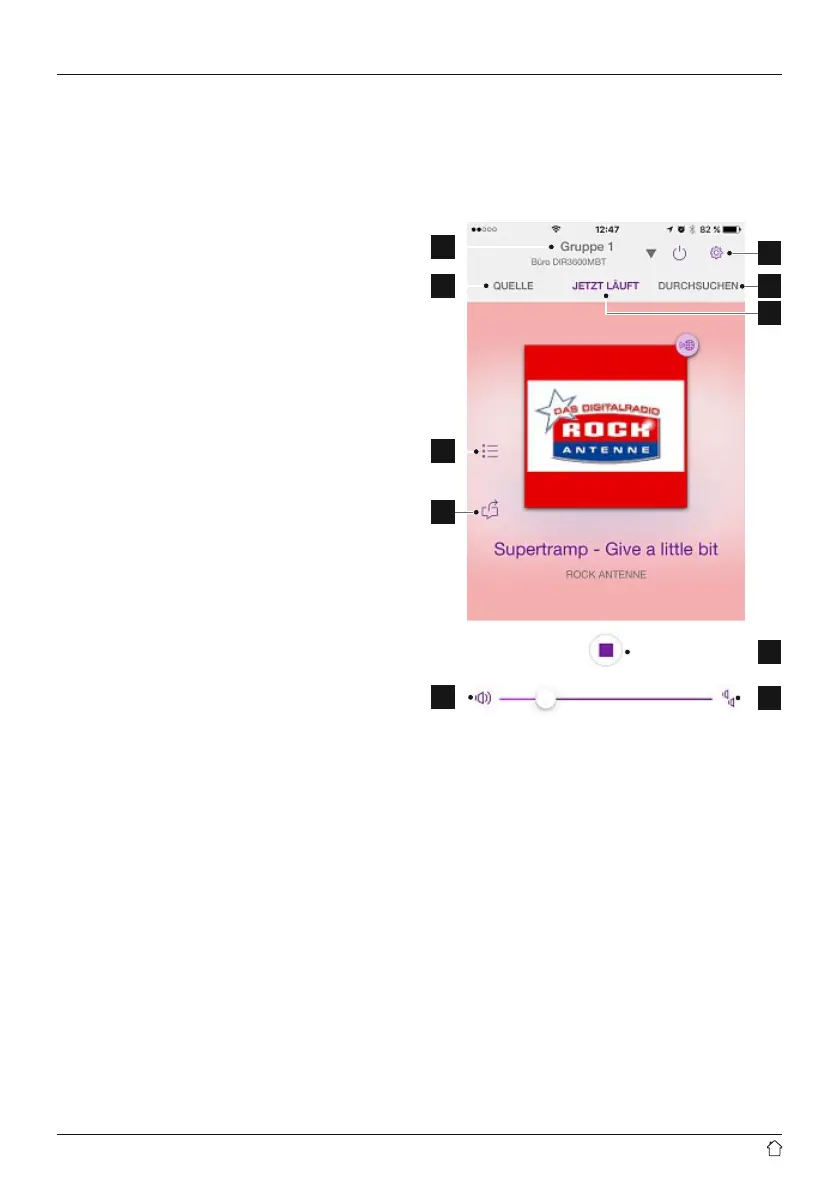
16.3 General control of adevice or group
To control acongured device, tap the relevant device/
group in the selection list on the UNDOK home page.
This takes you to the product’splayback screen; the
following functions areavailable:
1
2
3
4
5
7
8
10
11
9



 To Next Page