PIANO / ENSEMBLE Voice Sections10
u PIANO / ENSEMBLE FUNCTION Modes
The PIANO and ENSEMBLE FUNCTION Modes allow you to modify the characteristics of the PIANO or
ENSEMBLE Voices according to your preference.
NOTE: The PIANO and ENSEMBLE PATCH EDIT FUNCTION Modes are identical. The following pages of
this Guide will refer to the PIANO PATCH EDIT Modes to explain both PIANO and ENSEMBLE.
t Accessing the PIANO / ENSEMBLE PATCH EDIT FUNCTION Mode using the MENU/EXIT button:
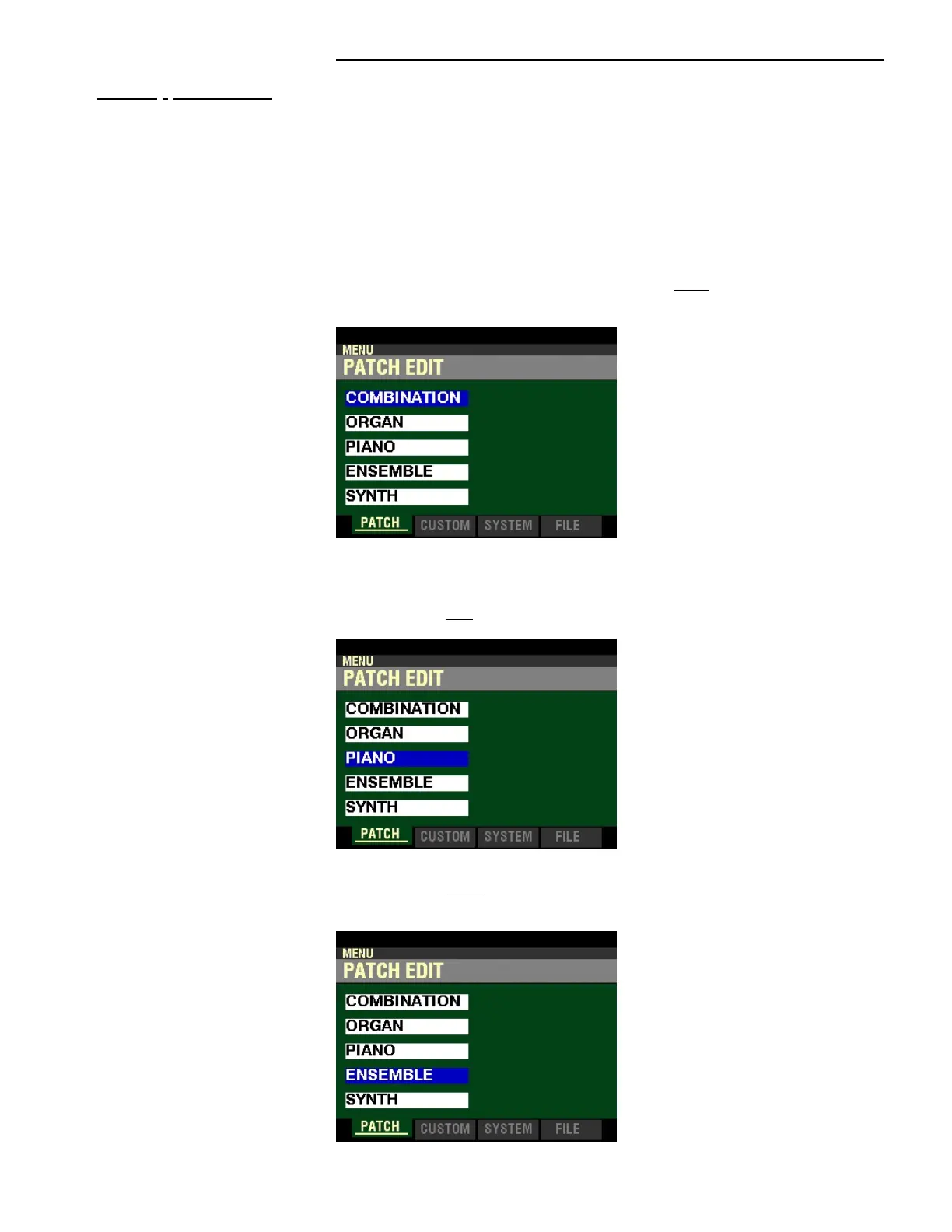
1. From any of the PLAY Mode screens, press the MENU/EXIT button once. The Information
Center Display should now look like this:
The word “COMBINATION” should be highlighted.
PIANO Voice Section:
2. Press the DIRECTION “q” button two times. The word “PIANO” should be highlighted.
ENSEMBLE Voice Section:
2. Press the DIRECTION “q” button three times. The word “ENSEMBLE” should be
highlighted.


 To Next Page